10 Content Calendar Apps for Smarter Planning
Sep 30, 2026 · 21 min read
The app with the longest feature list isn't automatically the best content calendar app. A social team may need fast, platform-specific publishing, while an agency may care more about approvals, inbox ownership, or client reporting. A marketing department may need one calendar for social posts, campaign tasks, blog production, and launch milestones.
The useful comparison isn't “which tool has the most features?” It's “which operational problem does this tool remove?” The shortlist below separates calendar usability, publishing depth, collaboration, analytics, integrations, and pricing mechanics. It also distinguishes between solo creators, small teams, agencies, and larger organizations, because pricing by seat, profile, channel, brand, or add-on can change the practical winner.
The category has moved well beyond a simple editorial spreadsheet. Industry coverage places content calendar software at about $2.5 billion in 2023 and forecasts more than 15% CAGR from 2023 to 2028, while another forecast cited in the same coverage values the category at $2 billion in 2025 with 15% CAGR through 2033. Those projections reflect the convergence of planning, scheduling, collaboration, and measurement in modern publishing workflows, not just demand for a prettier calendar. (Industry market coverage)
1. Social Media Scheduler
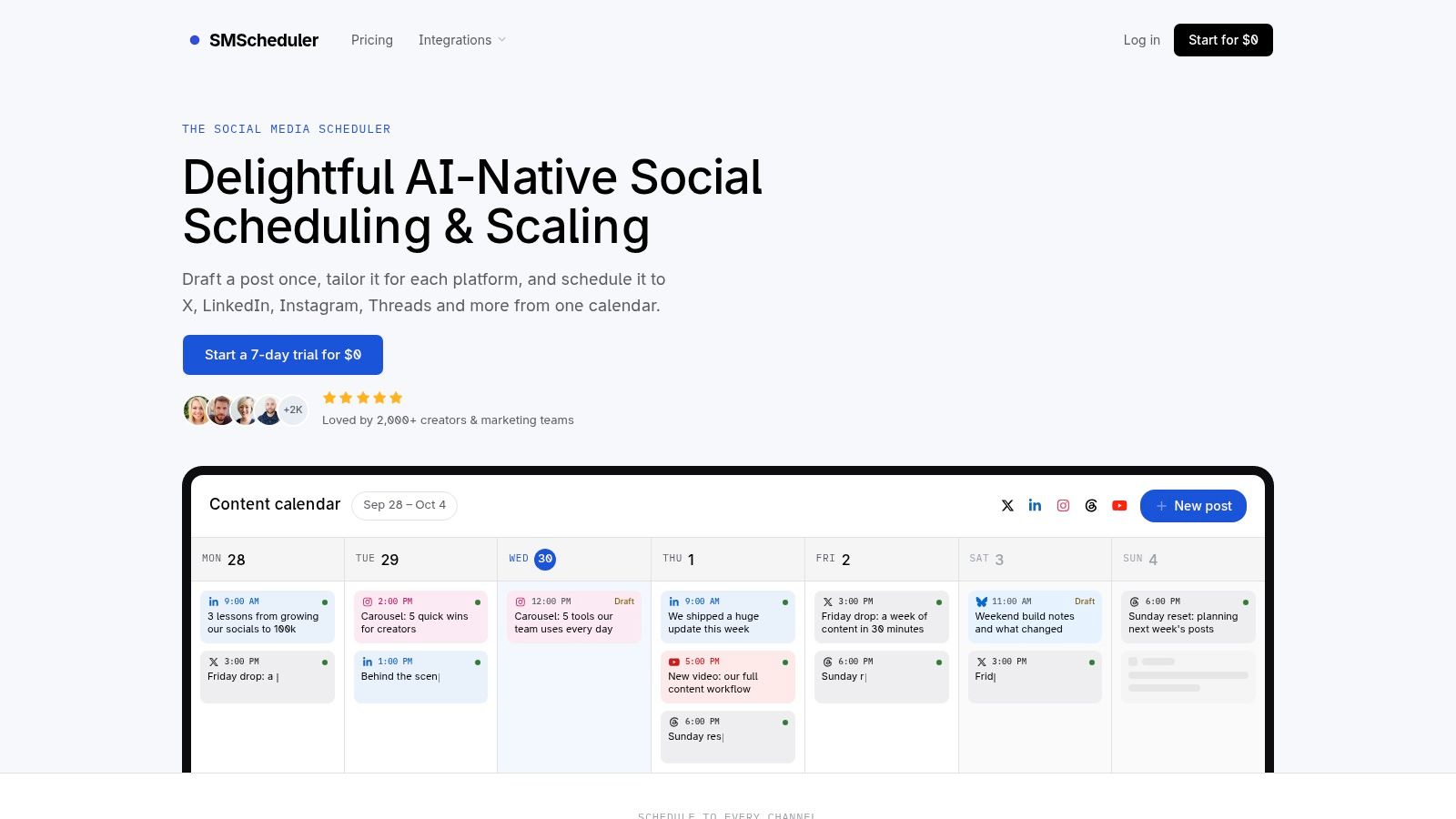
Social Media Scheduler is the strongest fit when the core problem is turning one content idea into platform-specific posts across multiple networks. Its AI-native workflow lets a team start with one draft, then adapt the copy, media, and format for X, LinkedIn, Instagram, Threads, Facebook, TikTok, YouTube, and Bluesky. A visual drag-and-drop calendar provides separate time slots for each channel, so the same idea doesn't have to publish everywhere at the same moment.
That distinction matters. Cross-posting is fast, but it can flatten the differences between a LinkedIn explanation, an Instagram caption, a TikTok concept, and a short post for Threads. Social Media Scheduler is designed around preserving the original intent while changing the presentation for each network. It also supports automated publishing and status tracking for drafts, queued posts, and published content.
Why it solves a different problem
The platform combines the planning calendar, publishing queue, and performance layer instead of forcing users to move between separate tools. Analytics include reach, engagement, engagement rate, and sortable views of leading posts and accounts. Recommendations use historical results to suggest what to publish, when to schedule it, and which format may suit a channel.
That makes it particularly useful for solo creators, startup social managers, mid-sized teams, agencies, and video creators who need a repeatable cross-channel rhythm. Its support for emerging networks also fits the current publishing environment, where workflows increasingly include Threads and Bluesky alongside established platforms. Recent scheduling guidance argues that timing is no longer one-size-fits-all, because peak windows and audience behavior vary by platform. (Later's scheduling analysis)
Best operational fit: Reduce repeated rewriting and consolidate multi-network publishing, scheduling, and performance review in one calendar.
The limitation is equally important. The public product page doesn't show the full pricing structure, so buyers need to verify the cost after the risk-free trial. Advanced analytics or enterprise business intelligence may also be less extensive than a dedicated analytics platform, and recommendations become more useful as the account builds enough publishing history.
Pros
- Per-channel tailoring: Adapt one idea to each network without manually recreating every post.
- Unified planning: Use one calendar for established and emerging platforms.
- Automated publishing: Reduce manual posting and check status changes in the same workspace.
- Actionable analytics: Review reach, engagement, engagement rate, top posts, and top accounts without exporting to spreadsheets.
- Privacy-focused handling: The publisher says it stores what is needed to publish and report and doesn't sell user data.
Cons
- Pricing visibility: Exact plan tiers and costs aren't displayed publicly.
- Analytics depth: Organizations needing extensive BI may still require a specialist platform.
- Recommendation maturity: Historical recommendations depend on having enough prior content to analyze.
2. Sprout Social
Sprout Social is built for organizations whose calendar is only one part of a wider governance and reporting system. Its visual publishing calendar supports queueing, post previews, optimal send times, and approval workflows. The platform covers major social networks, including Threads and Bluesky, and adds collaboration controls suited to teams with defined roles and access requirements.
The operational problem here is enterprise-grade coordination. A larger organization may need a content manager to prepare posts, a brand lead to approve them, an analyst to build reports, and an administrator to manage permissions or single sign-on. Sprout Social's collaboration and enterprise features are more relevant to that structure than a lightweight creator calendar.
Reporting carries the recommendation
Sprout Social's strongest differentiator is its analytics and reporting depth. Teams can use the publishing schedule alongside performance analysis, while premium capabilities extend into listening and advocacy. Trellis AI adds planning and assistance features, but the central buying reason remains governance and measurement rather than simple scheduling.
G2's marketing calendar category lists 54 products and an average rating of 4.47 out of 5. The category scores 8.1 out of 10 for performance and return-on-investment tracking, above the 7.7 category average, which indicates that buyers evaluate measurable workflow outcomes alongside calendar features. (G2 category analysis cited by Storyflow)
Choose Sprout Social when: Reporting standards, permissions, governance, and executive visibility matter more than keeping the interface minimal.
The trade-off is economic complexity. Per-seat pricing can rise quickly as more collaborators need access, and listening or premium analytics may be separate add-ons. That means a buyer shouldn't compare only the base calendar tier. Count administrators, contributors, reviewers, reporting users, and any listening or advocacy modules that the workflow requires.
Best for: Larger marketing organizations, regulated teams, and agencies with advanced reporting requirements.
Watch for: Seat growth, add-on exposure, and whether every required social network and report is included in the selected tier.
3. Hootsuite
Hootsuite suits teams that want a broad social operating system rather than a narrowly focused calendar. Its calendar supports drag-and-drop planning, post variants, bulk tools, and scheduling. Around that calendar sit an AI layer, a social inbox, analytics, and listening capabilities, giving teams a path from drafting to publishing, monitoring, and reporting.
The operational problem Hootsuite addresses is tool consolidation. A team standardizing on one platform may prefer a suite with separate modules for recommendations, inbox management, analytics, and listening instead of assembling a stack from specialist products. Its published plan structure also makes it easier to start with a defined tier and add depth as requirements become clearer.
Modular depth changes the buying decision
Hootsuite's architecture is useful when different people perform different jobs. A social manager can work in the calendar, a community manager can use the inbox, and an analyst can review reporting. AI assistance supports drafting and analysis, while advanced listening, analytics, and advertising capabilities can extend the platform.
That breadth doesn't make it the automatic winner. Per-user pricing can make expansion expensive, and advanced functions may require a higher tier or separate add-on. A small team that only needs scheduled publishing could pay for capabilities it rarely uses, while a larger team may value the reduced number of disconnected tools.
The publisher offers a 14-day free trial on self-serve plans, so the most useful test is operational rather than feature-based. Build a real week of posts, route one through approval, answer a few inbox items, and export the report someone sends to a client or executive. (Hootsuite product information)
Best for: Teams seeking a broad suite with calendar, inbox, AI, analytics, and listening modules.
Watch for: Whether the required capability is included in the base tier or appears as an add-on, and how many users need paid access.
4. Buffer
Buffer is the practical choice when the main problem is getting approved social posts published without complicated administration. It offers a clear visual calendar, scheduling, collaboration for small teams, and support for major networks as well as Threads and Bluesky. Its pricing logic is based on channels rather than seats, which can be attractive when several people need to review or manage the same accounts.
That unit matters more than a headline plan price. A five-person team with a stable set of profiles may prefer a channel-based model because adding collaborators doesn't automatically multiply the bill. An agency with many client channels, however, needs to model every account, because the cost grows with the publishing footprint rather than with headcount.
A publisher, not a strategy system
Buffer is deliberately simple. It holds the post, media, timing, and approval workflow well, but it isn't designed to carry a complete campaign brief, content pillar system, or broader marketing production plan. Teams that use it as their only calendar may still need another place for blog posts, email work, launch dependencies, and the reason behind each social post.
For a small team, that simplicity is an advantage. New contributors can usually understand the queue quickly, and the visual calendar makes gaps and scheduled content easy to inspect. Its analytics and reporting are lighter than enterprise-oriented suites, while inbox and community functions are less extensive than dedicated social management platforms.
A team building a repeatable publishing rhythm can pair Buffer with a broader weekly content system, keeping strategy and briefs separate from the delivery queue.
Best for: Creators, small businesses, and agencies that want predictable channel-based publishing costs.
Watch for: Channel growth, lighter analytics, and the need for a separate planning layer if campaigns extend beyond social posts.
5. Later
Later solves a visual planning problem. Its drag-and-drop calendar, multi-profile scheduling, visual content organization, and best-time-to-post tools suit brands where the appearance and sequence of a social feed matter as much as the individual caption. Instagram and TikTok workflows are its natural center of gravity, although the platform also supports Threads.
The calendar is useful for a creator or small brand that needs to see how images, short-form video, and other visual assets fit together. That view is different from a text-first queue. A social manager can assess the sequence of planned creative, spot a weak visual gap, and move assets without opening several platform-native schedulers.
Visual control has boundaries
Later is less suitable when the team needs broad network parity or a highly structured approval and analytics environment. Its platform list doesn't currently include Bluesky, and lower tiers use monthly post caps per profile, with unlimited scheduling reserved for the highest listed level. Buyers should therefore count profiles and scheduled volume, not just users.
The best-time-to-post feature also needs careful interpretation. Average timing guidance can help a creator start testing, but it shouldn't replace channel-specific performance review. Recent scheduling coverage notes that midweek morning patterns can benchmark well on average, while enterprise publishing windows vary materially by platform and audience. (Platform timing and scheduling research)
Use Later's visual workflow when the brand's creative grid is the calendar. If the team needs AI to reshape one idea for every network, a platform such as Social Media Scheduler may be a closer fit. For teams that need a dedicated Instagram scheduler, the decision should turn on visual planning depth, profile limits, and approval requirements.
Best for: Creators and small visual brands prioritizing feed planning and fast onboarding.
Watch for: Profile-based limits, post caps, platform coverage, and the number of reviewers included in each plan.
6. Loomly
Loomly is the approval-led choice. Its calendar centers on collaborative drafting, versioning, threaded comments, multi-step approvals, and per-platform optimization. The operational problem it solves is preventing review from escaping into email, chat, and disconnected documents.
A team can create a post, tailor it for each network, attach discussion to the work, and move it through a defined review path. That makes Loomly more useful than a basic scheduling queue when a manager, client, legal reviewer, or brand owner must sign off before publication. Threads support expands its relevance for teams that don't want to treat newer networks as an afterthought.
The calendar is the review surface
Loomly's clean calendar UI helps a reviewer understand both the individual post and its place in the broader schedule. Lightweight media editing through Loomly Studio keeps some production work close to the post rather than sending every adjustment to another application.
Its main constraint is the relationship between calendars and accounts. The one-per-platform-per-calendar design can require additional calendars as the number of client or brand accounts grows. Pricing and exact plan inclusions may also vary by location or remain behind login, so agencies should request a scenario-based quote rather than assume that a small team plan covers every workflow.
Best for: In-house teams and agencies where structured approvals and post-level discussion are the bottleneck.
Watch for: Calendar expansion as accounts scale, reviewer access, and whether required approval stages are included in the chosen tier.
7. Agorapulse
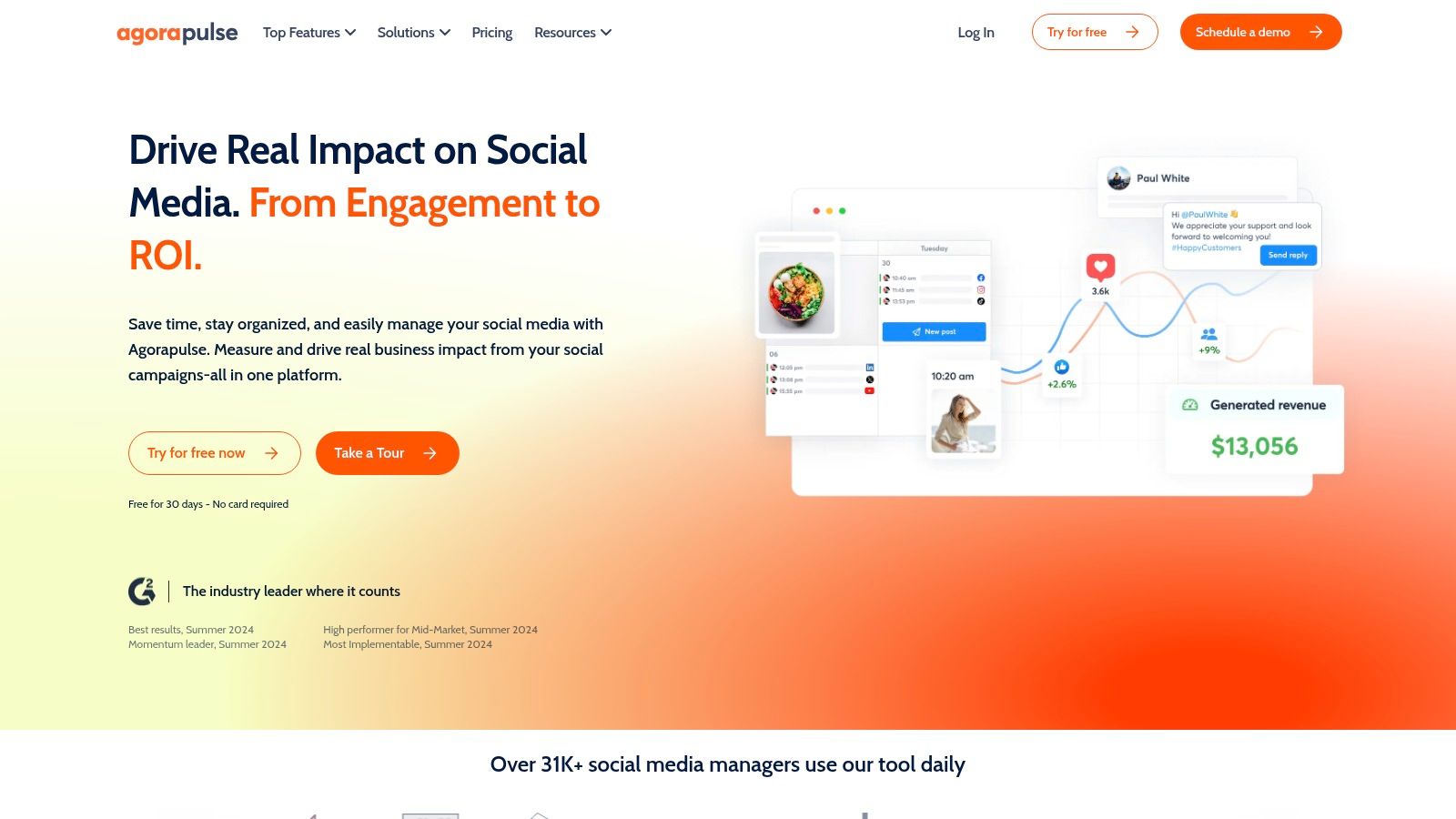
Agorapulse is the strongest fit when publishing is only half the job and the larger problem is managing replies, comments, and direct messages after publication. Its calendar supports scheduling and collaboration, while its unified inbox brings conversations from major networks into one working view. Reporting and competitor insights add a measurement layer for teams and agencies.
That combination changes how the calendar is used. A social manager does not merely schedule a post and return to a separate inbox. The same operating environment can connect planned content with the conversations it creates, helping teams assign responses and maintain ownership of community activity.
Inbox economics matter
Per-user pricing can become significant when clients, account managers, community specialists, and analysts all need access. Some advanced capabilities also sit in higher tiers or add-ons, including listening. Agencies should model the number of people who respond to conversations, not just the number who want to view the calendar.
Agorapulse supports Threads and Bluesky, which helps teams maintain a modern network mix. Its documentation and trial period also make it easier to test an inbox-led workflow before committing. The useful trial question isn't whether the calendar looks familiar. It's whether the team can assign, clear, and report on real inbound work without losing accountability.
Best for: Agencies and social teams that need a unified inbox with scheduling and reporting.
Watch for: Collaborator growth, add-on requirements, and whether competitor or listening features are essential to the purchase.
8. CoSchedule Marketing Calendar
CoSchedule Marketing Calendar addresses broader campaign coordination. It combines social scheduling with marketing tasks, approvals, analytics, and automation for recurring or evergreen posts. That makes it more suitable than a social-only scheduler when a campaign includes social content alongside other marketing deliverables.
Its published network coverage includes established platforms and newer destinations such as Threads, Bluesky, and Mastodon. ReQueue supports evergreen or recurring content, while higher tiers add more advanced campaign and collaboration capabilities. The result is a calendar that can act as a marketing team's operational center rather than merely a list of social posts.
The seat model changes the fit
CoSchedule's limitation is the cost of adding people. Starter and Professional tiers include limited profiles and users, and extra users cost more. A small team with two or three core operators may find that manageable. An agency with many reviewers, clients, and contributors needs to calculate access carefully before choosing it.
The product's broader scope is valuable when campaign dependencies matter. A launch calendar can hold social activity beside other marketing tasks, helping the team see whether content is aligned with the campaign rather than publishing in isolation. Teams planning a complete month can use a structured monthly content planning process before placing posts into the publishing calendar.
Best for: Marketing teams that need social scheduling and wider campaign planning in one system.
Watch for: Limited included users, paid additional access, and higher-tier gates around approvals, inbox functions, and analytics.
9. Metricool
Metricool is the analytics-forward option. It pairs a scheduling calendar with reporting, multi-brand management, and connectors such as Looker Studio, Zapier, and Make. The operational problem it solves is turning publishing activity into repeatable reporting across brands or clients.
Its pricing mechanics are based on brands, with higher tiers enabling team and role management, approvals, and broader operational controls. That model can work well for agencies because the number of brands often maps more closely to the work being delivered than the number of internal users.
Reporting is the primary purchase reason
Metricool's calendar is useful, but the stronger case is the relationship between scheduled content and measurable performance. Teams prioritizing report builders, external data connections, and multi-brand views may prefer it over a simpler scheduler. Looker Studio connectivity is especially relevant when clients expect reporting in a broader dashboard environment.
The limitation is tier structure. Starter is single-user, some team features are reserved for Advanced, and approvals may not be available where a small team expects them. Buyers should test the complete reporting chain, including data export, brand separation, user roles, and the exact metrics available for each network.
Best for: Agencies and multi-brand teams that prioritize analytics and client reporting.
Watch for: Brand brackets, higher-tier access controls, approval availability, and connector requirements.
10. Vista Social
Vista Social is designed for agencies and growing teams that want broad social operations in one platform. It combines visual planning, scheduling, approvals, a social inbox, reporting, listening, link-in-bio functionality, direct-message automation, and AI assistance. That breadth makes it a candidate for teams that don't want separate tools for publishing, replies, reports, and lightweight growth features.
Its pricing scales by profiles and users, which can create attractive capacity for agencies managing several accounts. Optional listening and other add-ons let a team extend the system without immediately adopting a classic enterprise platform.
Capacity doesn't mean every channel is included
Vista Social's main caveat is add-on exposure. X publishing and analytics are currently paid separately per profile, and some platform-specific capabilities also sit outside the base plan. An agency comparing apparent profile capacity should add the cost of every required network, not just count how many profiles the tier allows.
The platform makes sense when the team values breadth and wants built-in growth functions such as link-in-bio pages or DM automations. It may be more than a solo creator needs, but it can reduce tool switching for an agency with multiple clients and a shared community workflow.
Best for: Agencies and growing teams seeking broad profiles, users, inbox features, reporting, approvals, and optional listening.
Watch for: Per-profile add-ons, X-related costs, and whether the base tier includes the platform-specific functions clients require.
Top 10 Content Calendar Apps: Feature Comparison
| Product | Core features | UX & quality (★) | Pricing / Value (💰) | Target audience (👥) | Unique selling points (✨) |
|---|---|---|---|---|---|
| 🏆 Social Media Scheduler | Cross‑platform calendar; AI draft + per‑channel tailoring; automated publishing; live analytics | ★4.9/5 (G2), intuitive calendar | 💰 7‑day free trial; tiers via signup | 👥 Creators → midsize teams | ✨ Draft once, auto‑tailor per network; privacy‑first; Threads & Bluesky support |
| Sprout Social | Enterprise publishing calendar; approvals; Trellis AI; deep analytics | ★★★★★ enterprise‑grade | 💰 Per‑seat (rises with team); listening as add‑on | 👥 Large teams & enterprises | ✨ Best‑in‑class reporting & enterprise workflows |
| Hootsuite | Social OS: calendar, AI (Wisdom), inbox, listening & analytics | ★★★★ cohesive end‑to‑end | 💰 Tiered plans; per‑user costs can scale | 👥 Teams standardizing on one platform | ✨ Broad ecosystem & modular add‑ons |
| Buffer | Visual calendar; per‑channel pricing; unlimited scheduling on paid plans | ★★★★ simple & predictable | 💰 Per‑channel pricing; free plan available | 👥 Creators & small agencies | ✨ Predictable per‑account costs; easy onboarding |
| Later | Drag‑and‑drop visual planner; best‑time recommendations; Threads support | ★★★★ visual‑first UX for creatives | 💰 Tiered plans; post caps on lower tiers | 👥 Creatives & small teams | ✨ Superior visual planning & best‑time tools |
| Loomly | Collaborative drafting; multi‑step approvals; per‑platform optimization | ★★★★ collaboration‑focused | 💰 Pricing/details often behind login | 👥 Teams needing structured reviews | ✨ Strong approvals, versioning & clean calendar UI |
| Agorapulse | Calendar + unified inbox; reporting; listening add‑on | ★★★★ inbox & reporting praised | 💰 Per‑user pricing; 30‑day trial | 👥 Agencies & social teams | ✨ Leading unified inbox + team reporting |
| CoSchedule Marketing Calendar | Unified marketing + social calendar; ReQueue evergreen automation | ★★★ integrated marketing focus | 💰 Tiered plans; starter limits users/profiles | 👥 Teams combining social & broader campaigns | ✨ ReQueue for recurring/evergreen posts |
| Metricool | Scheduler + robust analytics & report builder; Looker Studio connector | ★★★★ analytics‑forward | 💰 Brand‑based tiers; competitive pricing | 👥 Data‑focused teams & agencies | ✨ Strong reporting & multi‑brand scaling |
| Vista Social | Calendar, approvals, inbox, reporting, link‑in‑bio, DM automations | ★★★★ agency‑oriented | 💰 Profiles/users tiers; optional add‑ons | 👥 Agencies & growing teams | ✨ Built‑in DM automations & Vista Page |
Choose by Workflow, Then Validate the Economics
There isn't one universal best content calendar app because the calendar is only the visible part of the operating model. A creator may need fast drafting and publishing. An agency may need client sign-off and inbox assignment. An enterprise team may need governance, reporting, APIs, and controlled access. Those are different buying problems.
Choose Social Media Scheduler when the priority is AI-assisted multi-network planning, per-channel adaptation, recommendations, and consolidated analytics. Choose Sprout Social when enterprise reporting, permissions, governance, and advanced measurement justify a deeper platform. Choose Hootsuite when you want a broad suite with modular calendar, AI, inbox, analytics, and listening functions.
For simpler publishing, Buffer remains the clearer fit when costs should follow channels rather than seats. Later is the better match for visual-first workflows, especially when feed presentation drives planning. Loomly is the approval choice for teams that need structured review and version discussion attached to each post.
The remaining choices solve different operational gaps. Agorapulse suits inbox-led teams that measure success partly by how well they manage conversations. CoSchedule Marketing Calendar fits teams coordinating social content with wider campaigns and marketing tasks. Metricool is the analytics and multi-brand reporting option. Vista Social suits agencies that want broad social operations, inbox tools, reporting, listening, and growth features in one environment.
A compact decision framework
- Calendar experience: Social Media Scheduler and Hootsuite emphasize unified visual scheduling. Later is strongest for visual feed planning. CoSchedule extends the calendar into broader marketing work. Metricool connects scheduling closely to reporting.
- Collaboration: Loomly and CoSchedule are strong when approvals and structured review matter. Sprout Social is better suited to enterprise governance. Buffer offers practical small-team collaboration.
- Analytics: Sprout Social leads for enterprise-grade reporting depth. Metricool is compelling for analytics-led multi-brand reporting. Social Media Scheduler keeps essential reach and engagement data beside the calendar.
- Integrations: Hootsuite, Sprout Social, Metricool, and Vista Social are better suited to connected social operations. Metricool's Looker Studio, Zapier, and Make connectors matter when reporting and automation extend beyond the app.
- Pricing unit: Buffer charges around channels, Later around profiles and plan limits, Metricool around brands, and several enterprise-oriented tools around seats plus add-ons. Vista Social combines profiles and users, while Sprout Social and Hootsuite can become more expensive as access and modules expand.
- Best-fit audience: Social Media Scheduler fits creators and multi-channel teams. Buffer fits straightforward small-team publishing. Later fits visual brands. Loomly fits approval-led teams. Agorapulse fits inbox-led agencies. CoSchedule fits campaign teams. Metricool fits reporting-heavy agencies. Sprout Social and Hootsuite fit larger, more complex operations. Vista Social fits agencies seeking breadth.
Before committing, run a trial with the channels you use daily, not a fictional test account. Create one post that needs platform-specific rewriting, send it through the standard approval path, schedule it for separate channel time slots, answer an inbox item, and produce the report your stakeholder expects. Then count the people, profiles, channels, brands, and add-ons required for that workflow.
The market's expansion reflects a broader shift from isolated editorial planning to always-on, multi-channel operations. Industry reporting has described social media management as a roughly $23.4 billion category in 2023, with projected growth of about 23% CAGR through 2030, while the broader content marketing industry was projected to exceed $600 billion by 2024. Those projections help explain why calendars now sit at the intersection of publishing, collaboration, and analytics, but they don't tell you which pricing unit fits your team. (Industry history and category context)
Test the workflow first, then validate the economics. The right app is the one that removes your most expensive coordination problem without forcing you to buy modules, seats, profiles, or channels you won't use.
Social Media Scheduler brings AI-assisted drafting, per-network tailoring, automated publishing, a unified visual calendar, and performance recommendations into one workflow. If repetitive rewrites and fragmented channel planning are slowing your team down, visit Social Media Scheduler to test a multi-network calendar built around the way you publish.