Content Calendar Creation: The Consistency Guide for 2026
Oct 13, 2026 · 13 min read
You can build a beautiful content calendar in an afternoon and still watch it fall apart by Wednesday. The page is full of slots, the ideas look smart, and the plan feels responsible, until an actual week arrives with edits, approvals, client requests, and a missed publishing window. That's where most content calendar creation efforts break, not because the strategy was wrong, but because the calendar was designed like a schedule instead of a system that respects capacity.
A usable calendar has to do three jobs at once. It needs to coordinate people, preserve consistency, and leave enough room for the work that always shows up late, changes shape, or takes longer than expected. If you want a clear primer on the basics before going deeper, what is a content calendar is a useful starting point.
Why Most Content Calendars Fail Before They Start
The usual failure mode is simple. A creator or small team maps out every Monday, Wednesday, and Friday for the next month, then assumes the hard part is finished. A few days later, one post needs new visuals, another gets stuck in review, and the team has no slack left for the timely idea that would have mattered more than the filler.

The problem is not a lack of discipline. It's the assumption that publishing capacity is the same thing as publishing intent. A calendar can look rigorous while setting the team up to miss deadlines, reuse weak ideas, or rush work that should have been cut.
The trap of filling every slot
A filled calendar feels safe because it removes uncertainty. In practice, it often removes judgment too. The more tightly every slot is packed, the less room you have to choose better content when the week changes, which it always does.
That's why a good calendar needs empty space on purpose. Timely posts, rewrites, design changes, and approvals all consume attention, and calendars that ignore that reality turn into stress documents instead of planning tools.
Practical rule: if a calendar only works on your calmest week, it doesn't work.
What a calendar is really for
The most useful calendars don't just list dates. They show what gets made, who owns it, where it goes, and what happens when it's published. That's the level of visibility a content team needs, not a prettier grid.
A strong calendar also helps answer a harder question: should this idea be published at all? That question matters because the cost of content is often hidden in the time spent producing it, not in the act of scheduling it.
Building Your Rolling 26-Week Planning Framework
A rolling calendar beats a static one because it never freezes the future into a guess. Instead of treating planning as a one-time event, keep six months of content in motion and revisit the front edge of the calendar at fixed intervals. That makes the calendar a working system, not a museum of old decisions.
The best place to start is with one measurable objective and one primary metric. That metric might be reach, engagement rate, saves, comments, or clicks, but it should be the outcome you're actually trying to influence. Once that's clear, every planned item gets a platform, audience, content pillar, format, owner, deadline, publishing window, and repurposing path.
What goes into each planned item
A calendar item needs more than a topic. It needs enough metadata to support decisions when priorities collide. If two posts compete for the same day, you should be able to tell which one matters more and why.
A practical planning record often includes:
- Platform and audience: Define where the post lives and who it is for, instead of assuming the same message fits everywhere.
- Content pillar and format: Tie each asset to a strategic theme, then choose the format that matches the job.
- Owner and deadline: One person needs to carry the item forward, even if several people contribute.
- Publishing window and repurposing path: A post should have a clear launch point and a next life after publication.
The calendar works better when you think in batches, not isolated posts. You can reserve one meaningful publication each week, keep a few slots open for reactive content, and use monthly reviews to see which platform-format combinations deserve more production time.
The planning cycle that actually holds
A good rhythm is to plan, publish, review, and then revise the next block with evidence instead of instinct. That keeps the calendar from drifting into habit. For a more tactical month-by-month approach, this month-planning workflow shows how planning can stay structured without becoming rigid.
Audience research and AI integration can support this stage when teams need faster drafting without losing strategic direction. The useful part is not the AI itself, it's the discipline of matching ideas to audience needs before filling the calendar with output.
| Component | Purpose | Example |
|---|---|---|
| Objective | Anchor the calendar to one outcome | Improve clicks from social posts |
| Metric | Define how success is judged | Clicks, saves, comments, or reach |
| Platform | Match the idea to the channel | LinkedIn for a thought piece |
| Owner | Create accountability | One editor, one designer, one publisher |
| Review point | Keep the cycle current | Monthly performance check |
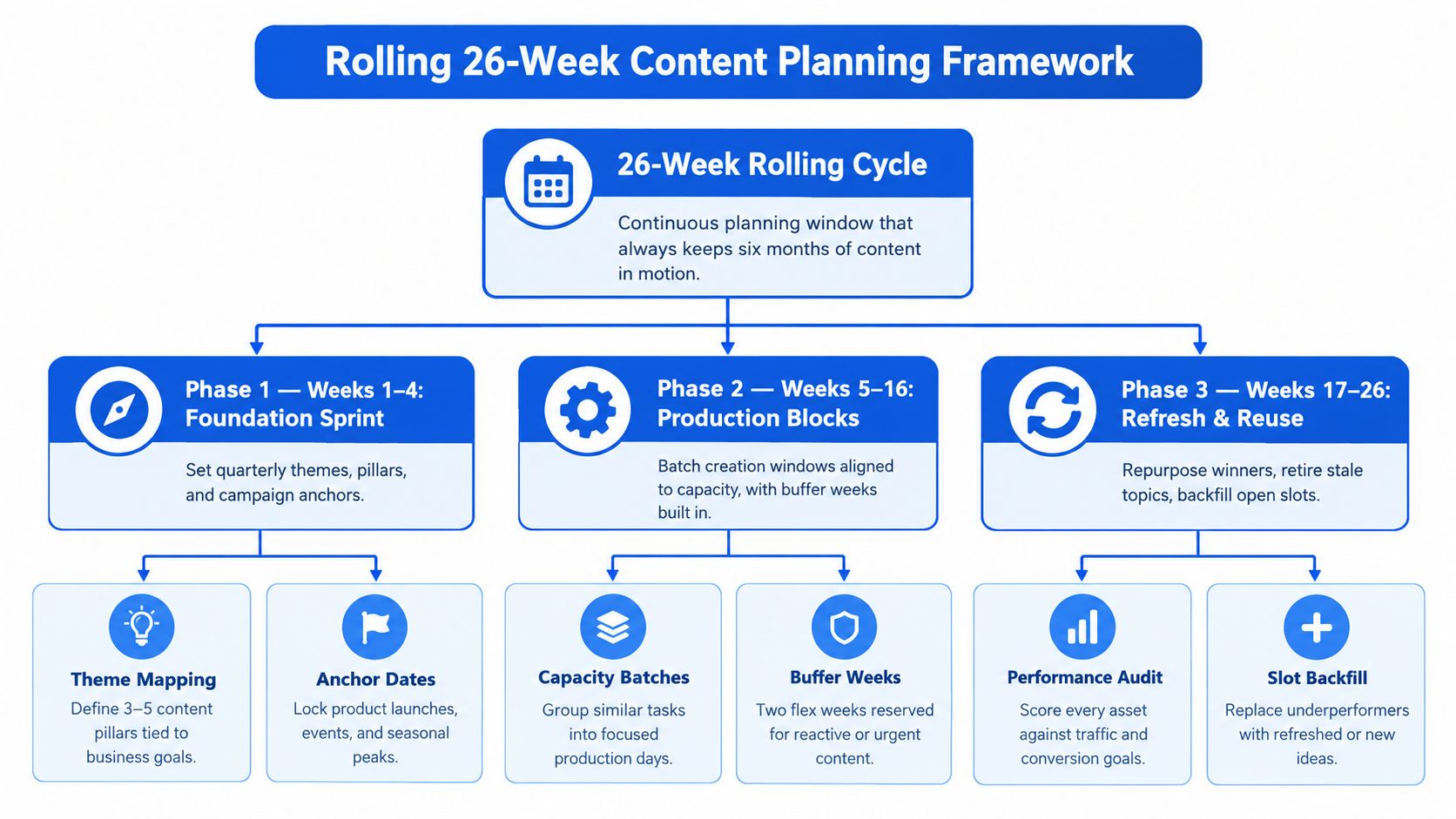
A useful framework is to protect the calendar from overcommitment first, then fill in the rest. That ordering sounds simple, but it changes the quality of every decision that follows.
What the calendar should help you see
The question isn't just “what are we posting next?” It's “what are we learning next?” A rolling cycle works because it makes learning visible enough to shape the next round of decisions.
| Component | Purpose | Example |
|---|---|---|
| Component | Purpose | Example |
| Theme mapping | Tie work to business goals | Three pillars aligned to campaigns |
| Anchor dates | Lock important moments early | Launches, events, seasonality |
| Capacity batches | Group similar work together | One day for drafting, one for design |
| Buffer weeks | Preserve flexibility | Reactive coverage and urgent updates |
| Performance audit | Review what earned attention | Compare content against goals |
| Slot backfill | Replace weak items with stronger ones | Refresh an underperforming topic |
Platform-Specific Timing and Format Strategy
A calendar fails fast when every platform is treated like a copy-and-paste lane. The same idea can perform differently depending on whether it lives on LinkedIn, Facebook, Twitter, or another channel, because audience expectations and consumption habits are different. A smarter calendar plans for those differences instead of trying to flatten them.
Research on university social posts found that more activity didn't reliably increase engagement, and the authors recommended a restrained overall schedule of roughly 2–3 posts per day across channels, with around 1–2 posts daily on Twitter, 0.5–1 on Facebook, and 0.25–0.5 on LinkedIn (Wiley study). The same study also reported an inverse relationship between posting volume and interaction, which is a strong reminder that a calendar should manage frequency as carefully as it manages ideas.
Match the format to the channel
A 2024 study of 5,825 posts from 155 Vietnamese universities found that visual content and posts published in the afternoon, midweek, and on weekends generated higher engagement (Taylor & Francis study). It also found that longer posts tended to get fewer reactions and comments but more shares, while hedonic content increased reactions but reduced shares compared with utilitarian content.
That mix matters because it changes how you should draft. A post meant to spark quick reactions should not be written like a deep explainer, and a share-worthy post often needs more context than a lightweight caption can hold.
A calendar works better when the message is stable but the packaging changes by channel.
Timing should follow behavior, not habit
If a platform favors visual content in the afternoon, the calendar should reflect that without forcing every idea into the same window. Midweek slots can serve one job, weekend slots another, and longer-form posts can be reserved for places where sharing matters more than immediate reactions.
That's where a channel-specific workflow helps. A draft can start from one core idea, then be adapted into shorter or longer versions depending on the platform. For a scheduling workflow that supports per-channel planning, the Instagram scheduler is one example of how a calendar can reflect platform differences instead of hiding them.
| Platform | Optimal Timing | Format Preference | Engagement Driver |
|---|---|---|---|
| Frequent, spaced-out slots | Short, timely updates | Fast response and visibility | |
| Fewer, more deliberate posts | Professional, insight-driven copy | Relevance and credibility | |
| Moderate cadence | Visual and conversational posts | Community interaction | |
| Strong visual-first planning | Images, short captions, carousel-style content | Visual appeal and saves | |
| TikTok | Distinct creative patterns | Short native video | Watch time and retention |
| YouTube | Planned releases with room for depth | Long-form or short-form video | Topic clarity and repeat viewing |
Choosing Between Manual and AI-Assisted Scheduling Tools
The tool shapes the process. A spreadsheet makes you think in rows and reminders, while an AI-assisted system makes you think in drafts, variations, and performance feedback. Neither is automatically better, but each one nudges the team toward a different kind of discipline.
Manual workflows are useful when the team is small, the channel count is low, and the publishing pattern doesn't change much. They're also easier to control when every item needs a human eye before it goes live. The trade-off is time, because manual systems make duplication painfully visible.
Manual and AI-assisted workflows compared
A manual calendar is often enough for a solo creator running a few channels. An AI-assisted workflow becomes more useful when the same core idea needs to be adapted for multiple platforms without rewriting everything from scratch. In that case, LunaBloom AI for social publishing is one example of a tool that can support drafting and scheduling in a more centralized way.
| Factor | Manual Approach | AI-Assisted Platform |
|---|---|---|
| Time investment | Higher, because every version is built separately | Lower, because drafting and tailoring are centralized |
| Flexibility | Very high for one-off changes | High, but dependent on good setup |
| Consistency | Strong if someone maintains it closely | Strong if templates and review rules are clear |
| Analytics use | Often exported or checked manually | Usually built into the workflow |
| Best fit | Solo creators, small teams, simple calendars | Multi-channel teams, agencies, higher volume |
When each approach makes sense
If you manage one brand and can keep the system in your head, a manual calendar may be enough. If you manage several client accounts or a wide channel mix, the duplication cost starts to outweigh the simplicity. That's where centralized drafting and scheduling saves real effort.
The trap is adopting AI without deciding how success gets measured. If you don't label the variation, the platform, and the intended outcome, you'll know the tool produced more content, but you won't know whether the content performed better.
Useful standard: any tool should make your calendar easier to review, not just faster to fill.
Creating a Sustainable Review and Optimization Cadence
A calendar without review is just an archive of guesses. Value comes from making the plan visible enough that each cycle teaches the next one something useful. That means the calendar should live inside a review rhythm, not beside one.
Weekly check-ins handle immediate adjustments. Monthly reviews reveal patterns across platforms and formats. Quarterly sessions are for bigger decisions, like whether a pillar is still worth the effort or whether a different format deserves more production time.

Review the right metrics
The key is to stop comparing raw engagement totals across networks as if they mean the same thing. A platform with more reach will naturally produce different absolute numbers than a smaller channel, so the calendar should look at platform-specific signals such as engagement rate, clicks, reactions, comments, or shares.
That approach also makes it easier to identify which pillars deserve more room. If one topic consistently drives the outcome you care about, it earns more calendar space. If another topic drains time without producing anything useful, it should be reduced or repurposed.
Keep the review loop short and honest
A review should change something specific. It might shift a posting window, retire a format, or move an idea into a repurposing queue. If every review ends with “keep doing what we're doing,” the calendar is not really being used as a learning tool.
The useful habit is to attach every published item to the next decision. Was it worth repeating, worth reformatting, or worth dropping? Once that question becomes normal, the calendar stops being a static plan and starts becoming an operating system for content.
Designing Calendars That Protect Creator Capacity
Most calendars assume production hours are stable. They aren't. A solo creator might have a spare Monday one week and a full client load the next, while a small team can lose half a day to edits, approvals, or an unexpected request. A calendar that ignores that volatility is usually too optimistic to survive.
A 2025 survey of 783 creators found that 65% were sometimes, often, or always stressed by their work, and 66% handled the entire workflow themselves, including planning and editing (Creators Survey 2025). That doesn't just describe burnout risk, it explains why so many calendars collapse when they're built around an idealized workweek.
Design for effort, not just output
A strong calendar separates anchor content from maintenance content. Anchor content takes more time, but it carries the strategic weight. Maintenance content keeps the rhythm alive without consuming the whole week.
That distinction matters because it lets you plan realistically. If a week gets crowded, you can protect the anchor asset and downgrade the filler instead of pretending all posts carry the same cost.
Make room for work that can't be predicted
Reactive opportunities, internal reviews, and production delays all need space. A capacity-first calendar should include effort estimates, batching windows, repurposing rules, review buffers, and fallback posts. Those additions make the calendar less elegant on paper and far more durable in practice.
For a practical view of how weekly rhythm can be organized without crowding every day, this weekly content system is a useful companion to a capacity-led calendar.
The question is not how many posts you can schedule. It's how many you can still produce well when the week gets messy.
A sustainable calendar knows when to reduce cadence instead of forcing the team to hit an arbitrary target. That choice protects quality, preserves morale, and keeps the publishing rhythm intact long enough to learn from it.
If you want a calendar that handles planning, drafting, scheduling, and performance review in one workflow, take a look at Social Media Scheduler. It's built to help creators and teams keep a consistent publishing rhythm while tailoring posts per platform and measuring what works.