How to Schedule Posts Across Platforms and Time Zones
Nov 5, 2026 · 14 min read
Most advice on how to schedule posts still hunts for one magic hour. That search fails once an audience sits in more than one city and more than one app. A timestamp that catches a morning commute in one market lands in the middle of the night in another.
Treat the calendar as an operating system, not a lucky guess. Lock a claim, fit it to each network, queue it in the audience's local time, and keep the slot only if your own results defend it. Timing can amplify a strong post. It won't rescue a weak one.
The Scheduling Workflow From Draft to Published
DataReportal's Digital 2025 report estimated 5.24 billion active social media user identities worldwide, 63.8% of the global population, with the total up 4.1% in the preceding 12 months. The same overview cites GWI research that 97.3% of connected adults use at least one social network or messaging platform each month. Those people aren't online together, so a one-off manual post can't cover the day.
Scheduling only works if the decisions happen in a fixed order. A slot chosen before you know the audience zone gets rewritten. A channel variant written before the core claim is fixed drifts away from the campaign.
| Stage | Decision | Output | Check |
|---|---|---|---|
| Draft master post | Core message and claim | One master post with its call to action | Message matches the campaign goal |
| Tailor per channel | Length, hook, media, hashtags, and link treatment | One variant per channel | Variant follows that network's conventions |
| Assign time slot | Primary and backup slot for each audience segment | Slot in the calendar | No competing post within 30 to 90 minutes |
| Set time zone | Audience time zone, not the publisher's | Local publish time on each post | Preview shows the correct local time |
| Queue and automate | Channel is connected, post saved as queued | Post with status queued | Status changes to published at the slot |
| Verify and review | Reach and engagement rate after 24 to 48 hours | Recorded results per channel | Compared with the previous period |
Each row is a decision, an artifact, and a pass/fail check. Skip the check and the next stage inherits a bad input. Teams that jump straight to "pick a time" usually publish the right words to the wrong city.
Build the week inside a weekly content system so the six stages sit on one calendar instead of six apps. Your first action is smaller than a full week: list every channel you post to, and write the audience time zone for each. Every later stage depends on those two facts.
How to Tailor One Draft for Each Channel
Fit one written post to every channel instead of pasting the same text across all eight. The eight networks are X, LinkedIn, Instagram, Threads, TikTok, YouTube, Facebook, and Bluesky, and every plan includes all eight.
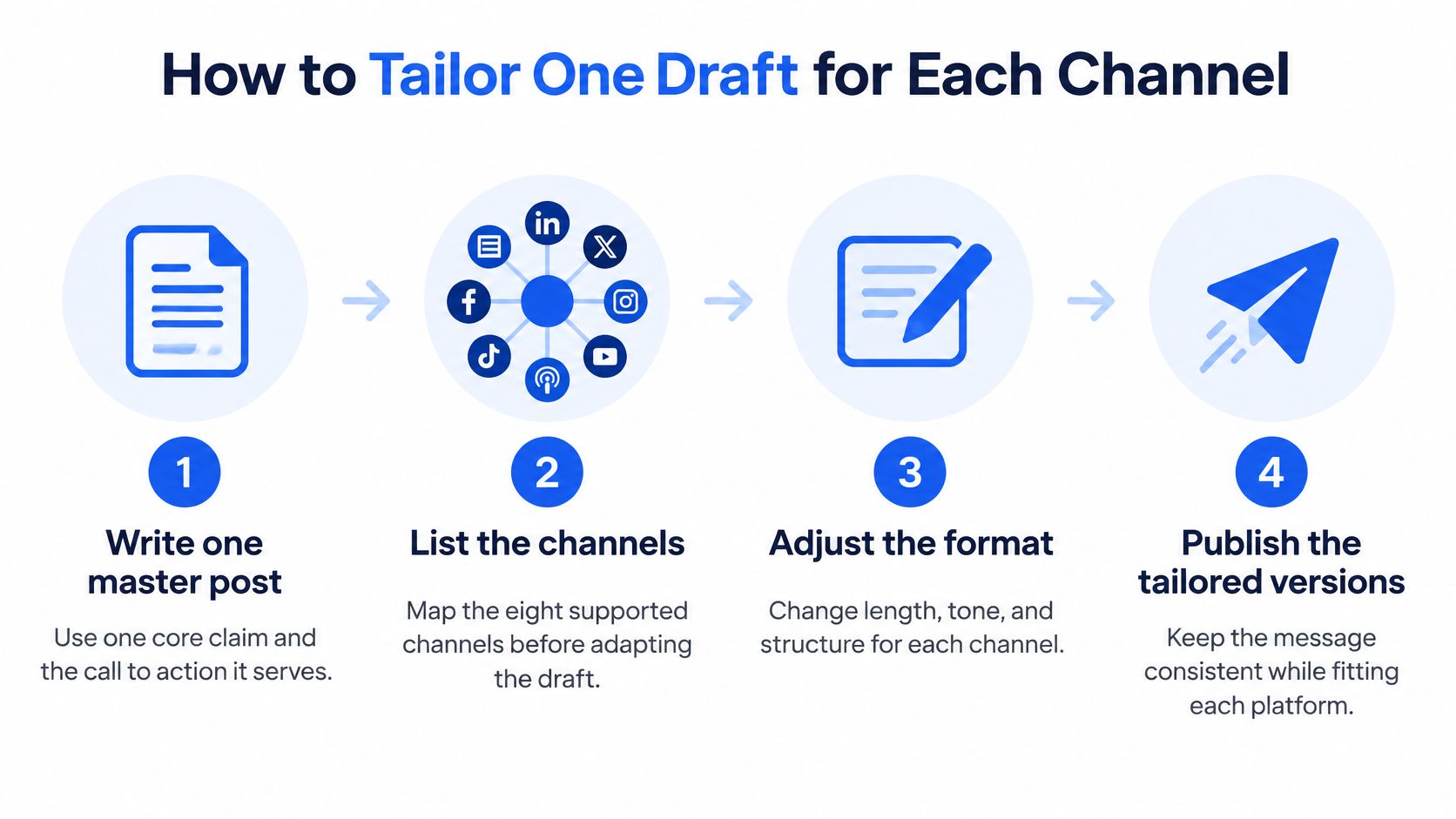
- Write one master post with a single core claim and the call to action it serves. If the claim is "our waitlist opens Friday," that sentence stays intact even when the surrounding copy changes.
- List only the channels this idea belongs on. A hiring note may need LinkedIn and X. A product demo may need TikTok, YouTube, and Instagram, and skip the rest.
- Rewrite hook and length per network. On X and Threads, lead with one sharp line. On LinkedIn, open with the argument and give the reader a short reason to care. On Instagram, the caption carries the claim because many people never tap through.
- Change the media ratio. Cut a vertical clip for TikTok, and keep a separate, slightly longer cut for YouTube so you are not stretching a 15-second hook into a watch-time format it cannot support.
- Adjust hashtags, and move outbound links into the first comment where a network tends to suppress posts that carry them in the caption. Facebook and LinkedIn can often keep a link in the body. Instagram usually should not.
- Read the variants side by side and confirm the claim and the offer still match. Tailoring changes the wrapper. It does not change what you are asking people to do.
A 2022 Journal of Consumer Research study of Twitter data, with observations taken every 30 minutes, found engagement shifting from virtue-oriented content toward vice-oriented content as morning moved into evening. That study describes one platform's rhythm, not a universal rule. The same hour does not carry the same meaning once the format changes, so treat slots as separate by platform, segment, and format. Keep the claim fixed and let the evidence tell you which wrapper earns attention.
Sync the campaign, not the timestamp
An analysis of 399 million posts found the strongest periods differed by network: midweek mornings often did well overall, while weekend evenings favored some lifestyle channels, according to Emplifi's best-times analysis. Simultaneous publishing keeps a launch easy to coordinate. Staggered, platform-specific publishing matches each network's habits and native format. Keep the core message and the launch period shared. Vary the copy, the media, the call to action, and the window.
Don't add reach across networks and call it one number. A TikTok view and a LinkedIn impression aren't the same unit, so compare reach and engagement rate inside each channel. That comparison shows whether a variant is doing its job or just inheriting the campaign's reach.
Founders who do not want to maintain eight native editors can use social posting support for founders while they learn which variants hold up. For feed-led work, edit the caption, first comment, and local slot together in an Instagram scheduler, rather than rewriting the same post in four places.
Placing Posts in Local Time Slots
The usual mistake is scheduling in the publisher's time zone. A single global timestamp privileges whichever market shares the office clock and misses the rest. Map each audience segment to its own local zone first, then reserve one primary slot and one backup slot per content theme.
| Rule | Organic posts | Boosted posts |
|---|---|---|
| Whose clock | Audience local time | Audience local time, separate from organic |
| Spacing on one account | Enough gap for early reactions and clicks to register before the next post competes in the same feed | Don't stack a boost on top of an organic post in the same window |
| When to lead | Highest-priority item while that segment is active | Afternoon often beat morning in the newspaper test detailed below |
| What to ignore | Raw like counts | A paid spike treated as proof the hour is "best" |
Spacing deserves its own rule. Leave enough room for early reactions and clicks to register before the next post competes for the same followers. The exact interval is an account-level question: a fast-moving news feed and a slower B2B audience do not clear the same way. A deliberate sequence is the exception. A thread of steps, or a story that continues, can sit closer because the posts work as one unit.
Paid hours are not organic hours
For organic, non-boosted content, a study of 5,706 Facebook posts from a major U.S. newspaper found morning posts generated 8.8% more clicks than posts at other tested periods, as reported by Notre Dame News. Boosted posts did best in the afternoon, with 21% more clicks than boosted morning posts. Copying the paid winner onto an unpaid calendar is how teams optimize themselves into a worse hour.
Practical rule: If the post isn't boosted, don't borrow the afternoon slot that only worked once money was behind it.
For a team covering several zones, give each zone its own primary and backup slot. The New York variant goes out in a New York window; the London variant goes out in a London window, with copy already adapted. The calendar shows every post for every channel in one week view or list view, so two items landing 10 minutes apart show up before anything goes live.
Treat each slot as a hypothesis. The next test confirms or kills it. Until then, a primary slot plus a backup is a plan, not a finding.
Test Timing Windows Before You Trust Them
A chart of "best times" is a starting rumor. Personalized timing is a measured gain, and even then it's modest.
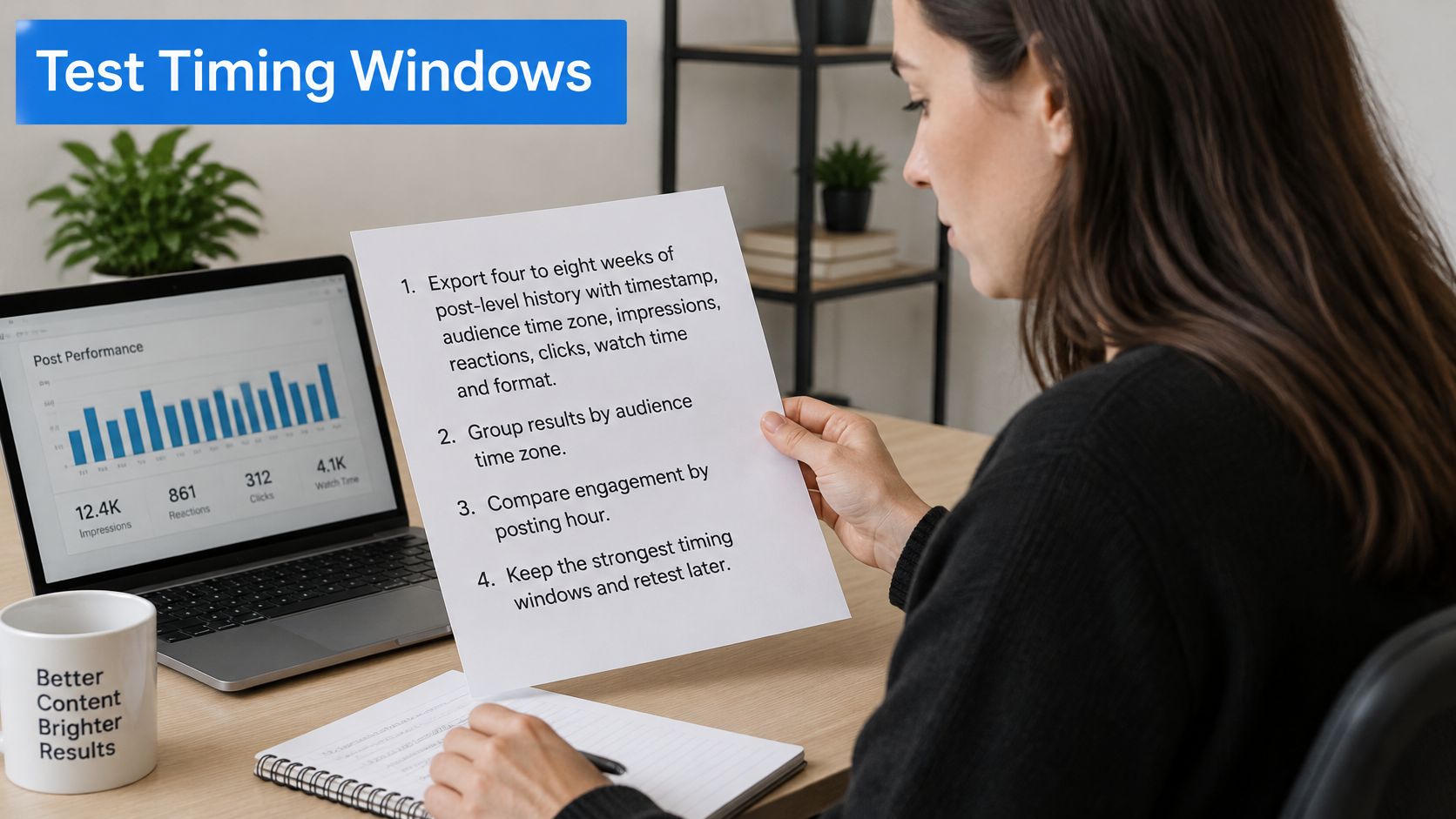
- Export 4 to 8 weeks of post-level history by platform: timestamp, audience time zone, impressions, reactions, clicks, watch time, and format. No history yet? Skip the export, run two non-overlapping windows drawn from each segment's zone, and start the full export after two cycles exist.
- Normalize by impressions or reach. A post that was shown to more people will collect more clicks even if the hour was ordinary.
- Segment by platform, geography, weekday, hour, format, and how much effort the post asks for. A one-tap reaction and a link that requires reading aren't the same job.
- Set several non-overlapping windows and rotate comparable content across them for two to four testing cycles. Keep topic and format steady, or you'll credit the hour for a better hook.
- Pick the primary metric before you look: reactions per impression, or click-through rate. Don't swap it after the results arrive. Use a confidence interval when the sample is large enough to support one.
A large study of 144 million posts and more than 1.1 billion reactions found that most reactions arrive within the first two hours, and that personalized timing produced an average reaction gain of 17% on Facebook and 4% on Twitter, summarized by the LSE Impact Blog. An academic cut of roughly 500,000 active users landed on the same pair of gains. That's an amplifier, not a new strategy.
Buffer's 2026 engagement review looked at 4.8 million channel-week observations and found consistent accounts generally beat their own growth baselines, with strong posts clustering in windows rather than one decisive slot. Separate a timing effect from a stronger hook before you lock the calendar. If the winning window also carried a sharper first line, you didn't learn the hour.
Platform-wide averages, paid timing applied to organic posts, and a single retest are the three ways this fails. Re-test after a real change in audience, algorithm, or how often you publish. Analytics should show impressions, engagement, clicks, and top posts for every channel, set against the last period, so the comparison is the same metric on the same account.
Watch the first two hours the way you'd watch a launch, not a monthly report. This walkthrough of reading early engagement makes the habit concrete:
How to Queue Posts and Read Their Statuses
A slot on a whiteboard isn't a published post. The queue is what turns the decision into a send.
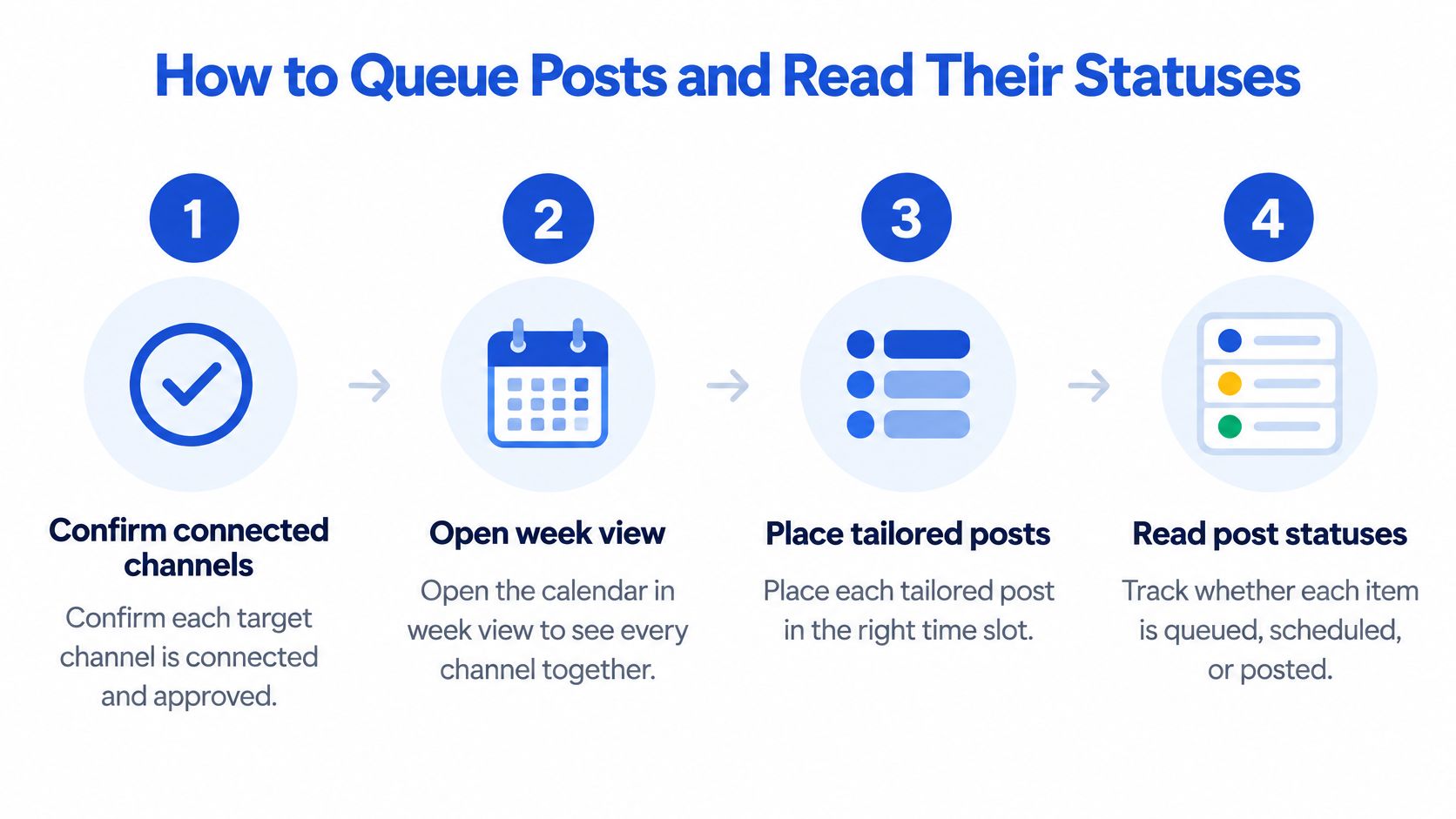
- Confirm each target channel is connected and approved.
- Open the calendar in week view so every channel sits on one grid.
- Place each customized variant into its chosen slot.
- Preview the time in the audience's zone, not yours.
- Save the post as queued.
- Leave it. Automated publishing sends it at the slot, with no one at the keyboard.
- Confirm the status changes to published.
After the agent is connected, you can ask it to plan the week. It drafts the posts, tailoring runs per channel, and the posts land on the calendar. You still review what goes live. Disconnecting a channel revokes publishing access, so anything aimed at that channel stops going out until you reconnect it.
What each status is telling you
| Status | What it means | What to do |
|---|---|---|
| Draft | Written, not assigned to a slot | Finish the copy and assign a time slot |
| Queued | Waiting for its slot | Check the local time and time zone before it goes out |
| Published | Sent to the channel at the slot | Check reach and engagement after 24 to 48 hours |
| Channel disconnected | Publishing to that channel has stopped | Reconnect the channel before the next slot |
A post that says published but isn't on the network is an account problem until you prove otherwise. Open the channel, confirm the connection, and only then look at distribution.
Week view or list view both show every post for every channel together, which is where a disconnected row stands out next to a healthy queue. Don't wait for the missed slot to discover it.
Fixing Missed, Duplicate and Late Posts
Most "the algorithm buried it" weeks start as a settings error. Work down the symptoms in the order they usually appear.
| Symptom | Likely cause | Fix |
|---|---|---|
| Post went out at the wrong hour | Time zone set to the publisher's zone | Reset the zone to the audience's and check the preview |
| Two related posts landed together | Posts placed less than 30 minutes apart | Move the backup slot to at least 30 minutes away |
| Post never published | Channel disconnected or access revoked | Reconnect the channel before the next slot |
| Low reach despite a correct slot | Weak hook or unsuited format, not timing | Rewrite the first line or change the media, then retest |
| Results look distorted | Paid amplification or breaking news in the window | Label the anomaly and leave it out of the timing comparison |
Wrong hour. The preview is the only check that matters. If it shows 9:00 a.m. your time and the audience is six hours ahead, the post is already late before it queues. Reset the zone on that post, preview again, and don't trust the calendar label alone.
Two posts at once. Related items inside the spacing window steal each other's early reactions. Move the backup, not the primary, unless the primary was the mistake. The next publish cycle picks up the new gap. You don't need a four-week test to confirm two posts no longer collide.
Never published. Access was revoked or the channel dropped. Reconnect before the next slot. Anything that already missed doesn't go out retroactively, so decide whether that idea is still worth a new time or should be dropped.
Low reach, correct slot. The hour did its job and the post didn't. Rewrite the first line or swap the media treatment, then put the new version through another cycle. Changing the slot and the hook in the same week makes the result unreadable.
Distorted results. A boost or a news spike in the window will flatter an hour that your organic posts can't repeat. Label it and exclude it from the timing comparison. That exclusion takes effect on the next review. A real timing conclusion still needs a full cycle of comparable, unpaid posts.
Set Up Your First Scheduled Week
A first scheduled week is a test design, not a publishing sprint. Limit it to the two or three channels the audience uses, and fill only the primary and backup slots already chosen for those accounts.
Write three constraints before anything is queued. The core message stays shared. Copy and media stay native to each network. Each audience segment keeps its own time zone on the post. Then lock a cadence the team can hold for the whole test. A timing result is readable only if frequency stays fixed. Doubling output in week three will look like a better hour when it is only more posts.
A data-informed timing strategy beats copying one generic best-time chart. Treat each slot as a hypothesis for that account and that channel. Run one window for four weeks, hold topic and format steady, and compare reach and engagement rate with the previous period. Simultaneous slots across channels collapse the comparison, because you cannot tell which network's hour moved the number. Stagger the backups so each window has its own early reactions.
Set the scheduler up manually, or connect an agent and have the week drafted and refined once the channels are connected. The Starter plan includes 3 channels, 100 scheduled posts per month, 1 brand space, AI drafting and rewrites, and analytics, which covers this first test without a second tool. If themes and campaigns need a longer view, plan them as a month of content and treat this week as the first slice.
After four weeks you should be able to point to a repeatable calendar, a written time zone for each segment, and at least one window you can defend with your own reach and engagement rate.
Social Media Scheduler puts drafting, per-channel tailoring, and local-time publishing on one calendar, so a queued post goes out while you're offline and the analytics show whether that window earned another week. To stop copying a generic best-time chart, visit Social Media Scheduler and set the first three channels against the audience zones already listed.