Managing Social Media Content: The AI Workflow
Oct 12, 2026 · 12 min read
Most advice on managing social media content still treats the job like a posting problem. That's outdated. The actual work is coordinating platforms with different audiences, different content rules, different buying behavior, and different expectations for speed, voice, and accessibility.
The moment a brand shows up on Facebook, Instagram, YouTube, TikTok, X, and Snapchat at the same time, cross-posting stops being efficient and starts becoming sloppy. A 2024 survey of 4,044 consumers who followed at least five brands found heavy overlap across networks, but also clear differences in use and purchase behavior, with Facebook leading direct purchases overall at 39%, TikTok leading among Gen Z at 54%, and 93% of consumers saying it was important for brands to keep up with online culture, even as 27% believed a trend stayed effective for only 24–48 hours (Sprout Social research). That's why good management is now a workflow discipline, not a copy-paste habit.
The Multi-Platform Coordination Challenge
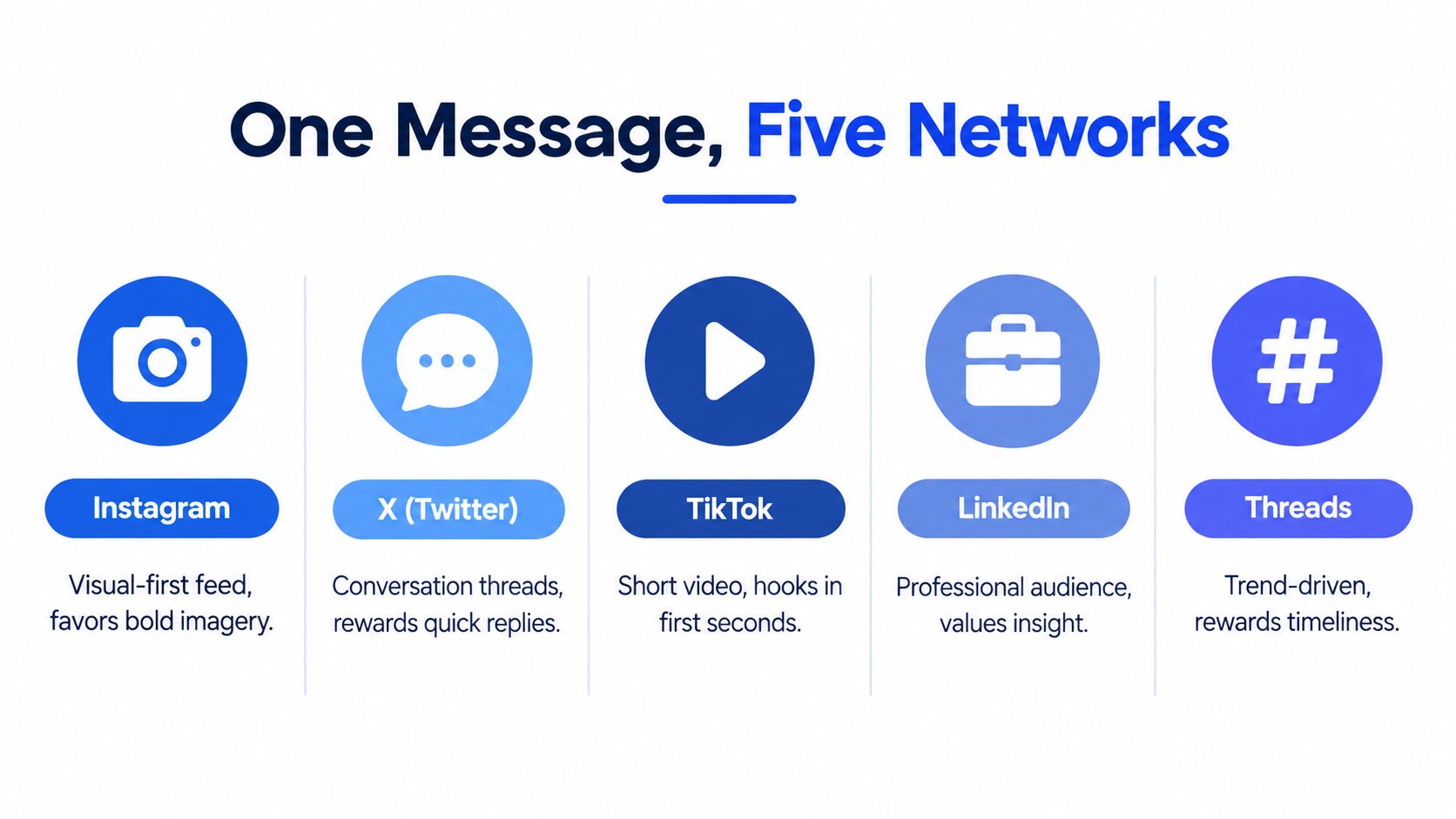
A brand manages social media content well by accepting a simple fact. Each network asks for a different version of the same idea. Audiences overlap, but the channels reward different hooks, formats, pacing, and accessibility choices. A post that drives quick product interest on Facebook may need a different tone, visual structure, or opening on TikTok or X.
One message, five different jobs
Strong content teams separate the core idea from the platform execution. One campaign theme can become a visual story on Instagram, a reply-driven post on X, a short video on TikTok, or a professional takeaway on LinkedIn. That is adaptation, not duplication.
The audience numbers in the 2024 consumer survey show why this matters. 90% of respondents had Facebook profiles, 82% had Instagram profiles, 76% used YouTube, 58% used TikTok, 50% used X, and 46% used Snapchat (Sprout Social research). The overlap is large, but the platforms still are not interchangeable, because each one carries its own content norms and buying patterns.
Practical rule: Treat the message as portable, but the post as native to the channel.
That is the right operating model for managing social media content at scale. If your team needs a framework for channel coordination, AdManage.ai on multichannel workflows is a useful reference point, especially when you need structure without turning the calendar into a tangle. The same approach applies to organic posts, paid support, or both.
Trends decay faster than most calendars do
Timing creates the second coordination problem. Brands often schedule content far ahead and lose sight of how quickly online culture moves, while the same survey found that 27% of consumers thought a trend stayed effective for only 24–48 hours. That leaves little room for a rigid calendar.
A platform-aware workflow gives each lane a job. One layer handles evergreen publishing, another handles trend response, and a third protects brand-sensitive content from rushed publication. Teams that keep those lanes separate avoid the worst failure mode, one generic post pushed everywhere and trusted nowhere.
For a practical publishing system, Social Media Scheduler keeps drafts, scheduling, and performance in one calendar, so evergreen work and trend-response posts stay visible side by side.
Drafting and Tailoring Content with AI Assistance
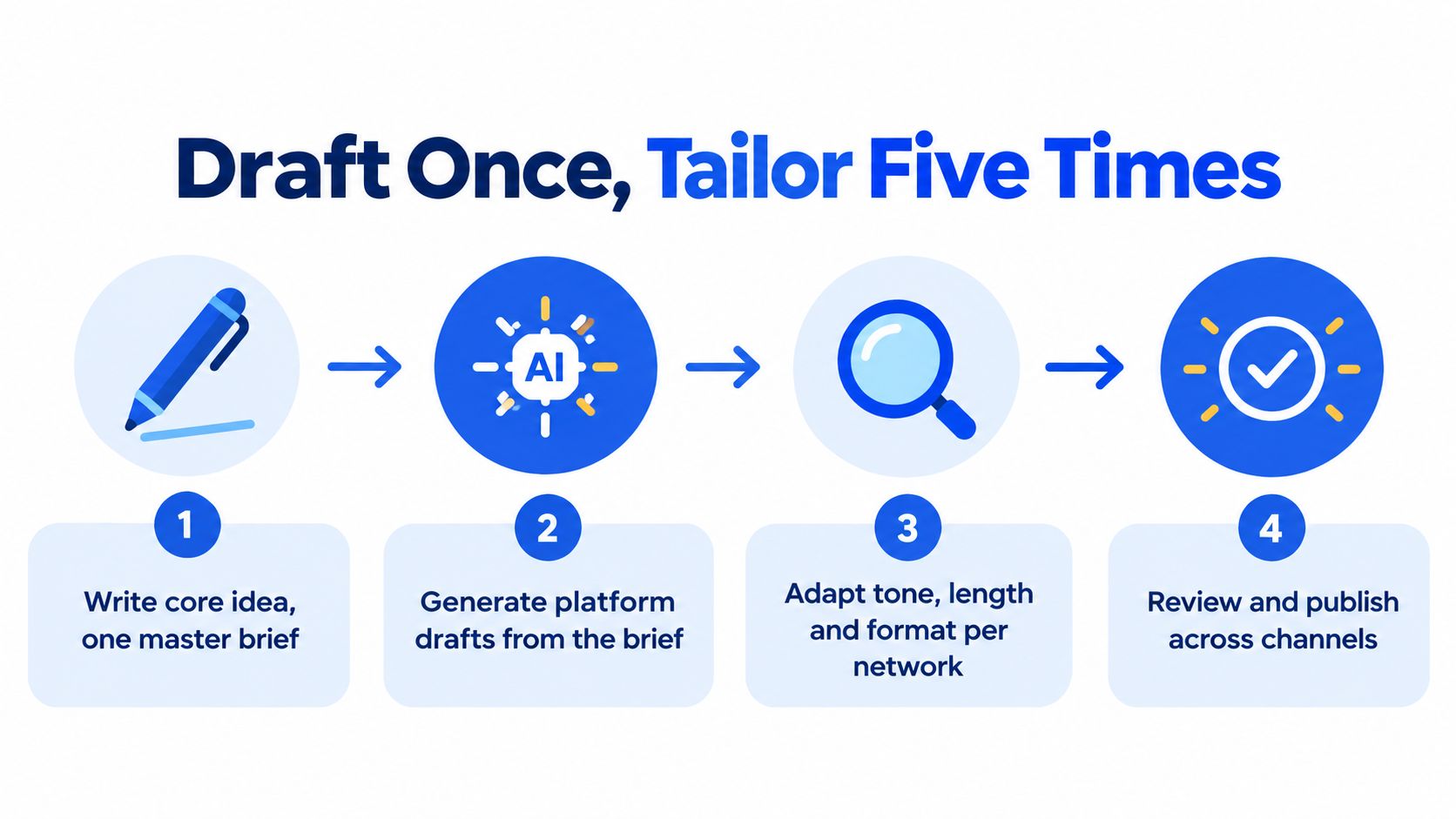
AI is useful in social publishing when it shortens the distance between a strong idea and a usable platform-specific post. It's not useful when it becomes a shortcut around judgment. The most efficient teams use AI to draft once, then tailor the output to each network's format, tone, and expectations.
Start with a master brief, not a finished post
The best workflow begins before writing the caption. Define the goal, the audience, the proof points, and the action you want the post to drive. Once that brief is clear, AI can generate first drafts that are easier to edit because they already point in the right direction.
That matters because a single idea usually needs different framing across networks. A social post for a product launch may need a punchier opener on X, a more visual structure on Instagram, and a more explanatory angle on LinkedIn. The AI step should reduce repetitive rewriting, not flatten the message into one generic voice.
Tailor the same idea into native formats
Brand-aware tooling helps here because it can rewrite without stripping out the core intent. A useful example is brand-aware social content tooling, which fits naturally into a process where one master concept becomes several channel-specific variants. The value isn't speed alone, it's keeping the voice aligned while adapting length, structure, and emphasis.
Keep the promise of the post intact, then change the packaging.
That's the part many teams get wrong. They ask AI for a new post, not a new version of the same strategic idea. In practice, you want the same claim, the same proof, and the same CTA, but with different surface treatment for each platform.
For teams building tighter hooks and sharper openers, hooks that stop the scroll is a natural complement to the drafting process. It reinforces the idea that the first line needs to earn attention before anything else can work.
Building an AI Quality Control Framework
Speed is easy to measure, which is why teams often optimize for it too early. The harder test is whether the content still sounds like the brand, stays factual, and avoids unnecessary risk once AI enters the workflow. Without a control layer, volume starts to create inconsistency.
Separate low-risk posts from high-risk posts
Different posts need different approval paths. A light brand update can move quickly through an AI-assisted drafting workflow, while a post that makes a factual claim, touches a sensitive topic, or references a campaign promise should get human review before it goes live. That approach keeps routine publishing moving without treating every post the same.
Editorial ownership matters here. AI can produce a lot of acceptable copy, but it cannot decide what should be published without supervision. Someone still needs to own voice, accuracy, and final sign-off.
Use a reusable voice and fact-check layer
The strongest teams keep a living voice guide that sets tone, preferred phrasing, and words to avoid. They also separate claims from commentary so factual statements can be checked before approval. That matters even more when a post is repurposed across several networks, because a small wording change can alter meaning.
A practical control framework usually includes a few simple steps:
- Brand voice check. Confirm that the post sounds like the brand and not like a generic content machine.
- Claim verification. Review any factual statement, statistic, or attribution before scheduling.
- Sensitive topic screen. Flag posts that may need legal, reputational, or cultural review.
- Human approval. Require a final person to accept the post before publication.
- Post-publish review. Watch comments, reactions, and corrections so the team can learn from misses.
AI should lower production friction, not lower editorial standards.
That is the shift in managing social media content with automation. The team keeps judgment where it matters and removes repetitive work where it does not. For a broader view of the operational side, social media automation is worth reading alongside your internal process docs. Automation should remove the repetitive work so the team's judgment is spent only where it changes the outcome.
Strategic Scheduling and Timing Experiments
Generic “best time to post” advice is easy to sell because it sounds decisive. It usually misses the core problem. Good scheduling tests one variable at a time, respects platform differences, and treats timing as an operational decision rather than a guess.

Test timing against one objective at a time
Start with a single outcome, such as link clicks, engagement rate, or conversions. If you test for everything at once, the signal gets muddy. Then segment by platform, format, audience time zone, and the emotional or informational angle of the post.
A useful benchmark comes from a model built on 366 days and 5,706 Facebook posts from a top-50 U.S. newspaper. In that sample, morning publication produced 8.8% more link clicks than afternoon publication and 11.1% more than evening publication, while sponsored content performed best in the afternoon, averaging 21% more link clicks than morning-sponsored posts (American Marketing Association). The pattern is directional, not universal, which is exactly why timing needs to be tested inside your own account history.
A scheduler that treats every post the same will miss those differences. Compare similar content in controlled windows, keep the creative variables as steady as possible, and record what changed. That gives you a baseline you can use instead of a hunch.
The operational part matters too. Keep a rolling experiment log, use local time zones, and leave manual review for sensitive or high-risk posts. Plan a month of content with enough flexibility to retest weak slots instead of deleting them from the calendar after one bad result.
Don't confuse activity with performance
Posting more does not mean the calendar is improving. A crowded queue can still underperform if the timing is wrong or if content keeps landing in the wrong audience window. Flag any slot whose median engagement rate sits more than 20% below the account's platform median for two consecutive test cycles.
For teams that want a practical overview of how automation fits into daily publishing, Contesimal on social media automation is a useful companion piece. Use it as a reference point, not as a substitute for your own timing data.
The walkthrough below shows how a timing experiment is set up and read inside a real calendar.
Integrating Accessibility into the Publishing Workflow
Accessibility shouldn't live in a separate checklist that someone remembers after the creative is finished. If the team only adds alt text at the end, accessibility becomes optional in practice, which is usually where it gets missed. The stronger approach is to build inclusion into the same drafting and approval flow that handles tone, timing, and scheduling.
Make accessibility part of production, not cleanup
The first step is ownership. Someone on the team needs to be responsible for checking captions, descriptions, and text treatments before a post goes live. Without that owner, accessibility gets diluted across creators, approvers, and schedulers until nobody feels accountable.
That responsibility matters because the implementation gap is still real. In Canada, only 37.0% of businesses and organizations using social media reported providing accessibility features during the 12 months before the fourth quarter of 2025, and in a separate survey of arts, heritage, and entertainment organizations, 87% used social media but only 33% of those users incorporated features such as alt text or captioning (Statistics Canada). Those numbers point to a process problem, not a lack of awareness.
Build the checks into the calendar itself
Accessibility works better when it's embedded in templates and approval stages. A post that includes video should require reviewed captions. An image post should include a meaningful description, not a keyword-stuffed line that adds nothing for the user. Text-only visuals should be used carefully, because they often become unreadable when repurposed or compressed.
A practical publishing system usually tracks a few things together:
- Caption status. Confirm every video post has reviewed subtitles before scheduling.
- Alt text status. Require image descriptions where the platform supports them.
- Asset review. Flag graphics that rely too heavily on text baked into the image.
- Ownership. Assign one person to clear accessibility before the post enters the queue.
- Reporting. Measure completion rates alongside standard engagement metrics so the team can see whether inclusion is really happening.
Accessibility is not just a compliance layer, it's a quality layer.
That framing changes how teams work. Once accessibility is part of the production flow, it stops being an extra task and becomes part of publishing quality. For multi-platform teams, that's especially valuable, because a post that works visually on one network can become inaccessible the moment it's reused elsewhere.
Normalizing Analytics for Cross-Platform Decisions
Cross-platform reporting falls apart when teams compare metrics that do not measure the same behavior. A 12% engagement rate on one network may not mean the same thing as 12% on another. If the denominator changes, the conclusion changes too.
Use platform-aware definitions
A large international benchmark analyzed 70 million posts from January 2024 through December 2025 and defines follower-based engagement differently by network, with Facebook using reactions, comments, and shares divided by fans, Instagram using likes and comments divided by followers, X using likes and reposts divided by followers, and TikTok including likes, comments, shares, and saves divided by followers (Socialinsider benchmarks). That alone explains why a single dashboard can mislead when it treats every platform as interchangeable.
Use the same platform, similar format mix, similar audience scale, and the same date range before drawing conclusions. Seasonal periods can distort a result, and a small account can swing wildly from post to post.
Keep reach and engagement separate
A good reporting model separates delivered reach from interaction quality. A post can travel widely without producing meaningful actions, and another can reach fewer people while creating stronger signals. If those numbers get blended together, the team cannot tell which content format is doing the job.
Use the same benchmark and wait for enough volume before making judgment calls. It recommends at least 30 posts before making engagement-rate judgments and roughly 90 days for trend analysis. That does not guarantee certainty, but it does reduce noise enough to make the data usable.
Match the cohort before you judge the content.
Before any cross-platform conclusion, confirm the cohort matches. Same platform, same format mix, same date range. Keep paid and organic performance separate, avoid double-counting cross-posted material, and do not use follower count alone as a proxy for audience delivered. When the measurement frame is clean, the next content decision is easier to defend.