Social Media Schedule That Actually Drives Engagement
Sep 22, 2026 · 17 min read
You've planned the campaign, written the copy, and prepared the creative. Then Monday arrives. One post goes live on LinkedIn, the Instagram version is still in drafts, the TikTok edit needs a final review, and nobody remembers whether the Facebook post was meant for the morning or lunch. By the end of the week, your team has published when someone had a spare moment rather than when the audience was most likely to pay attention.
A strong social media schedule removes that scramble. It gives every channel a deliberate rhythm, assigns each post a format and owner, and creates a record of what happened after publication. The calendar matters, but the operating system behind it matters more.
By 2026, scheduling had become standard infrastructure for many social teams. One industry roundup reported that 73% of social media marketers use scheduling tools, compared with 61% in 2024 and 47% in 2022. The same roundup reported average savings of 6.3 hours per week, management of 5.2 platforms at once, and approximately 328 hours saved per manager each year (industry scheduling statistics). Those figures point to a practical shift: scheduling isn't merely a convenience for busy days. It helps teams coordinate a fragmented publishing environment.
This guide treats scheduling as a dynamic, per-channel experimentation system. You'll start with the structure of a useful schedule, then choose cadence and timing, adapt one idea for different networks, build a weekly workflow, and use analytics to revise the plan. The aim isn't to find a permanent magic hour. It's to create a repeatable system that learns.
Introduction Why Consistency Beats Random Posting
A small team starts the week with a strong idea, then publishes it whenever someone has time. A trend interrupts the plan. A product announcement moves ahead of an educational post. By Friday, several promotional messages may sit together while useful content has gone quiet. The issue is not flexibility itself. It is the absence of a shared publishing pattern.
A social media schedule gives that pattern a practical shape. It answers what is publishing, on which platform, at what time, in which format, and who approves it before those questions become urgent. Writers, designers, and reviewers can work from the same plan instead of rebuilding priorities each morning.
Practical rule: Consistency means maintaining a deliberate pattern that your audience and team can rely on. It does not require identical content at identical intervals.
The value extends beyond saving time. Teams working across several networks must account for different formats, audience habits, approval steps, and publishing windows. A schedule makes those differences visible, so a post is adapted for its channel rather than copied everywhere. The industry scheduling statistics cited earlier also reflect how widely teams use scheduling tools to coordinate this work.
Treat timing as a working hypothesis, not a permanent best-time chart. A Tuesday morning slot may suit a LinkedIn text post, while an Instagram video needs a different test. Format and timing affect one another, and analytics show whether a channel responds to the combination. Each result gives the team a reason to keep, adjust, or replace a publishing choice.
A useful schedule has two layers. The editorial layer holds themes, campaigns, and ideas. The distribution layer decides how each idea becomes a platform-specific post, who handles it, and when it goes live. Keeping those layers separate prevents a promising idea list from being mistaken for an executable plan.
A new manager can start with a modest system:
- Choose a sustainable rhythm: Set expectations the team can maintain without lowering quality.
- Assign channel roles: Define what each network should accomplish.
- Reserve review time: Add production and approval deadlines to the calendar.
- Measure patterns: Compare results by platform, format, day, and time.
- Revise deliberately: Change one meaningful variable at a time.
The result is calmer execution. Timely publishing remains available, but it becomes a deliberate choice rather than the team's default response.
What a Social Media Schedule Really Is
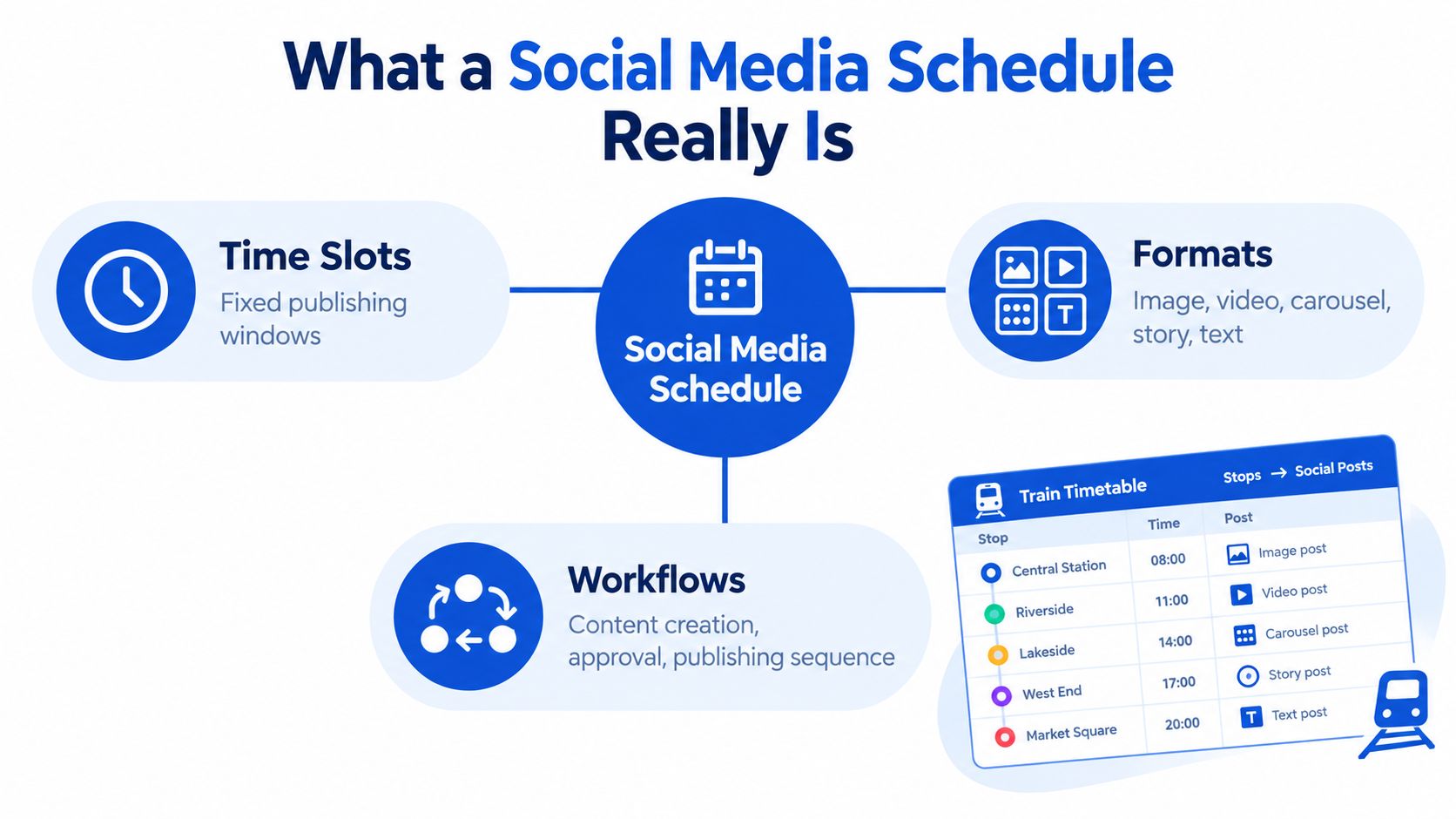
A social media schedule is a coordinated system of time slots, formats, responsibilities, and statuses. A list of ideas says what you might publish. A schedule says how those ideas move from concept to live post.
A train timetable is a useful analogy. The timetable doesn't just name destinations. It assigns departures, routes, and stops so passengers and staff know what should happen next. Your social calendar works in the same way. A post can begin as an idea, move to draft, enter approval, become queued, and finally reach published status. Each stage reduces uncertainty for the next person.
The three operating parts
Time slots create predictable publishing windows. They should be assigned per channel because an audience that checks LinkedIn during a workday may use Instagram at a different point in the day. For global teams, local-time scheduling prevents a carefully planned post from reaching a major audience while that audience is offline.
Formats tell the production team what to make. An idea about customer education might become a text-led LinkedIn post, an Instagram carousel, a short video, a Threads conversation starter, or a longer YouTube explanation. The central message can stay consistent while the treatment changes.
Workflows define movement and ownership. A simple workflow might include:
- Planned: The idea has a purpose, channel, format, and target slot.
- Draft: The copy and creative are being prepared.
- Review: A named person checks accuracy, tone, compliance, and links.
- Queued: The approved post is scheduled for automated publication.
- Published: The post is live and ready for monitoring.
This structure prevents a common error: confusing a full content calendar with a publishing queue. The calendar should show the broader campaign context, while the queue should make imminent production and approval tasks visible.
One idea, several tailored executions
A unified calendar lets a team draft the core idea once, then adapt it for each network. AI-assisted drafting can help produce a starting version or rewrite an existing post, but a human should still decide whether the result fits the platform, audience, and brand voice.
For example, a product lesson might use a concise argument on LinkedIn, a visual sequence on Instagram, a conversational prompt on Threads, and a demonstration on TikTok. Copying the same paragraph into every channel saves a few minutes at the drafting stage but often creates extra editing later.
The schedule should therefore record both the source idea and the channel execution. That gives the team a clear line from campaign intent to platform-specific publishing, without forcing every network into the same mold.
How Cadence and Timing Shape Your Schedule
A team may publish three polished posts in one week, then go quiet the next. The problem is not only timing. The schedule has no dependable rhythm, so production, audience expectations, and performance learning all become harder to manage.
Cadence is the publishing rhythm your team can sustain. Timing places a specific post within that rhythm. Cadence asks, “How often can we publish useful material here?” Timing asks, “When should this format reach this audience?” A workable schedule connects both questions instead of treating them as separate settings.
There is no universal best time. A 2015 analysis from the London School of Economics found that no single posting time works for every audience, while later research often reported stronger results during weekday mornings and midweek periods (London School of Economics analysis of posting times). Use those findings to choose your first tests, then replace assumptions with evidence from each channel.
Build the schedule around experimentation windows, not permanent rules. Select a few plausible slots for each platform and compare posts under similar conditions. Keep the format, audience, and objective in view, because a live announcement, tutorial, and short-form video can behave differently at the same hour. If your audience spans regions, separate local-time settings from actual audience behavior. A slot that fits one market may miss another.
Treat cadence as a promise
A schedule becomes fragile when it demands more creative work than the team can support. Higher frequency can create more learning opportunities, yet it may also reduce quality, exhaust contributors, and make the feed repetitive. Cadence should set a promise the team can keep, not a target that looks impressive on paper.
Before assigning a rhythm, ask:
- What can the team produce well: Match frequency to available writers, designers, editors, and reviewers.
- What does the format require: Short-form video usually needs a different production rhythm from a text update.
- What role does the channel play: A conversation-focused network may need a different rhythm from one used mainly for evergreen discovery.
- What does the audience tolerate: Check whether additional posts create repetition or weaker engagement.
- What can you measure: A cadence helps only when the team can review results and change the plan.
An independent synthesis of major-market scheduling found that engagement often concentrates in weekday mid-morning and lunch windows, while weekends tend to be weaker. The exact pattern varies by platform, so treat these windows as starting hypotheses rather than a fixed calendar. On Facebook, the analysis identified weekdays, particularly Tuesday through Thursday, as stronger periods, with early morning and midday outperforming other windows (Facebook posting time analysis).
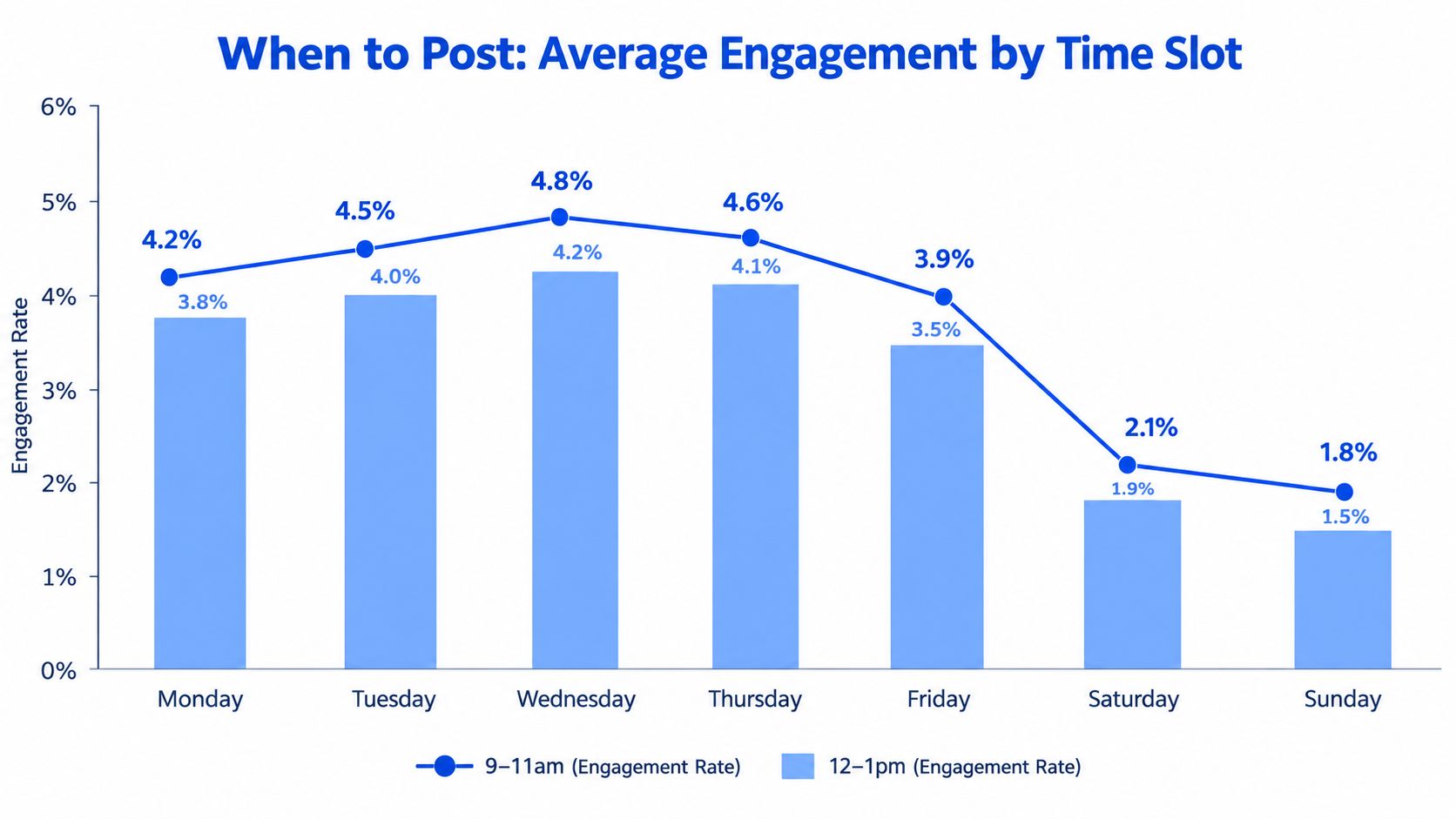
Review timing together with format and channel results. A strong hour for an image may not be strong for a video, and early reach does not always indicate meaningful engagement. Record the combination you tested so the team can repeat useful comparisons.
A short explanation of timing research can help your team question simplistic charts:
The useful question is, “Which time and format combination gives this channel the strongest reach and engagement for this audience, and can we reproduce the test?”
Structuring Your Schedule Across Different Platforms
A shared calendar should coordinate ideas, not flatten them into identical posts. Each channel is a different setting with its own audience behavior, format expectations, and feedback signals. The same campaign can travel across platforms, but it needs a new form at each stop.
X rewards concise, timely conversation and quick reactions. LinkedIn usually needs a considered professional argument with context that might feel too formal elsewhere. Instagram depends heavily on visual treatment, while Threads supports a more conversational flow. Facebook can carry community updates, links, images, and video. TikTok centers on short-form video, and YouTube requires separate planning for Shorts and longer viewing experiences. Bluesky may call for community-aware participation rather than a purely promotional broadcast.
Record the channel, format, audience, adaptation notes, approval owner, and local publish time for every planned idea. This turns the calendar into a production map. It also prevents cross-posting from becoming a copy-and-paste exercise.
A practical comparison
| Platform | Primary Format | Cadence Consideration | Platform-Specific Priority |
|---|---|---|---|
| X | Short text, threads, links, and media | Respond to conversation and timely topics | Opening line, brevity, and reply strategy |
| Text posts, documents, images, and video | Protect space for thoughtful professional content | Context, expertise, and clear business relevance | |
| Reels, carousels, images, and Stories | Coordinate feed content with visual continuity | Hook, cover frame, caption, and visual sequence | |
| Threads | Conversational text and replies | Leave room for participation rather than only broadcasting | Questions, follow-ups, and natural voice |
| Community posts, links, images, and video | Use channel-specific windows and audience habits | Community relevance, accessibility, and discussion | |
| TikTok | Short-form video | Build a production rhythm your team can sustain | First seconds, pacing, captions, and native feel |
| YouTube | Shorts and long-form video | Separate short and long viewing journeys | Title, thumbnail, retention structure, and description |
| Bluesky | Short text, links, and media | Prioritize relevance and community context | Tone, conversation, and network-specific norms |
Timing is one input, not the whole schedule. A Facebook post and an Instagram Reel might promote the same webinar, yet the Facebook version can explain the event through a community update while the Reel demonstrates the problem the webinar addresses. The campaign intent remains aligned, while the format, opening, and call to action fit the viewer's context.
Treat each channel as a small experiment. Keep the publishing slot, format, opening approach, and audience response together in your records. A time that works for an Instagram carousel may not work for a Reel, and strong early reach may not lead to meaningful discussion or clicks. Repeated comparisons help you adjust the schedule using your own results instead of relying on a static best-time chart.
If Instagram is an important part of your mix, an Instagram scheduling workflow can sit inside the wider calendar rather than becoming a separate planning process. Separate handling makes sense when the channel needs its own approval or production path.
Start with broad timing assumptions, then let channel-level analytics refine them. Your calendar should support different slots and formats for each network, while keeping the campaign idea recognizable across the full schedule.
Building a Repeatable Weekly Scheduling Workflow
A weekly workflow should make the next publishing cycle visible before production begins. It doesn't need to be complicated. The important part is that the team repeats the same decisions in the same order, so execution becomes easier to manage and performance becomes easier to interpret.
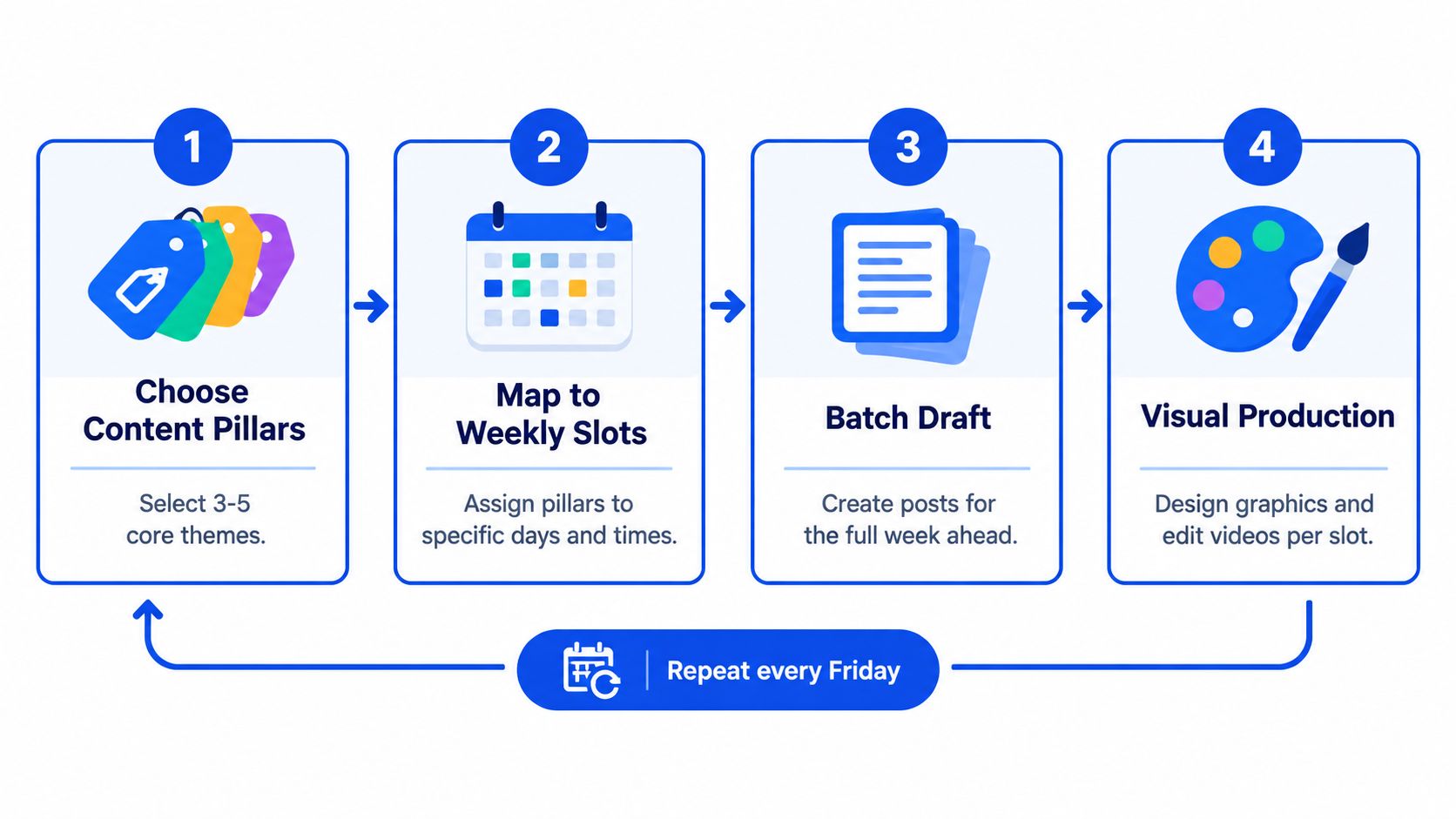
Start with a small set of content pillars. These are durable themes that connect your posts to business and audience needs. A software team might use product education, customer problems, industry perspective, and company culture. The point isn't to fill every slot mechanically. The point is to prevent the calendar from becoming a string of unrelated announcements.
A weekly cycle that holds up
- Choose the themes. Review campaigns, product priorities, customer questions, and relevant conversations. Select the themes that deserve attention in the coming cycle.
- Map themes to channel slots. Place each theme into a specific platform and format. One idea might become a LinkedIn explanation, an Instagram carousel, and a short video rather than three identical posts.
- Batch the first drafts. Create the core copy and creative brief together. This reduces context switching and reveals gaps before the content reaches design or approval.
- Tailor and produce. Adjust the hook, length, media, call to action, captions, and accessibility details for each network.
- Review the full calendar. Look for repetition, overloaded days, missing formats, and conflicts with launches or events.
- Queue approved posts. Confirm local times, links, media, tags, and publishing status. Leave room for real-time content and urgent changes.
Workflow principle: Batch the thinking, not the judgment. Draft in groups, but review every channel version as its own post.
A visual calendar with drag-and-drop placement helps managers see the week as a system. It also makes changes less disruptive. If a product announcement moves, the team can reposition related posts while preserving the relationship between the campaign, format, and channel.
Automation handles the final handoff. Once content is approved and queued, publishing can happen without someone opening several apps at the exact moment. That matters for distributed teams and audiences across time zones, but automation shouldn't remove oversight. A manager still needs to pause scheduled content when a crisis, product issue, or major news event makes the original message inappropriate.
Current scheduling practice also needs to account for short-form video, AI-assisted publishing, and emerging networks. Recent trend reporting describes AI-assisted creation as mainstream, short-form video as dominant, Threads as having more than 400 million monthly users, and cross-posting as a default multi-platform behavior (2026 social media trend reporting). These developments make format adaptation more important, not less. A single calendar is valuable because it lets teams compare how one idea behaves across networks while preserving channel-specific production.
For a more detailed operating rhythm, use this weekly content system as a reference point, then adapt the workflow to your approval capacity and audience needs.
Tracking Performance and Iterating Your Schedule With Analytics
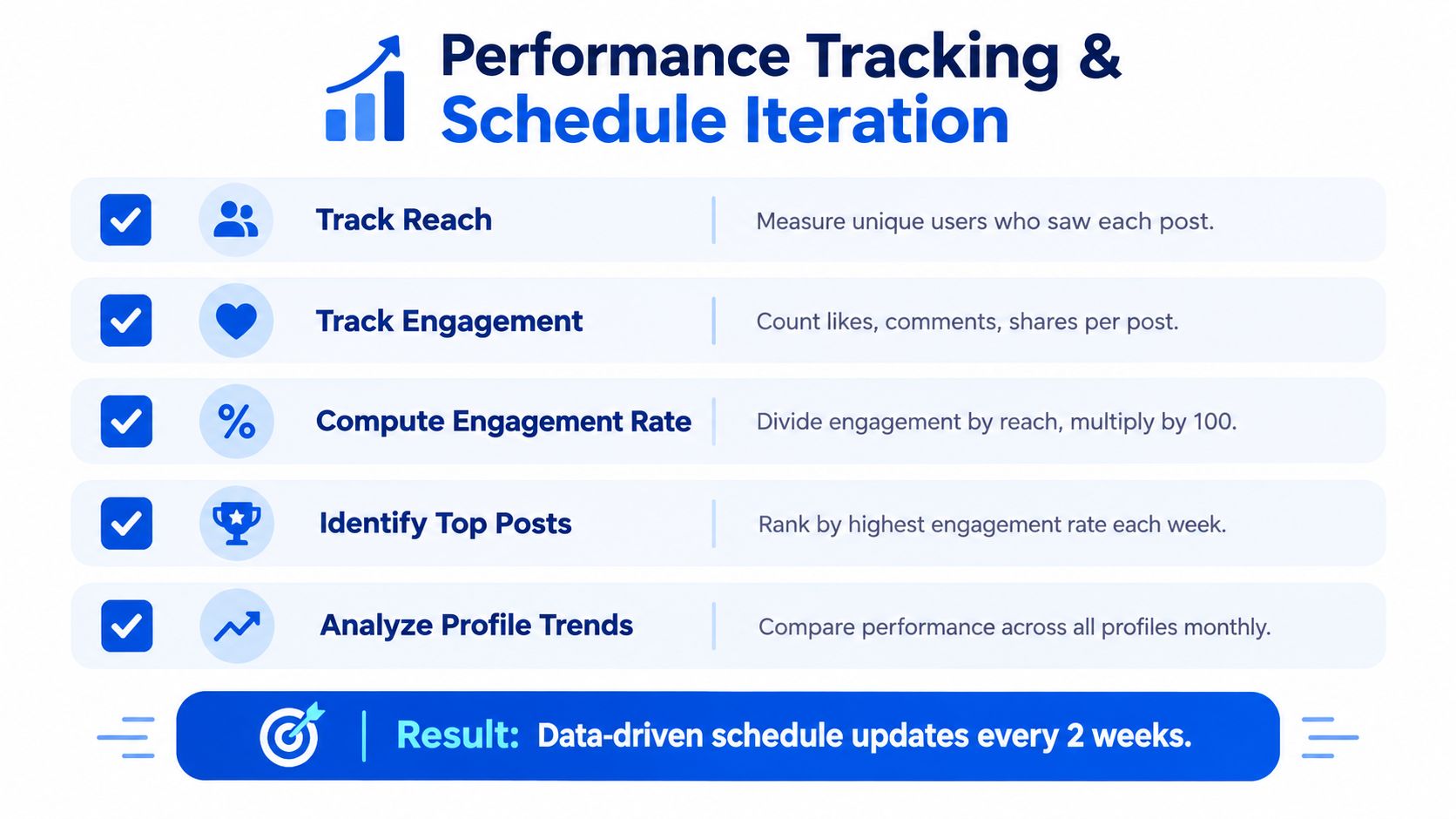
A calendar becomes a learning system only when the team connects each publishing decision to an observable result. Start with the basic measures: reach, engagement, and engagement rate. Reach tells you how many people saw the post, engagement records actions such as reactions, comments, or shares, and engagement rate puts those actions in relation to the audience reached.
Raw totals can mislead. A post may collect more interactions because it reached more people, not because its timing or format was stronger. Normalization makes the comparison fairer by relating engagement to impressions or reach.
A disciplined testing method
Independent technical guidance recommends exporting at least 90 days of native analytics, normalizing results by impressions or reach, and evaluating a 7×24 day-hour grid (technical guidance on testing posting times). That grid gives you a way to see patterns across days and hours without collapsing every channel into one average.
Use a controlled sequence:
- Collect the baseline: Export native data for each channel and preserve the post's format, topic, audience, reach, and engagement.
- Normalize the result: Compare engagement relative to reach or impressions instead of ranking only by raw reactions.
- Map the grid: Mark performance by day and hour so recurring windows become visible.
- Hold the format steady: Test similar topics and formats when comparing timing. Otherwise, a strong video may make a time slot look better than it is.
- Repeat the candidate slots: Guidance recommends testing selected windows for several weeks and using at least three posts in a cell to reduce noise.
- Compare two leading windows: An A/B test between the strongest candidates can help separate time-of-day effects from audience timezone or format effects.
The point isn't to prove that a particular hour is permanently superior. It's to reduce uncertainty enough to make the next schedule more informed. If morning posts perform well only for educational carousels, your recommendation should apply to that format, not to every Instagram post.
Review analytics on a fixed cycle. Look for changes in reach, engagement rate, top-performing formats, and account-level trends. Then revise one part of the schedule, such as the slot, format, or cadence, and record the reason. This creates an evidence trail that helps a new manager explain decisions without relying on memory or personal preference.
Putting Your Social Media Schedule Into Action
Start with a schedule that your team can operate, not one that looks impressive in a spreadsheet. Define the purpose of each channel, select a manageable cadence, and assign a few content pillars. Then give every planned idea a platform, format, owner, approval status, and local publishing slot.
For the first cycle, prioritize execution:
- Build the calendar: Add the core ideas and map each one to channel-specific versions.
- Queue the approved posts: Check copy, creative, links, accessibility, and timezone before publishing.
- Protect flexibility: Keep room for timely conversations and pause content when circumstances change.
- Record the baseline: Capture reach, engagement, engagement rate, format, day, and time.
- Review the evidence: Compare normalized performance, not just the posts with the largest raw totals.
- Change one variable: Test a different slot, format, or cadence while keeping the rest as consistent as practical.
Avoid turning general best-time charts into permanent rules. Hootsuite's 2026 analysis identifies 8 AM on Wednesdays as an overall best time, yet its platform guidance differs by network, with Instagram showing evening and early-morning peaks and Facebook favoring very early weekday windows (Hootsuite analysis of best posting times). The lesson is more useful than the headline: broad benchmarks can start a test, but channel and format data should decide what stays.
A monthly content planning process can help you connect weekly execution to larger campaigns without losing the flexibility to adjust individual slots. Review the calendar regularly, keep the decisions visible, and let results shape the next experiment.
Social Media Scheduler brings drafting, per-channel tailoring, publishing, and performance measurement into one calendar for networks including X, LinkedIn, Instagram, Threads, Facebook, TikTok, YouTube, and Bluesky. Visit Social Media Scheduler to plan a consistent publishing rhythm, queue platform-specific posts, and use performance signals to refine your schedule.