10 Social Media Scheduler for Instagram Tools
Oct 6, 2026 · 18 min read
Instagram scheduling advice often starts with “find the best time to post.” That's incomplete. A post can be scheduled at a supposedly optimal hour and still fail because the account lacks the right publishing permissions, the audience spans several time zones, or the workflow can't adapt one idea to different networks. Instagram's advertising tools could reach at least 1.74 billion people worldwide in January 2025, with major audiences distributed across India, the United States, Brazil, Indonesia, Turkey, Japan, Mexico, the United Kingdom, Germany, and Argentina, according to DataReportal's Instagram audience data. A useful scheduler must therefore solve an operational problem, not merely fill a queue.
This comparison evaluates Instagram feed, Stories, and Reels publishing where supplied, per-channel tailoring, visual planning, analytics, collaboration, network breadth, pricing constraints, and realistic scaling. It includes Social Media Scheduler as the AI-native cross-platform option and Meta Business Suite as the official low-cost baseline. The right choice depends on whether you need visual Instagram planning, cross-network adaptation, lean scheduling, agency approvals, or enterprise measurement.
1. Social Media Scheduler
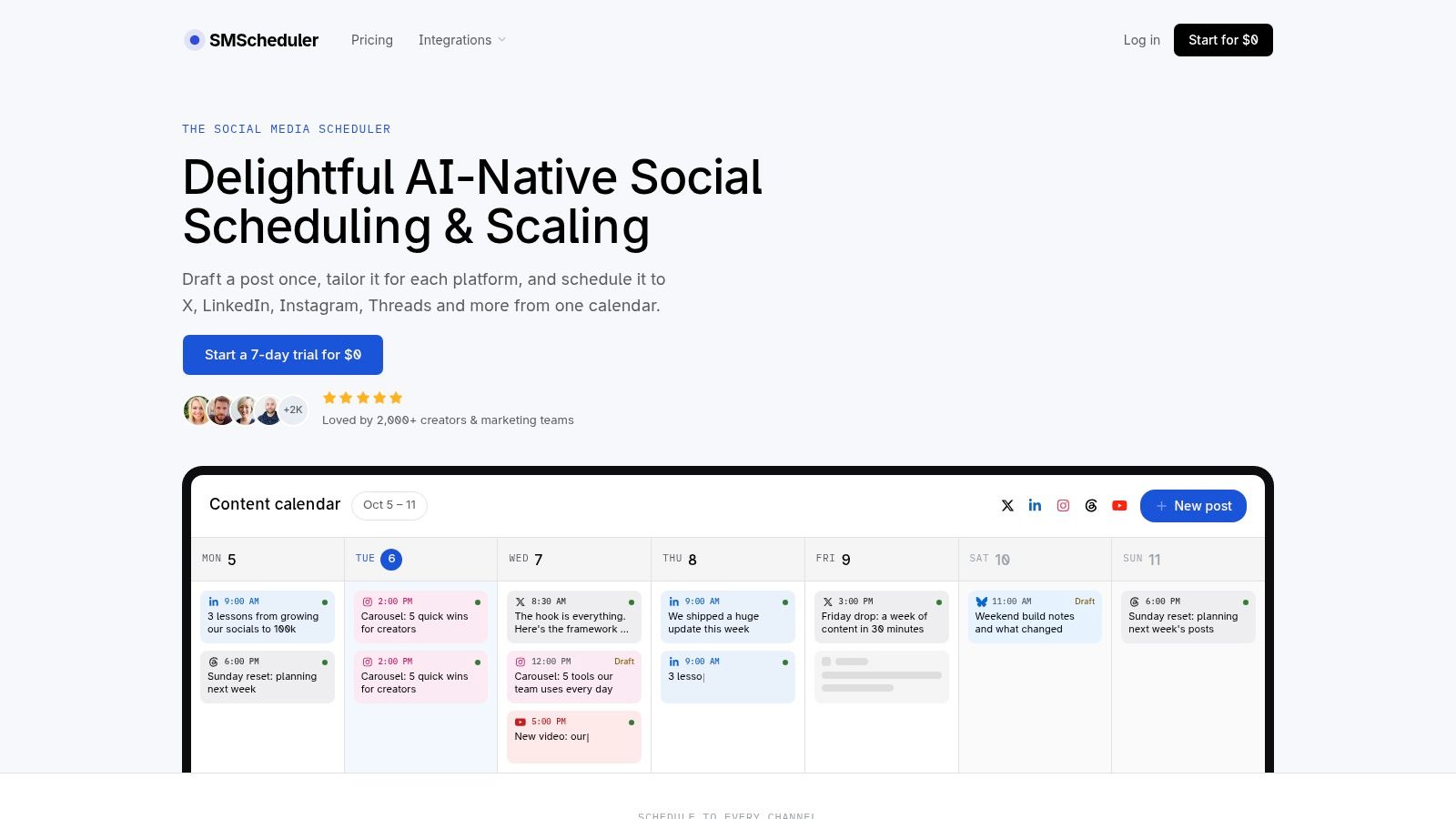
Social Media Scheduler is built for teams that don't want Instagram planning to become a series of disconnected tasks. You draft an idea once, adapt it for Instagram and other networks, place each version on a visual calendar, and monitor results from the same workflow. Instagram sits alongside X, LinkedIn, Threads, Facebook, TikTok, YouTube, and Bluesky, so the product is designed for campaigns that extend beyond one feed.
Its distinctive advantage is AI-assisted per-channel tailoring. Instead of copying an Instagram caption into every other composer, the platform can rewrite and format the content for each network while preserving the original intent and tone. That matters for a marketing team promoting one asset across several channels, although human review remains important for brand voice, regulated claims, and nuanced announcements.
Why it stands out
The visual calendar supports drag-and-drop planning, configurable publishing times, and status tracking for drafts, queued posts, and published content. Automated publishing reduces manual intervention, while account and post analytics bring together reach, engagement, and engagement rate. Learning recommendations use historical results to suggest possible improvements to timing, formats, and topics, so the calendar can become a feedback loop rather than a static queue.
Practical rule: Treat AI recommendations as testable hypotheses, not universal best-time instructions.
The product's strongest fit is a creator, startup social manager, marketing team, agency, or video creator that needs one operating surface for multiple channels. It also states that it stores only the data required to publish and report and doesn't sell user data. Ongoing pricing and feature tiers aren't detailed in the supplied product copy, so teams should verify the current pricing page before committing.
For a practical workflow, use the content planning guide from Social Media Scheduler to build a batch, review every Instagram adaptation, and then compare reach and engagement by channel. The result is less manual duplication, but not a reason to remove editorial control.
2. Meta Business Suite
Meta Business Suite is the sensible baseline for a creator or small team that mainly needs Instagram and Facebook. It offers a native composer, a shared calendar, and scheduling for Instagram feed posts, Reels, and Stories, with cross-posting to Facebook. Because it comes from Meta, account authentication and publishing sit close to the networks themselves.
That first-party position is its clearest operational benefit. Teams don't need a broad social suite if their work begins and ends with Meta properties, and the interface avoids paying for channels they don't use. Basic performance dashboards can also answer straightforward questions about how published content performed.
The limitation appears when the workflow becomes more demanding. Meta Business Suite has fewer multi-network planning, approval, collaboration, and reporting capabilities than the larger third-party platforms. It also isn't designed to tailor one campaign systematically for Instagram, LinkedIn, TikTok, and other destinations from a single draft.
Meta's publishing controls still matter even when a third-party scheduler is used. Meta's Instagram API documentation supports publishing images, videos, Reels, and carousel posts for professional accounts, but access and review requirements can apply to applications serving accounts they don't own or manage. The API also enforces a moving 24-hour limit of 50 API-published posts per account, with a carousel counted as one post, so a serious workflow needs eligibility checks, queue states, retry handling, and capacity awareness.
Choose Meta Business Suite when official Instagram and Facebook publishing is the primary requirement. Move beyond it when you need broader networks, structured approvals, deeper analytics, or a unified content system.
3. Later
Later solves the problem of Instagram-first visual planning. Its visual planner and grid preview let creators and brands evaluate how upcoming images and videos will sit together before publication. That makes it a stronger fit for accounts where profile presentation, campaign sequencing, and visual consistency matter as much as the caption.
The platform supports Instagram auto-publishing for feed posts, Stories, and Reels, alongside a broader scheduling workflow. It also offers Best Time to Post and Smart Scheduling suggestions, Link in Bio capabilities, UGC collection, and analytics that vary by plan. These features connect content planning with the destination a follower reaches after tapping a profile link.
The trade-off
Later is attractive when the team thinks visually first. A creator can arrange media, inspect the grid, and schedule Instagram-specific formats without adopting an enterprise social operations system. Support for Threads and other major networks also gives the workflow room to expand.
The main constraint is plan capacity. The supplied product information identifies post caps on the entry plan, including a limit of 30 posts per profile per month, which can become restrictive for high-volume accounts. Advanced listening and benchmarking are reserved for the Scale plan, so the platform's visual strength shouldn't be confused with unlimited measurement depth.
Timing recommendations also need interpretation. Engagement patterns vary by day, industry, geography, and time zone, and localized peaks have been reported across 118 countries in the research on Instagram reach and posting times. Later works best when its suggestions inform experiments rather than replace audience analysis.
Pick Later for a visual Instagram calendar, grid planning, creator features, and format coverage. Check post allowances and analytics requirements before scaling a publishing program.
4. Buffer
Buffer is the lean option for people who want a scheduler they can understand quickly. Its workflow centers on straightforward queues, a visual calendar, per-channel connection choices, and Instagram auto-publishing. The platform also supports first-comment scheduling, which can help teams separate the main caption from supporting information without relying on manual posting.
Its pricing model is operationally clear because teams pay according to the channels they connect rather than adopting a large suite by default. Paid plans support unlimited scheduled posts, while the interface remains accessible to solo creators and small teams. Buffer also supports Threads and Bluesky alongside established networks, making it more flexible than an Instagram-only planner.
Where Buffer fits
Buffer's strength is adoption speed. A solo creator can establish a queue, a small business can manage a handful of channels, and a lean marketing team can review analytics without learning a complex listening or governance system. Its comments inbox adds a modest engagement-management layer.
The trade-off is depth. Advanced approvals, roles, and deeper reporting require the Team tier, and lower plans don't provide every enterprise-grade control. That doesn't make Buffer weak. It means the product is best judged by whether the team needs fast execution or formal governance.
A simple queue that the team consistently uses can be more valuable than a larger suite that requires specialist administration.
Use this guide to reducing posting time with Social Media Scheduler as a useful comparison point when measuring workflow efficiency. Buffer is a good choice when lean simplicity, predictable channel-based scaling, and low friction matter more than advanced approvals or listening.
5. Hootsuite
Hootsuite addresses a broader operational problem than Instagram scheduling. It combines publishing, a unified inbox, listening, benchmarking, forecasting, analytics, and governance, making it suitable for organizations where social media involves multiple teams and customer-facing responsibilities.
Instagram scheduling includes a unified calendar and bulk posting. The value appears when publishing is only one part of the job. A larger team may need to assign work, manage conversations, monitor mentions, coordinate approvals, and produce reports across several brands or departments. Hootsuite's governance and security options are particularly relevant where access control matters.
Scaling logic
Hootsuite is less compelling for a solo creator who only wants to plan Instagram posts. Its breadth introduces administrative and financial complexity, and the per-seat pricing model can become expensive as more people join the workflow. Some advanced analytics and listening capabilities also require higher tiers.
The right question isn't “Does Hootsuite have enough features?” It clearly has broad coverage. Ask instead whether your organization has enough coordination, customer care, governance, and reporting demand to justify that coverage.
Bulk posting can help a team prepare campaigns efficiently, but Meta's API constraints still apply to Instagram publication. A queue should distinguish draft, queued, failed, and published states, because a scheduled item isn't automatically a successfully published item. Hootsuite fits enterprise operations when social publishing is connected to care, compliance, and measurement, not when the requirement is only an Instagram grid preview.
6. Sprout Social
Sprout Social is the strongest fit for teams that treat Instagram as part of a customer-care and reporting operation. It combines Instagram scheduling and publishing with approval workflows, post-level reporting, listening, shareable report links, and enterprise integrations. Optimal send time suggestions support planning, but the platform's main value lies in the measurement and collaboration layer around the schedule.
Teams can tag colleagues, route messages, coordinate approvals, and manage conversations across networks. That makes Sprout Social useful when the social team isn't only responsible for publishing. It may also be responsible for responding to customers, reporting performance to executives, and maintaining consistent processes across departments.
The premium positioning is deliberate. Sprout Social offers richer reporting and collaboration than SMB-oriented schedulers, but its per-seat pricing is a significant consideration for solo creators and small teams. A business that only needs a calendar may pay for capabilities it won't use.
Best operational match
Choose Sprout Social when stakeholders ask for shareable reporting, cross-network insight, customer-care workflows, and formal approvals. It's particularly appropriate for organizations that need to explain not just what was published, but how posts performed and how conversations were handled.
Don't use “optimal send time” as proof that one hour is universally best. A geographically fragmented audience may be active across different local windows, and immediate likes aren't the same as reach, saves, shares, or non-follower impressions. Sprout's analytics are most useful when the team defines the outcome before scheduling and evaluates timing alongside content and audience region.
7. Planoly
Planoly remains a natural choice for creators who want an Instagram-born visual planning experience. Its grid planner and content calendar help users arrange a profile before posts go live, while auto-posting is available where supported. The platform also adds a media library, an AI idea generator, Link in Bio storefront functionality, and basic CRM or direct-message automations.
Although Instagram is the center of gravity, Planoly supports other channels including TikTok, LinkedIn, Facebook, YouTube, Threads, and Pinterest. That gives creators an expansion path without forcing them immediately into a large enterprise suite.
Why teams choose it
Planoly's appeal is visual clarity and straightforward plans. A creator can manage media, inspect the grid, plan a link destination, and schedule content without adding listening or advanced governance to the workflow. That makes it easier to keep the system proportionate to the account.
The drawback emerges as teams add brands, users, or social sets. Starter and Growth limits can require an upgrade, and more advanced collaboration features are reserved for higher tiers. A small account may find the structure comfortable, while an agency needs to model the number of clients and collaborators before deciding.
For more context on the Instagram-specific workflow, see Social Media Scheduler's Instagram scheduling overview. Planoly is best for visual profile planning and creator-focused publishing, not for organizations whose primary need is enterprise listening or complex approval governance.
8. SocialPilot
SocialPilot solves the agency problem of moving content through a queue, a review process, and a client-facing report. It supports Instagram scheduling, bulk upload, queueing, team collaboration, client approvals, and white-label reporting. Its broad network coverage includes Instagram, Facebook, TikTok, X, LinkedIn, Threads, Bluesky, YouTube, Pinterest, and Google Business.
The platform's value increases with account volume. An agency can prepare posts in batches, route them for approval, and present reports under its own brand. The social inbox, available from the Standard plan, adds a way to manage interactions without using a separate customer-care product.
What to check before choosing
SocialPilot is positioned as a budget-friendly alternative for multi-profile teams, with an upgrade path for more accounts, users, and analytics. That structure can be more practical than a per-seat enterprise platform when an agency needs several collaborators but doesn't need advanced listening for every client.
Its limitations are concentrated in depth. Listening and some advanced analytics trail the enterprise tools, and certain features require higher tiers. Agencies should also check whether the desired approval sequence, reporting format, and number of profiles are available in the selected plan.
A useful test is to run one real client campaign through the full process. Upload a batch, assign reviewers, collect revisions, schedule Instagram formats, and export the report. If the workflow feels natural before scale, SocialPilot is a strong candidate for agency approvals, bulk scheduling, and white-label reporting.
9. Metricool
Metricool combines scheduling with reporting and advertising dashboards, making it a useful choice for teams that want performance data close to their publishing calendar. Instagram auto-publishing sits alongside cross-platform scheduling, Link in Bio tools, hashtag tracking, and automated PDF reporting.
Its brand-based tier structure can suit agencies that organize work by client or brand rather than by individual social profile. The reporting emphasis also makes Metricool practical for SMBs that need client-ready outputs without adopting a premium enterprise suite.
The strongest argument for Metricool is its analytics-to-price balance. Advanced Analytics adds deeper dashboards and unlimited history, but those capabilities can increase the total cost. Teams should compare the full module combination rather than looking only at the entry plan.
A better measurement question
Don't judge the scheduler only by whether it publishes on time. Ask whether it helps you connect a post to reach, engagement, audience response, and future content decisions. A calendar that produces reports but doesn't change the next batch is functioning as an archive, not a learning system.
Metricool is a good fit when reporting value, hashtag tracking, advertising context, and flexible brand-based planning matter. It's less attractive if the team wants every advanced analytics feature included without add-ons. Before committing, define which reports clients or managers actually need and remove modules that won't influence decisions.
10. Sked Social
Sked Social is an Instagram-first platform that has expanded into a broader social management suite. It supports Instagram, Facebook, TikTok, LinkedIn, X, Threads, Pinterest, YouTube, and Google Business from one calendar, while adding approvals, review portals, analytics, inbox management, and reporting exports.
Its Instagram coverage is particularly useful for brands and agencies that need more than a visual queue. Teams can coordinate reviews, manage comments and direct messages, track mentions, and use competitor or keyword monitoring on higher plans. Brand-trained AI captions add drafting support without replacing the approval process.
The scaling consideration
Sked Social's team-friendly pricing includes multiple seats without the same degree of per-user expansion associated with some enterprise tools. That can make its mid-market structure attractive to agencies and brands that want predictable collaboration costs.
The entry plan includes fewer profiles and users, however, so larger programs may need upgrades. Add-ons and higher tiers can also raise the total cost as the number of brands, networks, and reporting requirements grows.
Sked Social fits teams that want deep Instagram workflows with approvals, inbox management, and exports. It isn't the leanest choice for a single creator, but it can be a practical middle ground between a visual planner and a large enterprise social operations platform.
Top 10 Instagram Schedulers Comparison
| Product | Core features ✨ | UX / Quality ★ | Pricing / Value 💰 | Target 👥 | USP / Why choose 🏆 |
|---|---|---|---|---|---|
| Social Media Scheduler 🏆 | AI-native drafting + per-channel tailoring, unified drag‑&‑drop calendar, auto-publish, real‑time analytics | ★★★★★ 4.9/5 | 7‑day free trial; tiered plans (check site) 💰 | 👥 Solo creators → mid‑market teams & agencies | 🏆 Draft once → auto‑tailor for every network; data-driven recommendations; privacy‑forward |
| Meta Business Suite | Native IG & Facebook composer, scheduling (feed/Reels/Stories), basic analytics | ★★★☆☆ | Free, first‑party reliability 💰 | 👥 IG/FB creators & small teams | Official Meta tool, reliable auth & cross‑posting between IG + FB |
| Later | Visual planner & grid preview, Reels/Stories auto‑publish, "Best Time to Post" | ★★★★☆ | Tiered plans; entry plan post caps 💰 | 👥 Creators & brands focused on Instagram | Strong visual workflow and IG‑first features (grid preview, UGC tools) ✨ |
| Buffer | Simple scheduler, visual calendar, per‑channel pricing, unlimited posts on paid plans | ★★★★☆ | Low entry price; pay‑for‑what‑you‑connect model 💰 | 👥 Solo creators & lean teams | Affordable, very easy to adopt; clear scaling model ✨ |
| Hootsuite | Publishing calendar, unified inbox, listening, bulk posting, enterprise governance | ★★★★☆ | Per‑seat pricing; enterprise tiers (higher cost) 💰 | 👥 Large teams & enterprises | Deep feature breadth for complex orgs; governance & bulk workflows |
| Sprout Social | Advanced analytics, post‑level reporting, listening, collaboration & approvals | ★★★★★ | Premium per‑seat pricing 💰 | 👥 Mid‑market → enterprise teams | Best‑in‑class analytics & team collaboration for data‑driven programs 🏆 |
| Planoly | Visual grid planner, auto‑post, media library, AI idea generator, link‑in‑bio | ★★★★☆ | Low starting price; set‑based plans 💰 | 👥 Instagram creators & small teams | Clean IG workflow with strong grid preview and creator tools ✨ |
| SocialPilot | Bulk scheduling/queueing, approvals, white‑label reports, team workflows | ★★★★☆ | Competitive agency pricing; scalable account tiers 💰 | 👥 Agencies & SMB teams | High value for multi‑profile client management and white‑label reporting |
| Metricool | Scheduling + advanced analytics, ad dashboards, hashtag tracking, PDF reports | ★★★★☆ | Brand‑based tiers; add‑ons for advanced analytics 💰 | 👥 Creators, SMBs & agencies | Strong analytics-to-price ratio and client‑ready reporting ✨ |
| Sked Social | Multi‑network calendar, approvals/review portal, unified inbox, AI captions | ★★★★☆ | Predictable team pricing; add‑ons may apply 💰 | 👥 Brands & agencies (Instagram focus) | Team‑friendly seats, deep Instagram workflows and exports ✨ |
Choose the Scheduler That Matches Your Publishing System
There isn't one universal winner because the tools solve different operational problems. The best social media scheduler for Instagram is the one that matches your publishing system, account structure, approval burden, measurement needs, and tolerance for plan limits.
Choose Meta Business Suite when Instagram and Facebook are the only meaningful channels and you want an official baseline with native publishing. It supports feed posts, Reels, and Stories, but its analytics and collaboration depth are limited compared with paid suites. It's the sensible place to start for a creator or small team that doesn't need cross-network campaign management.
Choose Later or Planoly when visual presentation drives the workflow. Later offers a visual planner, grid preview, Stories and Reels auto-publishing, and creator-oriented features such as Link in Bio and UGC collection. Planoly offers a similar Instagram-first experience with grid planning, media management, and creator-focused tools. Check post, profile, user, and social-set limits before expanding.
Choose Buffer when the priority is lean simplicity. It provides straightforward scheduling, a visual calendar, Instagram auto-publishing, and a comments inbox without requiring a large suite. Choose SocialPilot or Sked Social when the workflow includes agencies, client approvals, multiple collaborators, white-label reports, or structured review portals.
Choose Metricool when reporting value is central and brand-based planning suits your organization. Choose Hootsuite or Sprout Social when social publishing connects to customer care, listening, governance, enterprise reporting, and multiple teams. Their broader capabilities can justify the higher operational and pricing complexity when those functions are genuinely required.
Choose Social Media Scheduler when AI-assisted per-channel tailoring and one cross-network calendar are central. It is designed to draft once, adapt content for Instagram and other networks, schedule each version, track publishing states, and use historical performance to inform future decisions. That makes it particularly suitable for creators and marketing teams that want less duplication without giving up human review.
Before committing, run a small operational test:
- Verify account compatibility: Confirm that the Instagram account is eligible for the required publishing workflow and that any access or review requirements are satisfied.
- Test required formats: Publish or schedule the feed posts, Reels, Stories, carousels, and media combinations your team uses.
- Map approval roles: Identify who drafts, who reviews, who can publish, and who owns failed or delayed posts.
- Audit plan limits: Check profiles, users, posts, analytics history, listening, exports, and add-on requirements.
- Schedule a small batch: Use real campaign content rather than placeholder posts and inspect every platform-specific adaptation.
- Review meaningful outcomes: Compare reach, engagement, saves, shares, and non-follower impressions across local-time windows before expanding the cadence.
Timing should remain an experiment, not a promise. Rotate comparable content across different audience-local windows, separate follower geography from current online activity, and evaluate results over several weeks. A scheduler can improve consistency and reduce manual work, but it can't guarantee distribution just because a post went live at a popular time.
Social Media Scheduler brings AI-assisted drafting, per-channel Instagram tailoring, automated publishing, visual calendar planning, and performance measurement into one workflow. If you want to reduce duplicated work while keeping Instagram connected to the rest of your social strategy, visit Social Media Scheduler and test whether its calendar fits your publishing system.