Time Zone Scheduler for Global Social Publishing
Oct 23, 2026 · 15 min read
You queue a post for 9:00 a.m. because that's when your New York audience is starting work. You check the calendar, see the familiar hour, and assume the job is done. What you can't see is whether your scheduler stored your intention, a place tied to a local hour, or only a fixed distance from UTC that'll drift when clocks change.
When a 9 a.m. Post Misses the Audience
A creator builds a four week campaign around a 9:00 a.m. in New York slot. The first post looks right on the calendar. Europe receives it in the afternoon, which seems acceptable, while followers in parts of Asia-Pacific receive it at night, long before they're checking feeds with fresh attention.
Then one region changes its clocks and another doesn't. The calendar still displays the slot confidently, but the actual instant has moved for part of the audience. A post that was merely inconvenient for one market becomes an overnight post, and the creator starts debating copy or hashtags when the actual failure is timing.
A Converter Is Not a Scheduler
A one-off city converter answers a narrow question. What time is it elsewhere right now? A time zone scheduler for publishing answers a harder one. Can the same intended local hour repeat correctly next Monday, next month, and after a daylight-saving transition?
That's why lists of top content posting windows are only a starting point. A recommended window has little value if your tool can't preserve which audience's morning you meant, or if it treats that morning as a permanent numeric offset.
A missed audience is often a data-model mistake, not a failure to chase a fashionable posting hour.
Solo creators feel this as inconsistent reach from one week to the next. Social media managers feel it as client questions they can't answer from the calendar. Agencies running several calendars feel it at scale, because one flawed assumption can repeat across every account.
By the end of this analysis, you'll be able to judge a tool on a specific distinction. Does it store a named place and an intended local time, resolve that intention for each date, and show the result in audience-local terms? Or does it store only hours from UTC and leave you to discover the drift after the post has gone out?
How a Time Zone Scheduler Converts Civil Time
A publishing schedule begins with local civil time, the wall-clock time an audience is meant to see. The scheduler must preserve that intent while calculating one globally comparable execution point. The UTC instant tells the publishing system when to act; the local date and time explain what the scheduled post means to people.
The conversion depends on rules attached to a location, not a fixed offset that can safely be hard-coded. IANA's time zone history documentation records named zones' historical offsets from Universal Time and, for dates after 1960, more precisely from Coordinated Universal Time, or UTC. Its records also cover daylight-saving periods and historical abbreviations such as EST.
The flowchart shows how a chosen wall-clock time becomes an execution instant.
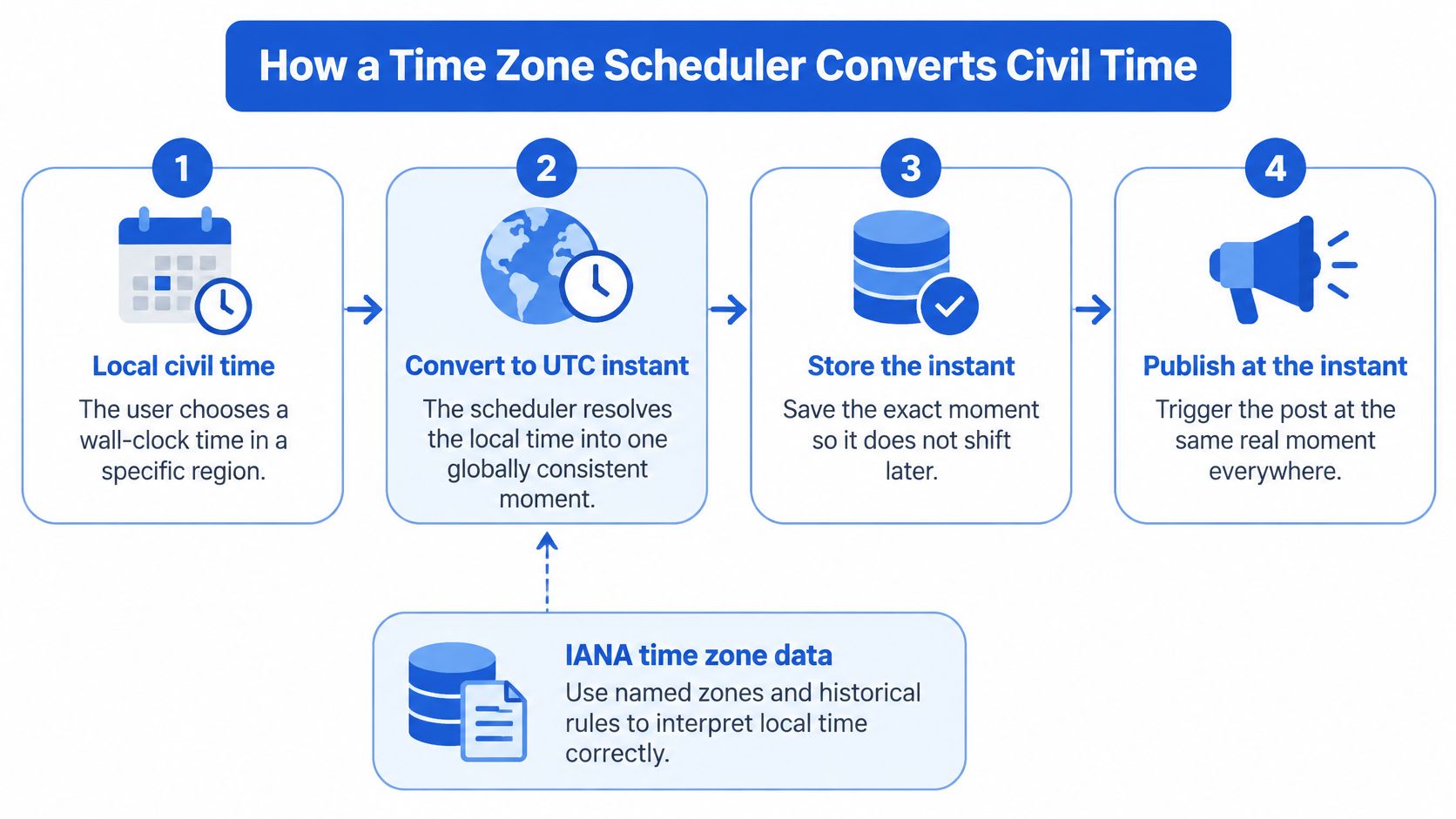
From Wall-Clock Intent to UTC Instant
For a post scheduled at 9:00 a.m. in New York on a particular Friday, the system should resolve the time using the rules for that date. Saving only the offset active when the post was drafted can shift the local hour when seasonal rules differ. The intended hour belongs to the audience's civil calendar; the UTC timestamp is the execution value derived from it.
A sound conversion process keeps those records connected:
- Capture the intention: Save the selected local date, time, and named time zone.
- Resolve the date: Apply that zone's rules for the scheduled date, including its daylight-saving state, to calculate a UTC execution timestamp.
- Store both forms: Retain the local intention for display and audit, alongside the UTC instant used by the publishing worker.
- Re-resolve when rules update: If time zone data changes before publication, calculate again from the preserved local intention rather than relying on a stale conversion.
Updates matter because civil-time rules can change. Since 1996, database releases have used a year-plus-letter naming scheme, such as 2024b, to distinguish successive updates in the IANA release history. Versioned releases give scheduling systems a way to identify which rule set informed a conversion and manage later updates deliberately.
Practical rule: Preserve the user's local-time intention, execute against the calculated UTC instant, and keep the two records distinct.
This separation serves both operational accuracy and audience fairness. A scheduler can show a single global hour that is easy to coordinate, yet that hour may place one region's post outside waking hours. Preserving each audience's intended local time makes the conversion auditable and helps teams assess who receives a post during the day, rather than treating one city's clock as a universal publishing target.
Store Named Zones Instead of Abbreviations
America/New_York is an identifier a system can resolve. EST is a label a human might recognize, but it doesn't encode the rules needed to schedule future posts. That distinction determines whether a recurring campaign keeps its local hour or drifts.
Abbreviations collide across countries. IANA's theory and practice notes on time zone abbreviations document that CST can refer to China Standard Time or North American Central Standard Time, while IST may refer to India, Ireland, or Israel. A scheduler that accepts those strings as storage keys has built ambiguity into every saved post.
What a Saved Post Time Should Store
| Storage choice | What it preserves | What breaks |
|---|---|---|
| IANA named zone, such as America/New_York | Local intention plus historical and future offset rules for each date | Requires maintained, versioned zone data and transition validation |
| Fixed UTC offset, such as UTC-5 | One arithmetic distance from UTC at the moment of conversion | Recurring local times drift by an hour when seasonal rules change |
| Abbreviation, such as EST, CST, or IST | A familiar display label for some users | The same label can identify different places and can't encode transition rules |
Named zones solve the recurring-post problem directly. A schedule defined as 09:00 in New York should remain 09:00 local after a daylight-saving transition, even though its UTC instant changes. If you store only a fixed offset, the UTC instant stays stable and the local hour moves, which is the opposite of what the user intended.
A production record needs, at minimum, the local date and time, the IANA zone, the recurrence rule, and a resolved UTC execution timestamp. The zone data behind that resolution should be versioned and periodically refreshed because governments can change transition rules. Anything less makes auditing a failed post guesswork.
The Two Hours That Need a Policy
Daylight-saving transitions create validation cases ordinary converters rarely surface. During a spring-forward transition, a selected local time may not exist. During a fall-back transition, a selected local time may occur twice, as discussed in guidance on UTC and time zone edge cases.
The interface shouldn't guess in the background. It should reject the impossible time, shift it under a stated rule, or ask whether the user wants the first or second occurrence. When you evaluate a scheduler, open a transition week and look for that prompt. Its absence tells you the tool probably hasn't modeled civil time seriously.
Plan Recurring Posts Through Daylight Saving
A campaign scheduled for the same local hour can reach different regions at different moments as clocks change. The scheduler must preserve the intended local civil time for each occurrence, rather than apply one global summer-time rule. Daylight saving is not observed uniformly, so a calendar built around North American or European transitions can misrepresent audiences elsewhere.
Pew Research Center's 2023 overview reports that about one-third of the world's countries observe daylight saving time, with most of them in Europe. That uneven adoption means a recurring post can keep its intended local hour in one region while its relationship to other regions changes.
The infographic shows why recurring global schedules need zone-aware planning.
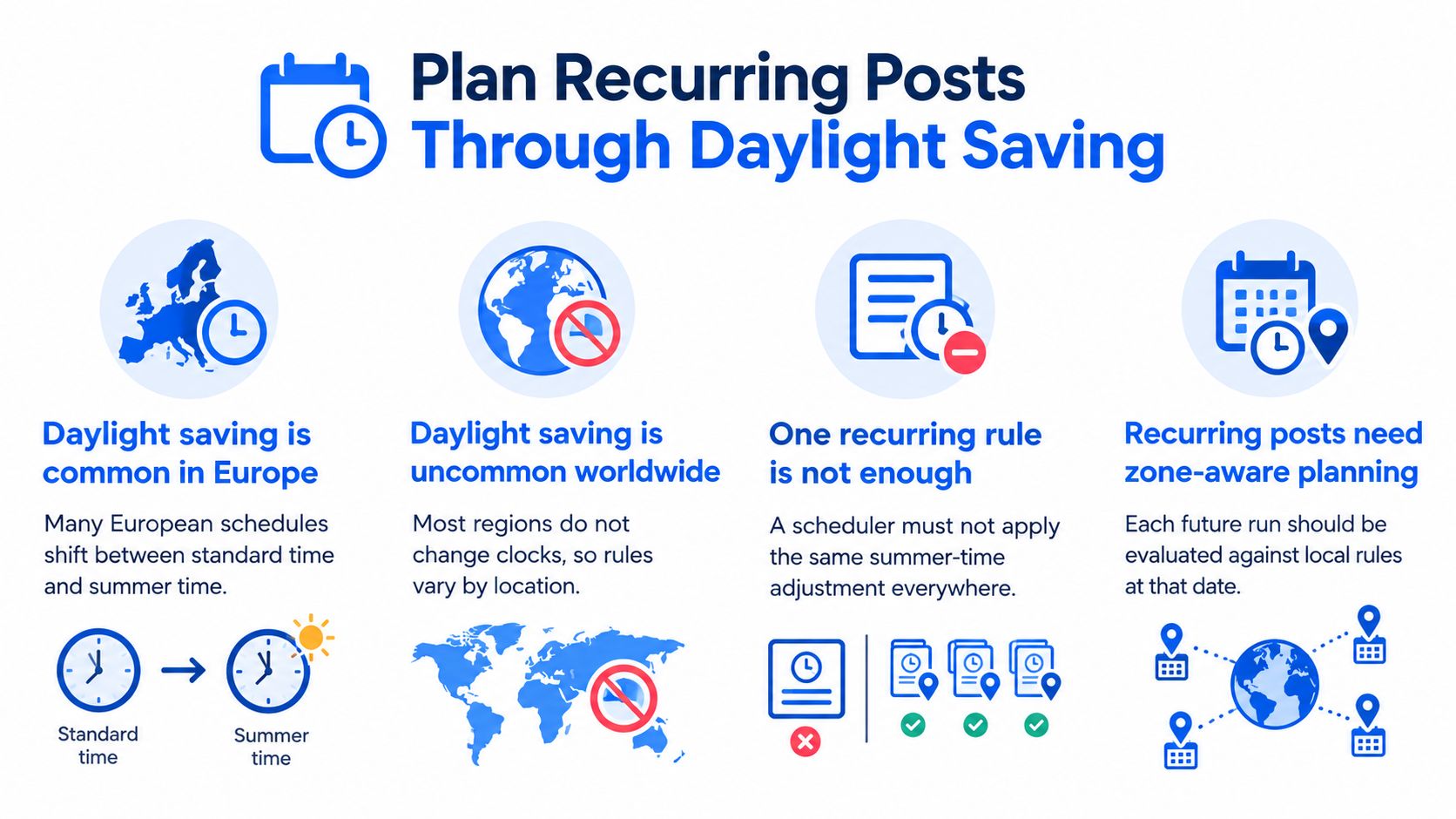
An Uneven Map Creates Uneven Drift
When a region changes its clocks, a recurring post anchored to its local hour can move by one hour in UTC. A country that does not change clocks keeps the same local schedule. The campaign settings have not changed, yet the distance between those audiences has.
That shift affects more than timestamp accuracy. A post that once appeared during a convenient overlap may reach one audience earlier or later after a transition. A global schedule should therefore be evaluated against each audience's local time, not judged by whether one headquarters clock stays fixed.
The calendar also needs the relevant zone's own transition rules. Northern and Southern Hemisphere regions do not necessarily change clocks at the same time, and some places do not observe daylight saving at all. Applying one region's seasonal pattern across a campaign can move posts away from their intended local hour.
Audit Every Occurrence, Not Just the Rule
Consider a series set for every Monday at 02:30 in a named local zone. If that time is skipped or repeated during a clock change, the scheduler needs a defined outcome before the series begins. Otherwise, a post may be delayed, duplicated, or missed without the publishing team realizing the rule was incomplete.
Require three audit features for recurring work:
- Per-occurrence UTC display: Show each future execution instant so changes are visible before publication.
- Transition flags: Mark the specific occurrence when a local time is nonexistent or ambiguous.
- Explicit user policy: Let the user choose the next valid time when an hour is missing, or the first or second occurrence when it repeats.
Recalculate each run from its zone and date. A fixed offset cannot preserve intended local time through a clock transition, and it cannot account for places that follow different rules. Review the full sequence, not just the first scheduled post, to confirm each occurrence remains aligned with its audience's local calendar.
Rotate Slots So No Region Owns the Night
Correct conversion doesn't settle the editorial question. Once you know a slot will fire at the intended instant, you still have to ask who receives it during waking hours and who receives it while asleep. Most converter thinking stops at agreement between two city clocks, but publishing requires a fairness decision across many audiences.
That decision isn't stable through the year. Daylight-saving changes can temporarily alter the gap between regions, particularly when one location changes clocks and another doesn't, a scheduling risk also raised in analysis of common time zone scheduling mistakes. An overlap that looks balanced during one season can end up burdening a different region during another.
There may be no single best global time. A rotating set of good slots can distribute attention more honestly than one permanent compromise.
Treat Fairness as an Optimization Problem
A useful time zone scheduler should help you balance competing goals. You want strong expected reach and engagement, but you also want to minimize local-night publishing and avoid repeatedly disadvantaging the same market. Permanently selecting the overlap that favors North America or Western Europe fails that test, even when the timestamp math is perfect.
Ask for a report written in audience-local time, not headquarters time. For each candidate slot, identify the share of followers likely to receive it during waking hours, then compare candidates across a month rather than crowning one daily winner. This turns timing into a governed rotation instead of a habit.
A worked monthly pattern can stay simple:
- Week one: Use the slot that favors your largest audience during its morning.
- Week two: Move to an equivalent slot that gives a second region its morning.
- Week three: Use a third slot for audiences that were overnight during the first two choices.
- Week four: Return to the first slot, then compare reach and engagement by audience-local hour before repeating.
Building that rotation into a repeatable weekly content system for cross-regional publishing keeps fairness visible week after week. You're not promising every post prime time everywhere, which is impossible on one instant. You're distributing prime-time opportunities deliberately over time.
Don't flatten markets into whole-hour assumptions while doing this. Some audiences sit at 30-minute or 45-minute offsets, and generic converter grids can misplace them. Abbreviations such as IST and CST can't identify those audiences reliably either, because each label maps to multiple places.
The contrarian conclusion is uncomfortable but useful. The convenient global hour is often just the hour convenient for the team choosing it. A slot rotation, reviewed in local time and adjusted when clock rules shift, gives every region a recurring chance to see your work awake.
What to Require in a Time Zone Scheduler
Start with reliability requirements before you compare calendars. A tool can convert zones correctly and still publish late, twice, or without an audit trail if its execution layer is weak. Clock synchronization is a separate constraint from time zone conversion, and buyers should test both.
The planner view below illustrates the kind of single timeline those requirements should support across channels and regions.
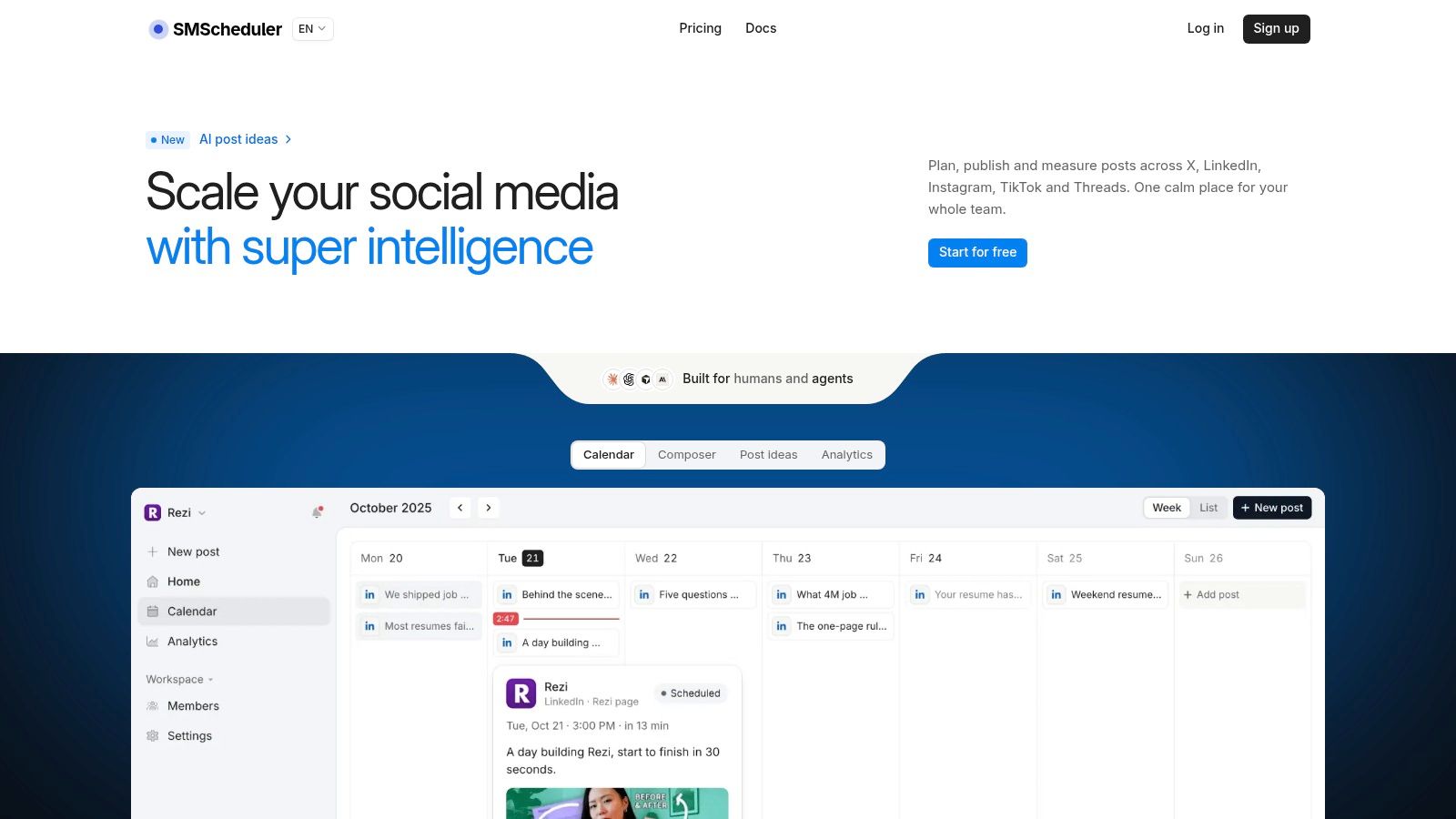
The Execution Checklist
Measurements on leadership-class supercomputers found node time uncertainty exceeding 600 milliseconds in some cases despite network latencies below 2 microseconds, while public time servers had median synchronization errors of roughly 2 to 5 milliseconds with a long tail, as summarized in Nylas guidance on calendar time zone handling. Those aren't social publishing benchmarks, but they justify humility about promising exact-millisecond delivery through external platform APIs.
Require the following architecture instead:
- UTC internally: Workers compare and trigger jobs against UTC instants, with hosts synchronized continuously.
- Monotonic timing for operations: Retry intervals and deadlines use a monotonic clock, while wall-clock time serves only as the trigger reference.
- Idempotency per occurrence: Each post, account, and occurrence carries a key so retries after failover or API timeouts can't create duplicate publications.
- Transactional claiming: One dispatcher claims a job before execution, preventing two workers from sending the same scheduled post.
- A stated tolerance window: The service defines a target such as publishing as close as possible within 30 seconds, then records scheduled and actual timestamps for review.
- Operational alerts: Monitoring tracks clock offset, queue lag, and scheduled-versus-actual latency.
Against that checklist, evaluate the planning surface. Social Media Scheduler provides one calendar for X, LinkedIn, Instagram, Threads, Facebook, TikTok, YouTube, and Bluesky, with per-channel slots and drag-and-drop week planning. Posts move through statuses from draft to queued to published, with automated send at the chosen time across time zones.
The short video below gives a practical look at how that calendar workflow fits together before you test transition weeks yourself.
Drafting and learning belong on the requirements list too. The platform's AI drafting tailors copy and media per network, and its analytics report reach, engagement, and engagement rate, with recommendations covering what to publish, when to schedule it, and which format to use. It stores only what publishing and reporting need and doesn't sell user data.
Put the Next Campaign on One Calendar
Choose one upcoming campaign and rebuild its timing from the audience outward. Pick the location that defines the campaign's primary local hour, then save that hour with a named IANA zone. Don't record an abbreviation in a spreadsheet and don't convert the slot into a permanent UTC offset you'll reuse all season.
Next, write down two or three candidate slots in audience-local time. For each major region, mark whether the slot lands in the morning, afternoon, evening, or night. Rotate those candidates across the month so the same region isn't always the one receiving your post while asleep.
A First Audit You Can Run This Week
- Define the anchor audience: Select the region whose local hour matters most for launch, and state that choice explicitly in the campaign brief.
- Build the rotation: Assign the candidate slots across successive weeks instead of locking every post to one overlap.
- Inspect the transition week: Find the week containing a daylight-saving change for any key audience and open each scheduled occurrence.
- Decide the edge-case policy: Confirm whether a missing hour shifts to the next valid time and whether a repeated hour runs on its first or second occurrence.
- Record actual delivery: Keep the scheduled instant and actual publish time together so you can separate planning errors from execution delays.
If you're extending the exercise beyond one campaign, use a structured approach to plan a month of content across audience regions so slot rotation and transition checks become routine. Monthly planning exposes patterns a single post can't. You'll see which regions repeatedly receive overnight slots and which local hours earn attention after publication.
Then place the campaign on one cross-network calendar. Give each channel its own time where audience behavior differs, keep drafts and queued posts visible on the same timeline, and review reach and engagement after the rotation completes. Keeping drafting, per-channel tailoring, scheduling, and performance review together makes the timing decision auditable instead of tribal.
Your first corrected campaign won't prove that one global hour fits everyone. It should prove something more valuable. Every post has a preserved local intention, every occurrence has a defensible UTC instant, and every region gets a fair turn in daylight.
Put your next campaign on a calendar that preserves local intent, supports per-channel slots across major networks, and keeps scheduled and published work visible in one place. Visit Social Media Scheduler to draft once, tailor each post for its network, and schedule across time zones without handing the night to the same audience every week.