What Is a Content Calendar and Why You Need One
Oct 3, 2026 · 12 min read
A content calendar is a planning document that maps each piece of content to a channel, publish date, status, owner, and supporting assets, linking strategy to drafting, distribution, and measurement. 96% of the most successful content marketers use a content calendar, and a documented strategy is tied to stronger reported success than an undocumented one, which is why this tool has become a working habit rather than a nice-to-have industry benchmark summary.
You probably know the feeling already. Three drafts are open, one designer is waiting on copy, someone in Slack is asking what goes live tomorrow, and nobody is sure whether the LinkedIn version matches the Instagram version.
A content calendar solves that by putting every piece of work on one timeline so the team can see what's being published, where it's going, who owns it, and what assets still need to be finished. Used well, it gives you visibility, consistency, accountability, and a way to learn from engagement data over time.
The Problem a Content Calendar Actually Solves
The core problem is not that teams lack ideas. It's that ideas live in too many places, and the publishing decision gets made too late, often by whoever feels most urgent that day.
A small team usually starts with good intentions. One person writes a blog draft in Google Docs, another drops a social idea into Slack, and the newsletter gets planned in a separate spreadsheet. By the time publishing day arrives, nobody has a single answer to basic questions like what's going live, who's finishing the copy, or whether the image set is ready.
A content calendar replaces that scatter with one connected workflow. It is a single timeline where each piece of content is mapped to a channel, publish date, status, owner, and supporting assets, so the team can move from idea to draft to distribution without re-litigating the plan every day Narrareach on content calendars.
What changes when the calendar exists
The benefit isn't just organization. It's that the team stops guessing.
Practical rule: if a task needs a Slack thread to explain it, it probably needs a calendar row too.
A good calendar makes the work visible before it becomes urgent. That means fewer missed dates, fewer duplicate drafts, and fewer moments where someone says, “I thought you were posting that.”
It also gives managers a clean way to see what's blocked. If the owner field is empty, the status is still “draft,” or the asset column is blank, the problem is obvious. That kind of clarity matters because content work is rarely delayed by one big failure, it's delayed by a chain of small handoff problems.
The strongest version of the calendar also sets up the next advantage, learning. Once every post is logged in one place, you can compare what got published, what got approved, and what earned attention. That's where the calendar stops being a list and starts becoming a system.
A Simple Way to Picture a Content Calendar
A train timetable is a good mental model. You're not trying to remember every passenger's plan, you're reading the board to see which train leaves, from which platform, and whether it's on time.
A content calendar works the same way. The channel is the track, the publish date is the departure time, the owner is the conductor, the status is the seat number, and the assets are the luggage that has to get on board before the trip can leave.
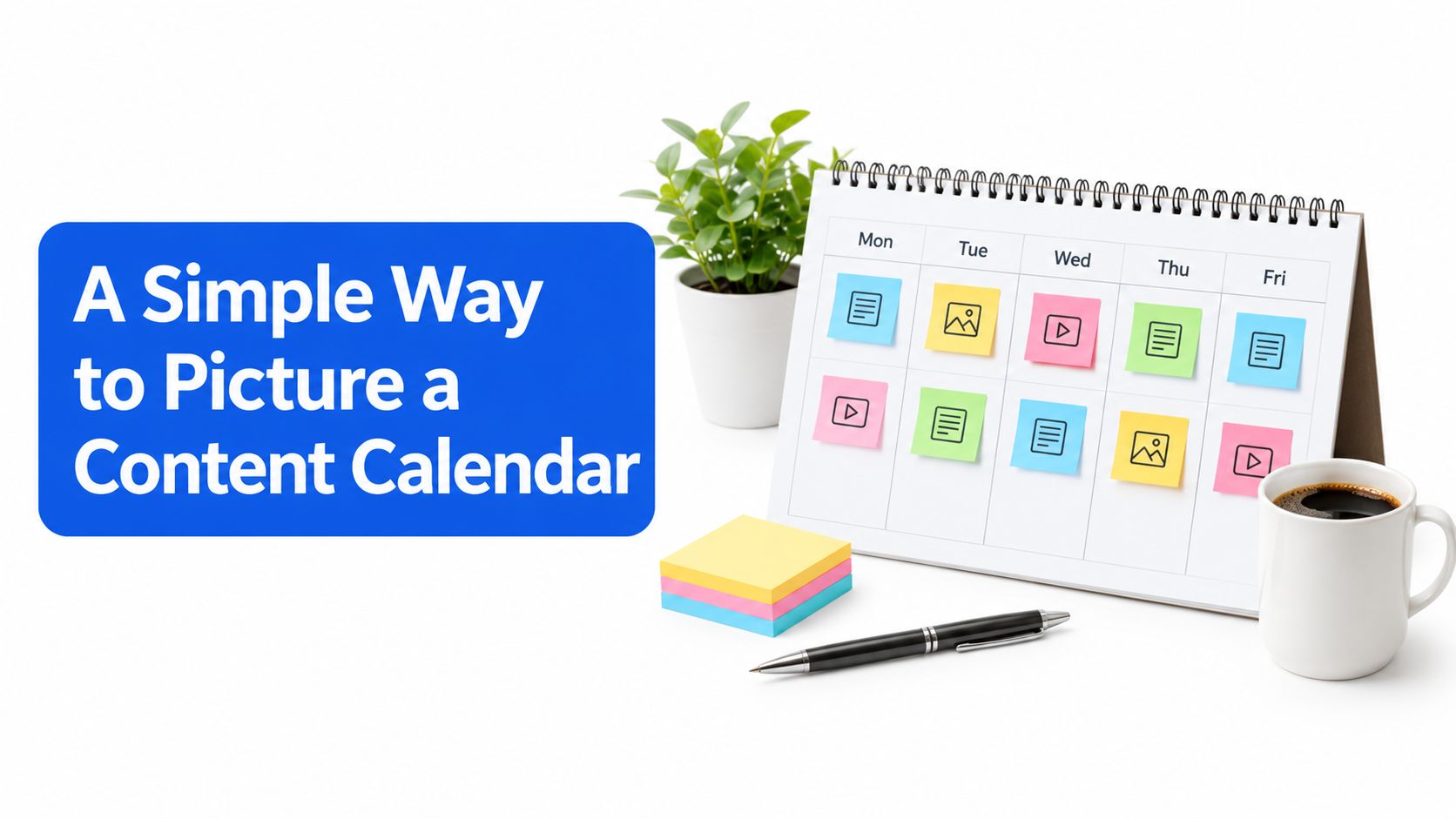
That image is useful because it shows the core idea without making the calendar feel abstract. A row on the calendar is not just an idea, it's a scheduled job with a place, a time, a responsible person, and material attached to it.
The restaurant version is even more obvious
A kitchen prep chart does the same job. Each station knows what to make, when to make it, and what ingredients are needed before service begins.
If the salad station is waiting on chopped vegetables, the problem is visible. If the Thursday newsletter still has no headline, the same kind of bottleneck shows up in the calendar. The point is not to make people busier, it's to make the flow of work easier to see and easier to trust.
That's why a unified calendar is so useful for small teams. It turns strategic intent into a sequenced, time-bound queue that people can execute without a daily standup for every single post.
The calendar should feel less like a reminder system and more like a departure board for content.
Once that clicks, the rest becomes easier to understand. Different channels, themes, and owners all fit into the same structure because the calendar is built to show what happens next, not just what exists in theory.
Core Components Every Content Calendar Needs
A team arrives at Monday's planning meeting with three channels, several ideas, and no agreement on what should go out first. A useful calendar turns that confusion into a shared workboard. Each entry identifies the content, its channel, its timing, its purpose, and the person responsible.
A kitchen prep chart offers a practical analogy. Every station knows what to prepare, when it is needed, and which ingredients must be ready first. A content calendar makes the same dependencies visible, so a missing headline or unfinished design appears before it delays publication.
| Component | What It Defines | Example |
|---|---|---|
| Frequency | How often each channel should be published | Daily, three times a week, biweekly |
| Channels | Where the content will appear and how it should be formatted | LinkedIn post, TikTok video, email newsletter |
| Campaigns | The larger goal or theme behind each item | Product launch, seasonal push, awareness series |
| Ownership | Who handles the asset and its current workflow stage | Draft, review, scheduled, published |
Frequency and channels are separate decisions
Frequency sets the publishing rhythm. Channels determine the format, audience context, and production requirements.
A team might publish on LinkedIn twice a week and send one email each week. Those slots require different work. A LinkedIn post may need a detailed point of view, while an email may need a brief summary and a different call to action. Repurposing can reduce effort, but each version still needs adaptation rather than direct copying.
Campaigns give individual posts a shared purpose
Without a campaign, the calendar can become a list of disconnected errands. A sustainability theme might include a blog post, several LinkedIn updates, a short-form video, and a newsletter block. Each asset keeps its own date and owner, while the campaign connects the pieces into one narrative.
Ownership turns intention into workflow
Clear responsibility prevents ideas from waiting in an invisible queue. One person may own the draft, another the design, and a third the final review. The calendar should show both the owner and the current stage, so a unified view replaces tab-switching and repeated re-drafting across channels.
Review engagement results beside these fields. If one format consistently earns stronger responses, the next campaign can adjust its channel mix or frequency. That makes the calendar a decision-making system as well as a publishing plan. Structured planning supports the broader practice in which 73% of B2B marketers use a content marketing strategy content calendar benchmark summary.
Editorial Calendars vs Content Calendars
These two terms get mixed up because they work together, but they don't do the same job.
An editorial calendar lives at the strategic layer. It maps quarterly themes, campaign arcs, narrative priorities, and audience emphasis far in advance. A content calendar lives at the production layer. It turns those themes into individual assets with publish dates, channels, owners, and status fields Brandwatch glossary on content calendars.
How the layers fit
Think of the editorial calendar as the direction of travel and the content calendar as the trip plan. One decides the story, the other decides what gets made and when.
A Q3 sustainability theme, for example, might become one blog article, three LinkedIn posts, a short video, and a newsletter block. In the editorial view, that's one narrative. In the content calendar, those are separate rows with their own deadlines, assets, and people responsible for them.
| Dimension | Editorial Calendar | Content Calendar |
|---|---|---|
| Focus | Themes, campaigns, priorities | Individual assets and publish dates |
| Time horizon | Longer range planning | Day-to-day execution |
| Detail level | Strategic and directional | Operational and specific |
| Team use | Sets narrative direction | Coordinates production and publishing |
A social media scheduler sits on the content calendar side of the process. It takes the rows you've already planned and pushes them to the right platform at the right time.
Almost every team needs both layers. Without editorial planning, the content can drift. Without a content calendar, the strategy never reaches the feed, inbox, or blog on time.
How a Content Calendar Powers Consistent Publishing
Consistency gets easier when the week has a shape. Without one, the team spends Monday deciding what should have been decided last Friday.
A simple weekly rhythm starts with planning, not publishing. On Monday, the team reviews the rows already in the calendar, checks which assets are ready, assigns any missing owners, and spots gaps by channel. That's where the calendar earns its keep, because the missing pieces are visible before they turn into a fire drill.
One source brief, many channel outputs
A single long-form article can become several calendar entries. The LinkedIn version might be a carousel, the Instagram version a caption with a visual, the X version a tighter thread, and the newsletter version a short editorial note.
AI-assisted drafting fits naturally here. One source brief can generate channel-specific versions, and the editor can refine the tone, format, and length before the posts are scheduled. The important part is not speed for its own sake, it's reducing the copy-paste loop that usually drains small teams.
If you want a practical tool surface for that workflow, Social Media Scheduler is built around one visual calendar that centralizes drafting, scheduling, and performance measurement across supported channels.
Why the week feels calmer
By Friday, the team has shipped across multiple platforms without ad hoc scrambling because the work has already been sequenced. The calendar handles the order of operations, so people can focus on quality instead of re-deciding the plan every day.
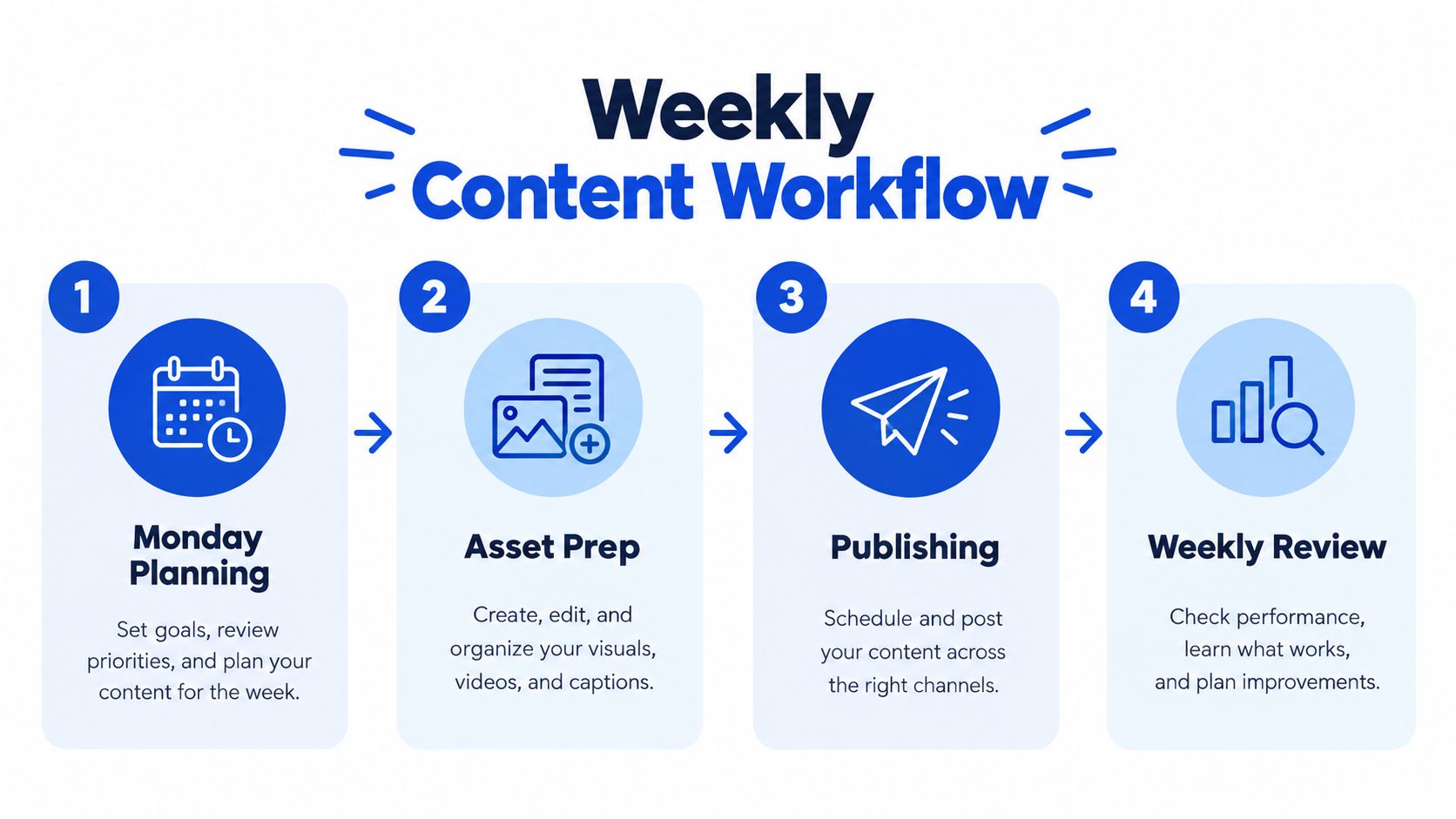
The primary benefit is not just that posts go out. It's that the team can trust the queue, because each row already contains the channel, timing, status, and assets needed to publish cleanly.
Why a Content Calendar Is a Learning System, Not Just a Schedule
A static calendar keeps you organized. A learning calendar helps you make better decisions next week.
The difference shows up in timing. Teams are advised to treat timing as a channel-specific optimization problem, not a universal rule, because each audience behaves differently and the best slot on one platform may be weak on another Zoho on social media content calendars. That means the team has to use its own data, not just borrowed posting advice, to decide when content should go live.
Weekly review turns publishing into feedback
A weekly review closes the loop. The team looks at what was published, checks the actual performance, and uses that history to shape the next calendar cycle.
If last week's TikTok performed better in the evening than in the morning, the next TikTok row should reflect that. If a LinkedIn topic keeps falling flat, the team can swap in a format or theme that already has traction. The calendar becomes a place where engagement data changes future planning instead of living in a separate dashboard nobody revisits.
Weekly rule: review the calendar, not just the report.
Content planning is no longer only about consistency. A recent Salesforce learning module frames the calendar as a hub that connects strategy, deliverables, deadlines, and analytics, which points to a bigger shift, the calendar is becoming a decision-making system that learns from engagement data Salesforce content calendar planning module.
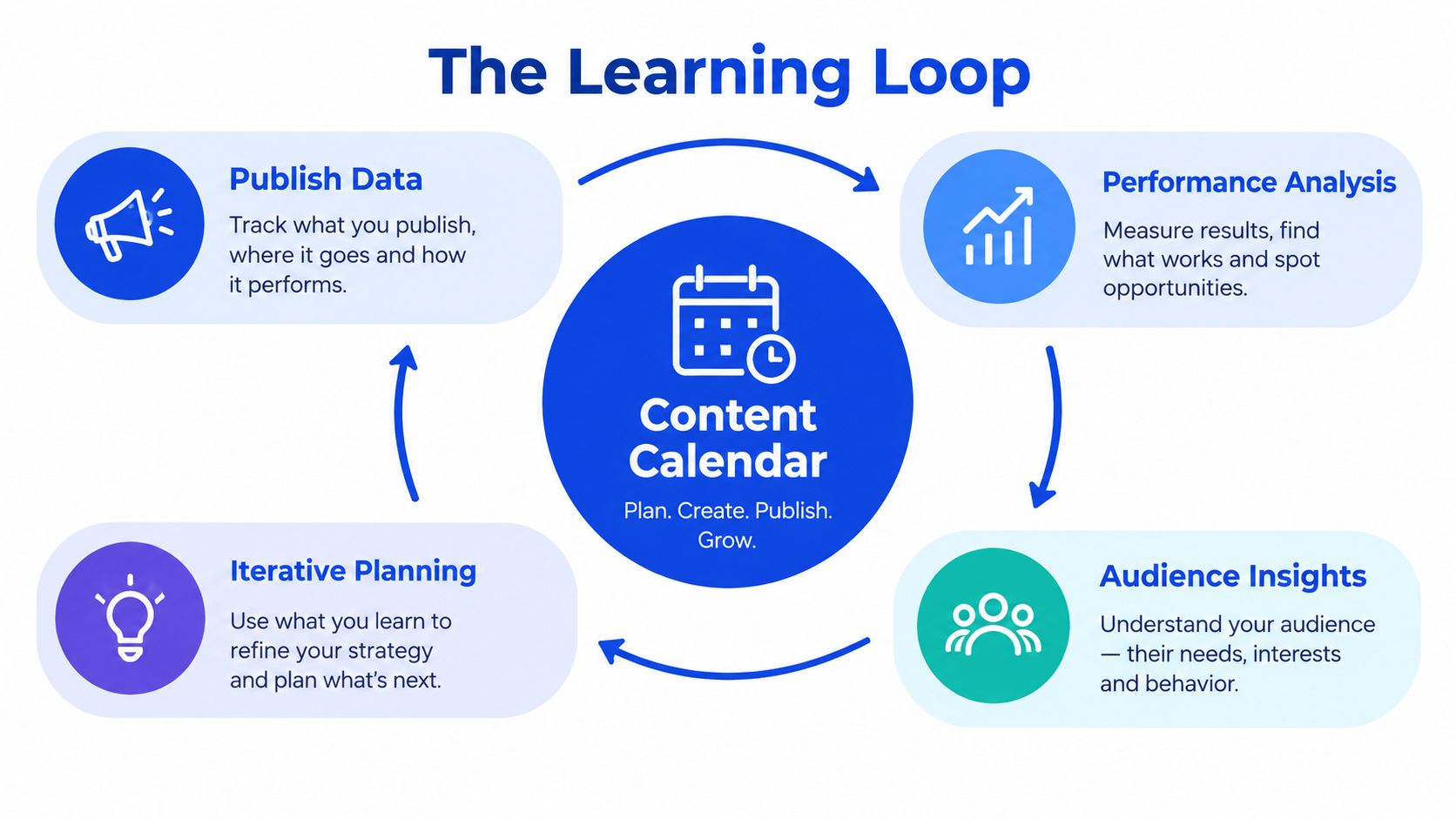
That's the mental model that usually makes the concept click. You are not filling boxes in advance. You are building a loop where publish data informs performance analysis, performance analysis informs audience insight, and audience insight reshapes the next plan.
Setting Up Your First Content Calendar This Week
The fastest way to start is to keep the first version small and real. Don't build a perfect system, build one you can use by Friday.
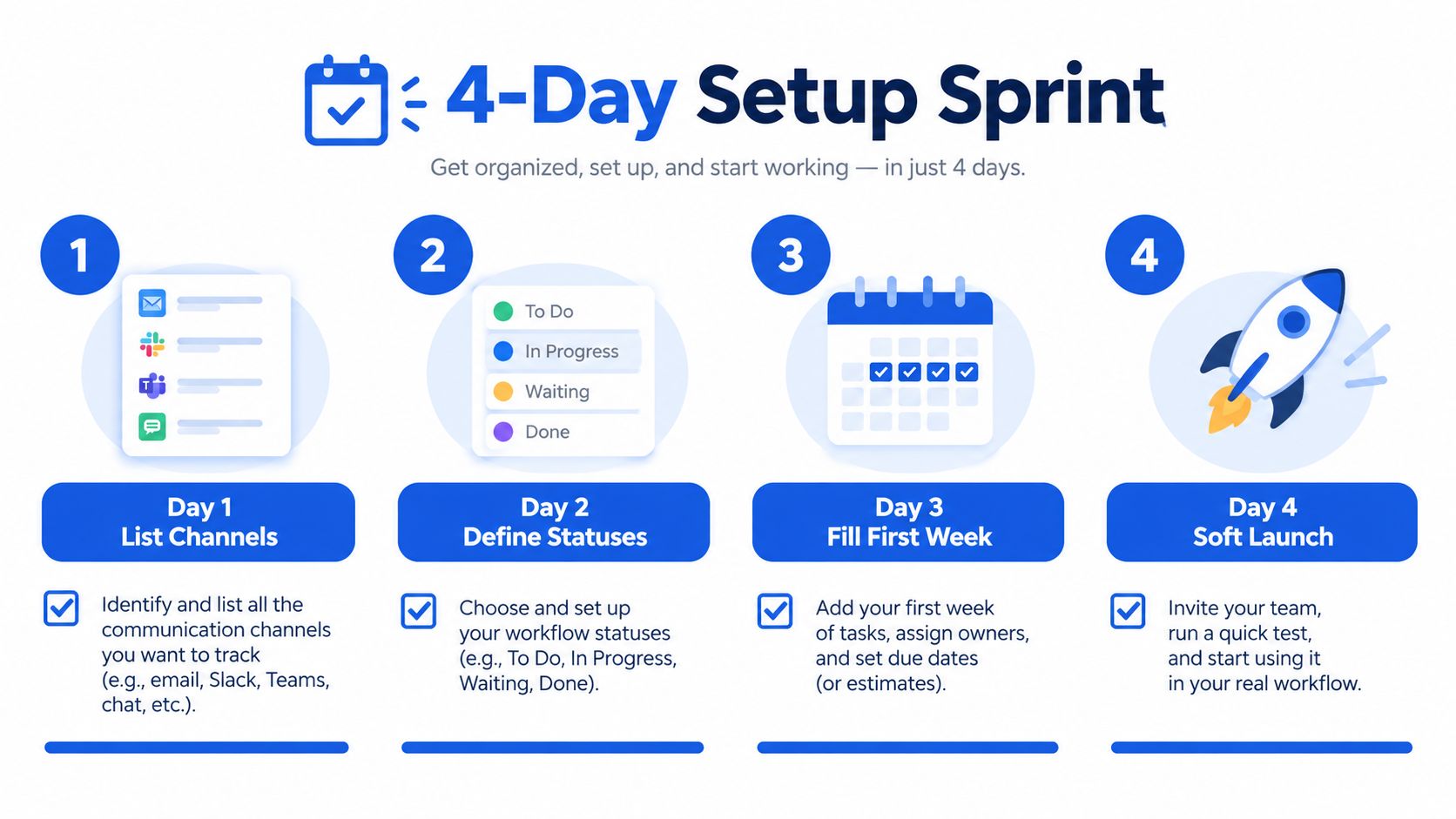
A four-day setup sprint
Day 1, list channels. Write down only the channels you'll publish on this quarter, then make each one a column or row so the layout mirrors your workflow.
Day 2, define statuses and owners. Use a short status set such as drafted, in review, scheduled, published, and repurposed, then assign one owner per channel so responsibility is visible.
Day 3, fill the first week. Block recurring time slots per platform, for example a Tuesday LinkedIn slot and a Thursday newsletter slot, then place the first posts into those openings.
Day 4, soft launch. Load the next two weeks with existing ideas, assign copy and design ownership, and set a Friday 30-minute review so the calendar becomes a habit instead of a file.
The easiest way to keep the system alive is to measure a few things after the first month. Track post count per channel, on-time publish rate, and one engagement metric per platform. That's enough to tell you whether the calendar is helping the team publish with more control.
If you want a fuller planning workflow, this month-planning guide pairs well with the weekly system in the content scheduling playbook.
Social Media Scheduler centralizes your drafting, scheduling, and analytics in one visual calendar, so you can plan by channel, publish at the right time, and learn from what performs. If you want a single place to manage that workflow, visit Social Media Scheduler and see how a content calendar can become a working system instead of a static spreadsheet.