How to Build a Social Media Content Calendar in 6 Steps
Oct 25, 2026 · 12 min read
The most repeated social advice is still "post more." A calendar built to hit a daily quota on every network burns the one thing a small team actually has, which is finished posts. Volume is a ceiling you check, not a target you chase.
A useful calendar is a per-channel system. Instagram, LinkedIn, TikTok, and YouTube each get their own frequency, a format that matches the job, and a metric that can fail. Copying one caption and one date across every profile is the habit to drop first.
What follows is the calendar a small team can realistically run. It starts under public benchmarks, assigns a format role to each network, builds the grid in six steps, records who approves what, and ends with a two-week pilot. Benchmarks are averages across huge samples. They describe what brands did, not what your account should do next Tuesday.
Channel Cadence Benchmarks to Start From
Set a separate rhythm for each channel. Sprout Social's 2025 Content Benchmarks Report analyzed nearly 3 billion messages from 1 million public profiles between February 1, 2024, and January 31, 2025. Brands averaged 9.5 social posts per day across networks in 2024, down from 11 posts per day in 2022. That is a cross-network average, not a sensible quota for a small team.
The report gives more useful channel-level reference points: Instagram business accounts averaged about 1–2 posts per day, LinkedIn about one post per day, and Pinterest about one post per week. These are broad averages, not targets for every account. HubSpot's 2025 marketer survey also describes publishing habits, but use its findings as survey context rather than a cadence rule. For your calendar, choose a frequency your team can sustain with original content, then measure each channel against its own baseline.
The table separates published cadence benchmarks from practical starting points. Pew Research Center's 2024 Social Media Fact Sheet reports the US adult reach figures shown below. Where this table has no cadence benchmark, the suggested frequency is a provisional placeholder, not a research finding. Replace it after reviewing that channel's 90-day performance baseline.
| Channel | Published cadence benchmark | US adult reach, 2024 | Provisional starting cadence |
|---|---|---|---|
| Cross-network brands | 9.5 posts per day in 2024, down from 11 in 2022 | Not applicable | Use as context, not a team target |
| About 1–2 posts per day for business accounts | 50% | 4 posts per week, mixing Reels and carousels | |
| About 1 post per day | 30% | 3 posts per week | |
| About 1 post per week | 36% | 1–2 pins per week | |
| No cadence benchmark listed here | 70% | 3 posts per week, then review against the 90-day baseline | |
| YouTube | No cadence benchmark listed here | 85% | 1 long-form video every two weeks, then review against the 90-day baseline |
| TikTok | No cadence benchmark listed here | 33% | 3 short videos per week, then review against the 90-day baseline |
| Threads | No cadence benchmark listed here | Not listed here | 3 posts per week, then review against the 90-day baseline |
| X | No cadence benchmark listed here | Not listed here | 3 posts per week, then review against the 90-day baseline |
Start low. Keep a cadence only when the channel's results justify the time it takes to produce and approve the posts. Check a channel's own success metric, not just the number published.
A weekly content system helps a small team track each channel's cadence alongside recurring formats, campaign windows, and approval deadlines. When a slot slips, the calendar shows where the gap is without turning every network into the same schedule.
Matching Formats and Audiences to Each Channel
A calendar works better when each channel has its own job. Copying the same post and date across every network ignores who uses each platform and what its formats can do.
According to Pew Research Center's 2024 Social Media Fact Sheet, YouTube reaches 85% of US adults, Facebook 70%, Instagram 50%, Pinterest 36%, TikTok 33%, and LinkedIn 30%. These are overall adult reach figures, not age-based comparisons. Pew also reports that Instagram reaches 76% of adults aged 18–29, TikTok 59% of that group, and Snapchat 65%. Use age splits to check audience fit, not to rank platforms against overall reach figures. If your buyers are mostly over 40, a TikTok-first calendar may not fit. Leave Snapchat off the calendar if that age group is not your audience.
Give each channel a format role and a metric. Buffer's analysis of more than 4 million Instagram posts compares reach and engagement across Reels, carousels, and single-image posts. Treat its findings as patterns from that analysis, not guaranteed results for your account. Reels can fill discovery slots, while carousels can support deeper engagement. Use single-image posts when the idea suits them, rather than defaulting to that format.
| Channel | US adult reach, 2024 | Content role | Lead format | Metric to judge |
|---|---|---|---|---|
| 50% | Discovery and depth | Reels for reach, carousels for engagement | Reach and saves | |
| TikTok | 33% | Discovery | Short vertical video | Watch time |
| YouTube | 85% | Long-form and search-led video | Long-form video, short clips for reach | Watch time and views |
| 70% | Community and local updates | Image posts and native video | Comments and shares | |
| 30% | Professional education | Text posts and document carousels | Comments and profile visits | |
| 36% | Evergreen search content | Idea pins and product images | Saves and outbound clicks | |
| Threads and X | Not reported in the fact sheet | Conversation and news | Short text with an image | Replies and reposts |
Repurpose the core idea, not the exact post. Change its hook, length, visual structure, call to action, and success metric for each platform. A product walkthrough could become a Reel measured by reach, a LinkedIn document measured by comments, and a YouTube video measured by watch time. Likes do not substitute for those outcomes. Reach, saves, shares, comments, watch time, profile visits, and conversions each measure a different job.
A LinkedIn post scheduler helps manage timing, but the LinkedIn version still needs to read like a professional post, not a resized Reel caption.
Give each content theme one funnel role and a named version for every channel it runs on.
How to Build the Calendar in Six Steps
A calendar built around one posting schedule for every platform misses how each channel works. Set a planning window, then give each platform its own cadence, format role, and success metric. For a small team, a rolling two-week schedule under monthly themes leaves room to adjust without planning each post at the last minute. Planable's 2025 survey found that 38% of marketers planned one week ahead, 18% planned two weeks ahead, 20% planned monthly, and 14% planned three or more months ahead. Those figures are averages, not a rule for every team. A week can leave little room for approvals, while a quarter can lock in hooks that stop working.
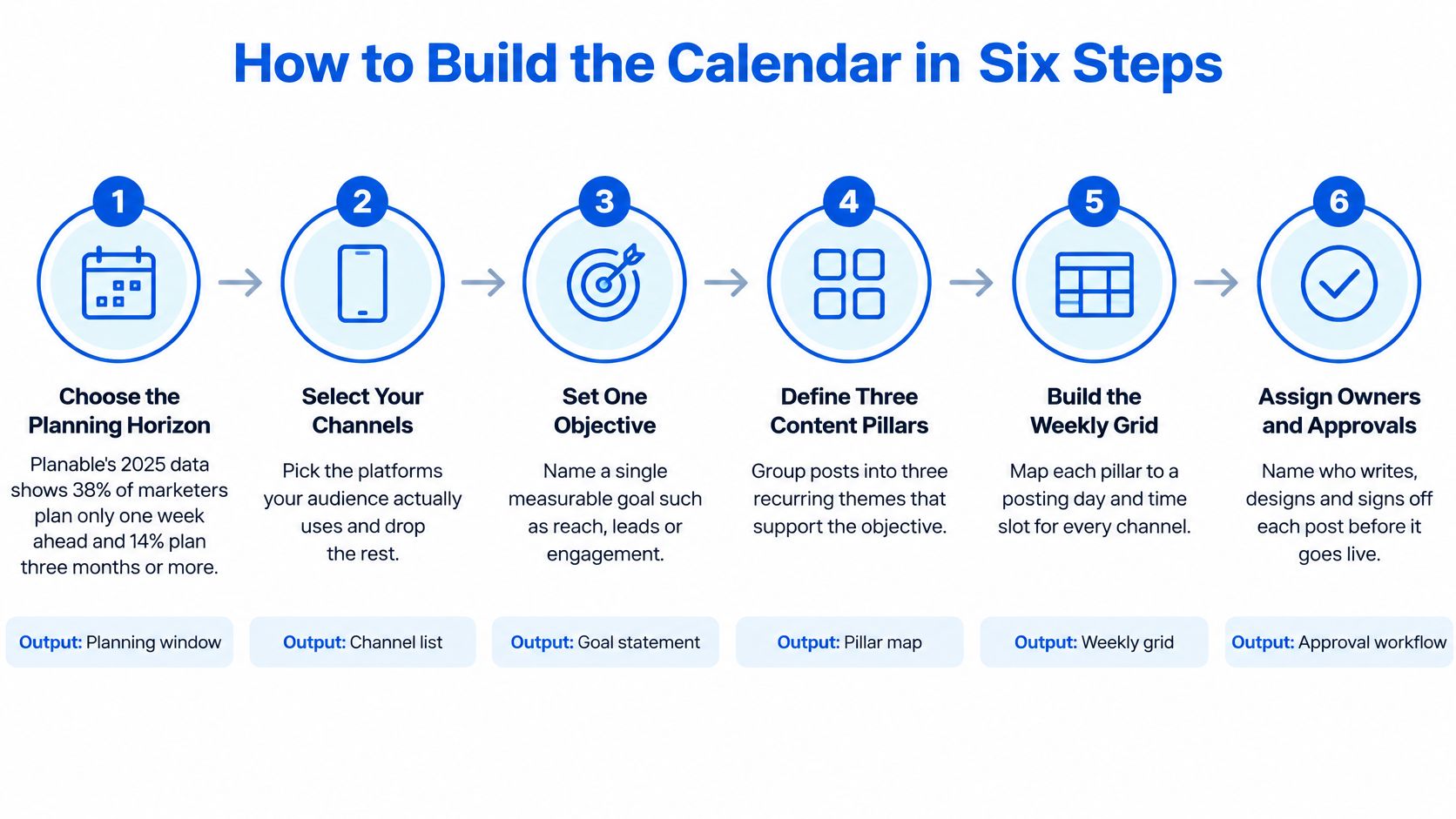
The six outputs
Choose the planning horizon. Start with a rolling two-week window and organize it under monthly themes. The output is a dated calendar window, not a blank year. Check audience activity before choosing posting times; a tool's default slots may not match when your audience is online.
Audit 90 days per channel. Record reach, engagement rate, and which posts drove those results. The output is a one-page baseline for each channel. Without it, the first cadence is a guess in spreadsheet form.
Set one primary objective per campaign. Choose qualified reach, comments, video completion, or conversions. Keep the campaign focused on one outcome instead of adding a second goal, such as leads. Write the objective in one sentence before selecting content pillars.
Define three to five content pillars. Tie each pillar to the campaign objective and note its role. A small team might use proof, such as customer clips; teaching, such as showing how the product solves one job; and point of view, such as a take buyers may challenge. The output is a pillar map. If a pillar serves no objective, leave it out.
Place posts on a weekly grid. Set slots by channel, then test two posting windows before settling on one. Label open cells with a pillar so gaps are visible, but don't fill every slot with evergreen content. Keep space for a test, such as a new format or trend, and assess it against that channel's chosen metric.
Tag every post before it enters the grid. Add platform, audience, role, format, owner, deadline, approval state, tracking code, and metric. The output is a completed row for each post. A caption without an owner can miss its slot unnoticed.
A walkthrough, not a template tour
For a spring product update, a small team could schedule a Reel for discovery and reach, a carousel for depth and saves, and a LinkedIn teaching post for comments in the first week. In the second week, repeat those channel roles with a new hook and leave one slot open for a trend test. The calendar connects each post to a channel and an outcome. Thirty captions without metrics are only a backlog.
Batching posts into one work session can make production easier to manage. See this guide to planning social media posts in batches. Keep the weekly review on a set weekday so the team can check results and adjust each channel's cadence.
Here is a video version of the process.
Assigning Owners and Approval Deadlines
A calendar row needs one accountable owner and a clear path to approval. Keep fields for platform, audience segment, content role, format, owner, deadline, approval state, tracking code or URL, and success metric. Use one status sequence: draft, in review, approved, queued, published. This makes a missed deadline visible before it pushes a post off its channel's cadence.
For example, an Instagram Reel aimed at discovery might target reach and saves. Assign one person to make the asset, set the review deadline, and name the approver. Keep channel and metric attached to the row, so the team can judge the Reel against Instagram's goals rather than treating it as interchangeable with a LinkedIn post.
| Team type | Who plans | Who approves | Lead time before publish | Review rhythm |
|---|---|---|---|---|
| Solo creator | Creator | Creator, after a 24-hour pause | 2 days | Weekly, on Friday |
| Startup or small business | Social media manager | Founder or lead | 3 days | Weekly, on Monday |
| Mid-sized marketing team | Content lead | Brand and legal | 5 business days | Biweekly, with analytics |
| Digital agency | Account lead for each client | Client contact | 7 days | Weekly, one per client |
For a solo creator, a 24-hour pause gives you time to catch a post you might regret publishing late at night. A startup should name one approver; a group chat can leave a draft waiting without a decision. Build five business days into the schedule when brand or legal review is required. Agencies should maintain a separate calendar for each client, so one delayed sign-off does not stall other accounts.
Assign an owner to original assets first
A study of 90,000 posts from 70 universities examined social media posts from university accounts and reported an inverse relationship between posting activity and engagement. The sample does not establish what will work for a small brand team, so use it as a reason to test cadence on your own channels, not as a universal rule.
Give an owner responsibility for original assets first, such as a channel-specific Reel or a LinkedIn teaching post. Set the approval deadline and success metric for each asset according to its platform role. Reshares can fill a useful slot, but they should not take priority over original work by default. Keep posting volume as a test, and judge results against each channel's own metric rather than counting posts alone.
Pilot, Review and Adjust the Calendar
A full quarter can look polished and still fail once posts meet the audience. Run a two-week pilot before committing to it. Choose two channels, one objective, three content pillars, and a weekly grid. Review results on day 7 and day 14 against the 90-day baseline. Two posts are too little evidence to justify a major change.

What stays flexible
Metricool's study of more than 1 million accounts and 21 million posts across eight networks reports that smaller accounts can grow on Instagram, YouTube, and TikTok, where recommendation systems can favor content quality over account size. Treat platform benchmarks as starting points, not fixed rules. Your audience, format, and channel results should determine what stays on the calendar.
Keep one in five weekly slots open for experiments or timely posts. Give each experiment a testable hypothesis: are you changing the hook, format, or posting window? Compare the same metric across similar formats. A Reel with more likes and a carousel with more saves do not show the same kind of success.
- Stop rule: Cut or rebuild a format that trails its channel average for three consecutive reviews.
- Refresh rule: Expand a theme into a second series after it beats its benchmark for two cycles.
- Cadence rule: Increase frequency on one channel at a time, and only if engagement per post holds.
Day-14 checklist
Before extending the calendar, check that:
- Baseline recorded: The 90-day audit is documented.
- One objective: The campaign still has a single goal.
- Every post tagged: Each entry has an owner and tracking code.
- One review booked: The next weekly review is scheduled.
- One experiment logged: The entry includes a hypothesis, not just a topic.
- Rules written: The publisher can see the stop and refresh rules.
For a small team running Instagram, LinkedIn, TikTok, and Threads, keep one calendar with separate slots for each channel. A spreadsheet can work; a scheduler can also keep drafts, queued posts, and published content on one timeline. Social Media Scheduler includes per-channel time slots. Use whichever setup makes the Friday review practical, rather than adding tools the team will not maintain.
On day 14, decide whether either channel has earned a frequency increase. If neither beats its baseline, keep the starting cadence and replace the weaker format. The point of the pilot is to make a decision, including deciding what to stop. A filled calendar alone does not show that the plan worked.
Keep the calendar focused on content with a clear role for its channel. A post that repeats another channel's format without serving its audience adds work without giving the team a useful test. Publish the version with a defined job, and skip the duplicate.