How to Post to Instagram Automatically
Sep 24, 2026 · 12 min read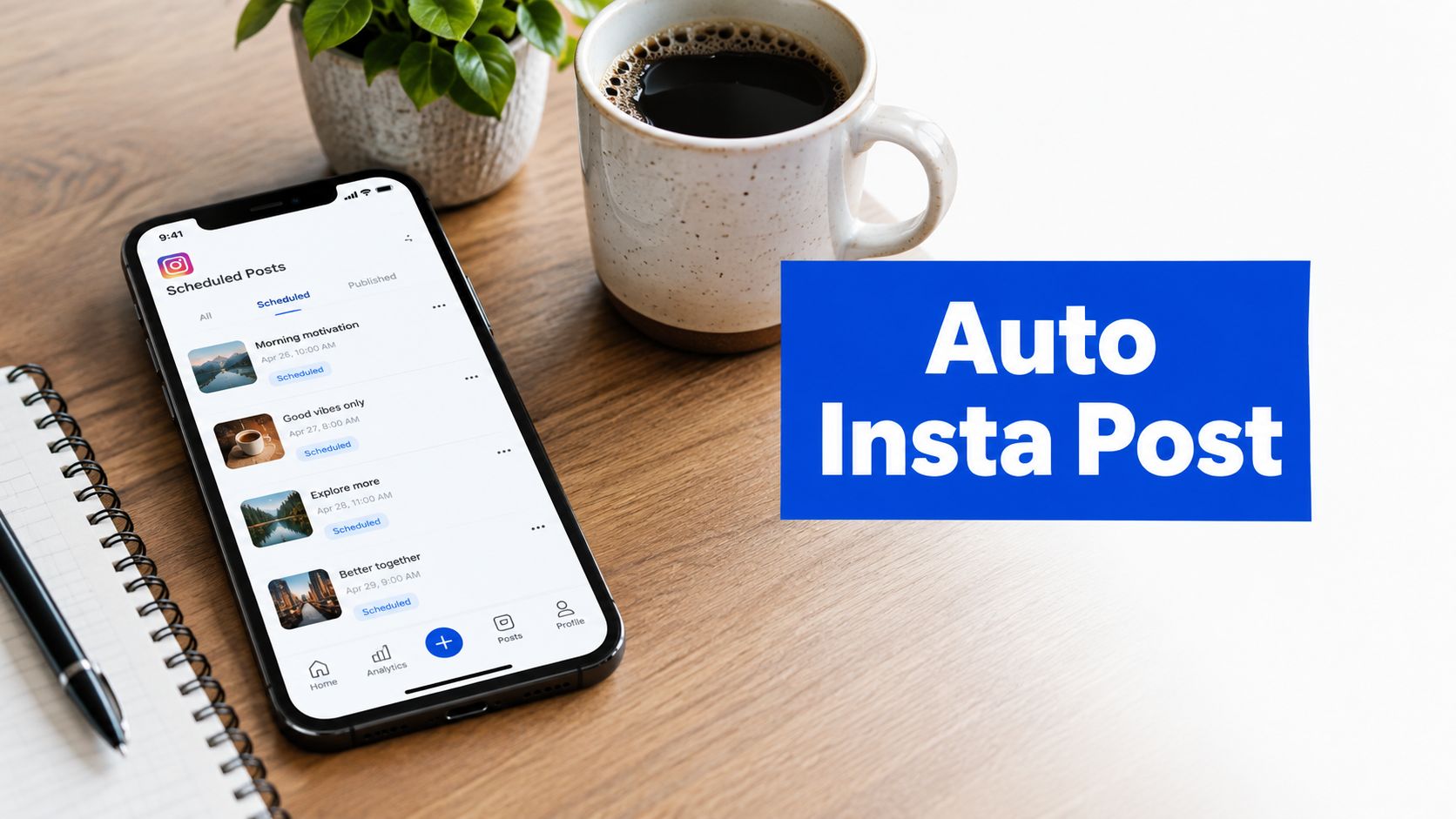
You're staring at a calendar full of client posts, three time zones, and a phone that still pings at odd hours because Instagram won't publish everything the same way. That's why people look for a way to post to Instagram automatically, not because they want another dashboard, but because they need publishing to behave like a system instead of a late-night task.
The catch is that Instagram automation isn't a single switch. It's a quota-managed publishing pipeline with account rules, media rules, and format-specific failures that can push a post back to mobile notification mode or block it outright. If you treat it like infrastructure, you'll make better decisions about what publishes cleanly, what needs manual help, and where your schedule is most likely to break.
Why Automatic Instagram Posting Matters in 2026
A campaign can have approved creative, a finished caption, and a scheduled time, yet still fail because the publishing path treats a feed post, Reel, and Story differently. For a social lead managing four brands across three time zones, automatic posting matters because it replaces scattered reminders with a controlled workflow that can handle edits, weekends, and changing publish windows.
Meta's introduction of direct post publishing for eligible business accounts in January 2021 moved approved workflows from reminder-based publishing to true Graph API automation (Ayrshare's technical summary of the API shift). The change made feed publishing a real pipeline. Media is first placed in a container, processed, and then published. An unfinished container expires after 24 hours, so a scheduler needs timely retries and clear failure states (Meta's content publishing documentation).
Why the workflow is not uniform
A Professional account provides the foundation, but the destination format determines how reliable the automation will be. Meta requires an Instagram Business or Creator account linked to a Facebook Page, with permissions such as instagram_basic and instagram_content_publish; personal accounts cannot use these publishing endpoints (Meta's content publishing documentation). As a result, automatic publishing covers a narrower set of actions than a calendar interface suggests.
Practical rule: if a tool cannot show whether an item will publish automatically or fall back to a notification, it is not giving you a dependable publishing system.
The operational issue is quota and format handling. A useful pipeline checks account eligibility, validates media, tracks processing status, and records whether Instagram accepted the final publish request. Feed posts may complete predictably while Reels or Stories encounter different media requirements or require manual intervention. Across client accounts, the key question has been “What will publish without a phone tap, and what will fail without notice?” A calendar shows intent. Reliability depends on the path that executes it.
Setting Up Your Account for Automated Publishing
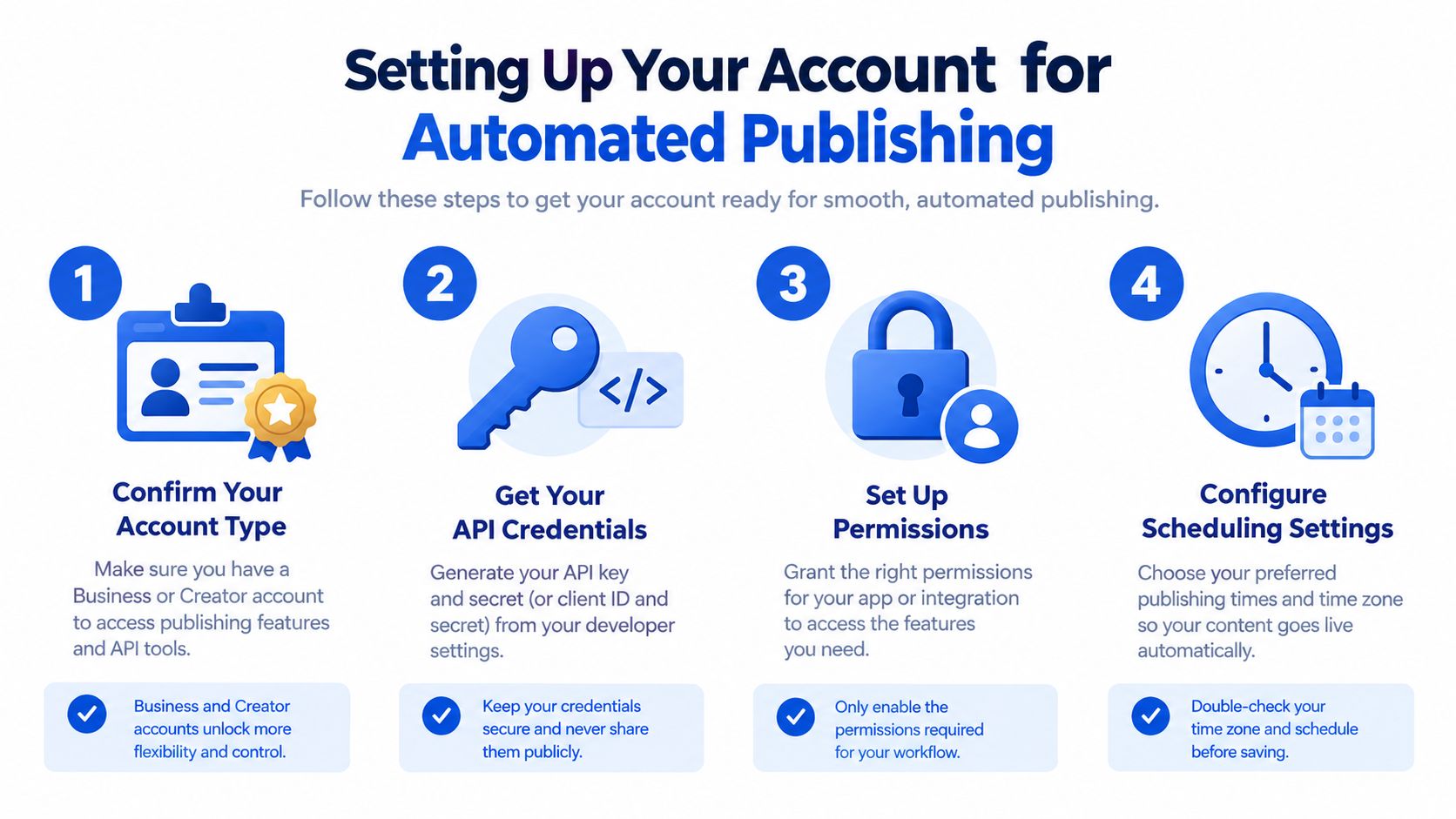
A scheduled post can sit in a queue and still fail at publish time. The first gate is the Instagram account itself. Personal profiles are outside the publishing endpoints, so automation requires a Professional account, specifically Business or Creator, connected to a Facebook Page. Meta's publishing documentation describes these account and Page requirements (Meta's content publishing documentation).
Page linkage is part of the execution path, not an administrative detail. If the connection is missing or points to the wrong business asset, a scheduler may accept the draft while Instagram rejects the publish request. That failure often looks like a calendar problem, although the account was never eligible for the route being used.
Permissions and tokens are the part people skip
Publishing also depends on approved scopes, including instagram_basic and instagram_content_publish. Treat the access token as an operating credential, not a one-time login detail. Its state determines whether queued content can still move from the scheduler to Instagram after the initial test succeeds.
Role changes in Business Manager, password resets, and removed permissions can interrupt that route with little warning. Post Pulse's automated posting guide also highlights token and permission maintenance. Shared access across several operators increases the number of ways a valid connection can become invalid.
Use this setup sequence:
- Confirm the account type, Business or Creator rather than personal.
- Verify the Facebook Page link, including the correct business asset.
- Grant the publishing scopes, with the permissions required for Instagram content publishing.
- Check the token state, then reauthorize before scheduling a batch.
- Test one post, and confirm that Instagram accepted it rather than merely saving it as pending.
That final check matters because automation is a quota-managed pipeline. Account eligibility, permissions, media validation, processing status, and the final publish response all need to line up. Feed content may complete while another surface enters a notification fallback or remains stuck in processing. A calendar records intent; the account setup determines which path can execute it.
A repeatable content calendar, such as the workflow in this guide to cutting posting time in half, helps only after those gates are verified. Speed comes from repeating a known-good path, not from filling the queue before the first publish has been confirmed.
Scheduling Posts, Reels, and Stories From One Calendar
A calendar can show three items as ready while only one is eligible for automatic publication. The reliable workflow checks the media, destination surface, and publishing route before adding a time slot. Draft the caption, upload the asset, add a first comment if needed, select Feed, Reel, or Story, and confirm how that surface will publish. If the scheduler provides a media library, run format checks there before the asset enters the queue.
Feed, carousel, Reel, and Story don't behave the same
Buffer's Instagram publishing guidance distinguishes automatic publishing from mobile notification fallback. Professional accounts can auto-publish when the content meets the supported format rules. Personal accounts, unsupported features, and aspect-ratio problems can redirect an item to a notification workflow. The calendar may still display the item as scheduled, so the publishing method needs its own status.
Use this working matrix when one calendar contains several Instagram surfaces:
| Media Format Requirements for Automated Publishing | |||
|---|---|---|---|
| Surface | Aspect Ratio | File Format | Duration / Slide Limit |
| Feed post | Accepted range required | JPG or PNG for images, video support depends on tool and API path | Single asset |
| Carousel | Matching aspect ratios across slides | JPG or PNG in most workflows | Up to 10 slides |
| Reel | Vertical 9:16 | MP4 is the common supported format | Short-form video, tool and API rules vary |
| Story | Vertical 9:16 | Image or video | Up to 60 seconds in many workflows |
These specifications describe a starting check, not a guarantee. The scheduler, Instagram surface, and API route must all support the selected asset. Music, links, text, product tags, collaboration posts, and other interactive Story or Reel features can send an item to notifications instead of automatic publication. A composer preview therefore proves that the item is assembled, not that Instagram will publish it.
Operational habit: preview the asset in the scheduler, then verify the destination surface and publishing route. A strong caption attached to an incompatible format still fails.
Planning also needs a clock. Build the queue in the audience's intended timezone, rather than the operator's local time, and label exceptions before approval. A guide to planning a month of content can help establish that rhythm in advance. Add UTM tags while the item remains in draft, because once it publishes, the work has shifted from preparation to measurement.
Publishing Limits and Format Compatibility
An automated Instagram calendar is a quota-managed publishing pipeline. Meta applies a rolling 24-hour quota to API-published posts, while technical guidance describes limits ranging from 25 to 100 posts, depending on account status and documentation version. Carousels count as one post in that quota (Blotato's Instagram posting API guide). The exact limit depends on the implementation, so a full calendar can still contain more publishable items than the account can send in one window.
The same post type can behave differently by account and tool
A feed post may publish automatically while a Story containing links, stickers, mentions, or other interactive elements switches to notification mode. The outcome depends on the connected account, the tool, and the publishing surface. The asset remains prepared, but a person must complete the final action when the route does not support direct publication.
| Auto-Publish Behavior by Content Type | |||
|---|---|---|---|
| Content Type | Media Spec | Auto-Publishes? | Rate-Limit Impact |
| Feed image | Accepted aspect ratio, standard image file | Often yes on professional accounts | Counts toward the rolling quota |
| Carousel | Matching slides, within accepted aspect ratios | Often yes when supported | Counts as one post |
| Reel | Vertical video, supported length and encoding | Sometimes yes, sometimes notification fallback | Counts toward quota when API-published |
| Story | Vertical image or video, feature support varies | Often mixed, especially with interactive elements | Counts when API-published |
The less visible failure point is media delivery. Instagram's publishing route expects a public media URL, rather than a raw file upload, and the upload container may need status checks about once per minute for up to five minutes before publication. A scheduler therefore has to reserve time for upload, processing, and the final publish request. A calendar timestamp alone does not guarantee that the post is ready.
A container that is still processing is a publishing failure waiting to happen.
Feature compatibility creates a separate queue-management problem. Stories with links, text, product tags, music, and collaboration posts may require notification publishing instead of automatic publication. Reels can face similar limits when their audio, collaboration, or other settings fall outside the supported route. The destination is still Instagram, but the action changes from server-side publication to a phone prompt.
That distinction should shape tool selection. Test the exact feed, Reel, and Story combinations used by each account, then record which ones publish directly and which ones need manual completion. A reliable pipeline tracks quota usage, container readiness, and fallback behavior rather than treating every scheduled item as an equivalent post.
Troubleshooting Failed and Stuck Auto-Posts
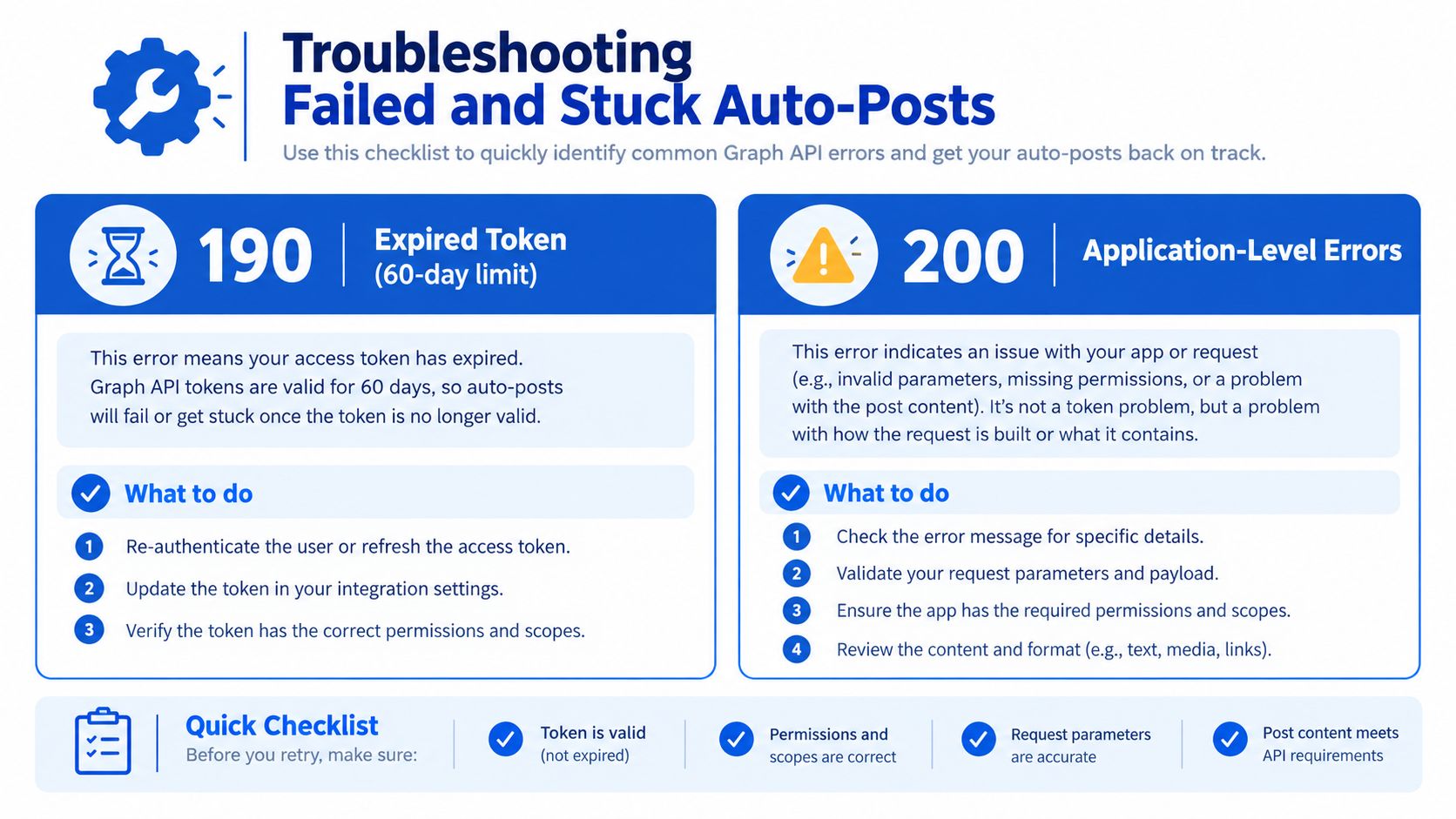
A scheduled post can fail even when the calendar shows no warning. In production, the cause usually sits in one of three layers: authentication, media delivery, or publication. Expired tokens, changed permissions, invalid assets, and containers that are still processing create different failure patterns, so the recovery step depends on locating the broken layer first.
Match the symptom to the cause
An expired long-lived token can break authorization after it lapses or after a password reset disrupts the connection. Permission denial points to missing publishing scopes or changed business roles. A container failure occurs when media uploads successfully but does not reach a publishable state before the tool sends the final request. Post Pulse's automated posting guide describes this container problem and its effect on automated publishing.
Use a recovery sequence that matches the failure:
- Regenerate the long-lived token when authentication is stale.
- Reauthorize the scopes after role or password changes.
- Validate media before upload, including its format, size, and aspect ratio.
- Wait for container readiness rather than sending the publish request immediately.
- Create a fresh container ID when the earlier container has expired or stalled.
Error labels can narrow the diagnosis. Invalid parameter usually points toward metadata or media values. OAuth token failure indicates authentication. Permission denied suggests access or role configuration. A container-not-ready response means the upload exists, but processing has not finished. Separating these cases prevents a team from re-uploading a valid asset when the actual fault is a token or permission setting.
Reels and Stories fail differently than feed posts
Feed posts, Reels, and Stories do not share the same reliability profile. Reels can leave the automatic route when their audio, collaboration settings, or other features are unsupported. Stories are more sensitive to interactive elements, links, music, and similar options. In those cases, the scheduler may send a phone notification instead of publishing directly. A queue item can therefore appear stuck even though the system deliberately changed its delivery path.
A video walkthrough can help teams identify where the chain breaks before they change captions or resize assets:
For a publishing-task object or queue status, classify the failure as upload, readiness, metadata, or fallback behavior. Then log whether the item consumed quota and whether Instagram published it or requested phone completion. Rebuild the post only after the failed layer is known.
Reliability Tips and the Future of Instagram Automation
A client launch can fail before anyone notices. A queue may show “scheduled,” while an expired token, unavailable media URL, or format-specific restriction prevents Instagram from completing delivery. Reliable automation therefore depends on a quota-managed publishing pipeline, not a calendar alone.
Keep scheduled items staggered below the rolling quota window. Check long-lived tokens before they expire, maintain mirrored media URLs, and reserve a buffer slot before a campaign launch. These controls separate a recoverable delay from a public publishing failure. A weekly operating rhythm also helps teams review queued assets, permissions, and delivery results across accounts. This weekly content system guide follows the same principle: disciplined inputs make format checks and token refreshes easier to manage.
Track each item through five states: draft, validation, queue, publish, and verification. Record the content type, account, attempted delivery path, quota usage, and final result. A feed post that publishes directly should not be measured against a Story that requires phone completion. The operational question is whether the item reached Instagram and whether a person still had to finish the job.
What the next phase looks like
Meta continues to develop structured publishing through its API and Business Suite workflows. Third-party platforms are also expanding support for professional accounts and approved publishing paths. Automated DMs, comment replies, and more consistent handling across feed posts and Reels remain open operational concerns.
Operating model: treat auto-publishing like a monitored pipeline. Draft, validate, queue, publish, and verify. Review failures instead of assuming the calendar completed the work.
Social Media Scheduler centralizes drafting, scheduling, and publishing in one calendar, with content flow tracked across accounts. Use it within a monitored process, particularly where quotas and fallback steps affect delivery, rather than treating scheduled status as proof of publication.