Short Form Videos: Specs, Creative, and Cadence for 2026
Oct 26, 2026 · 14 min read
YouTube reported 70 billion daily views for YouTube Shorts in March 2024, according to Kapwing's short-form video roundup. That shelf now moves more clips in a day than most brands will publish in a career. Short form videos stopped being a side format. They became the default way a viewer meets a creator, a product, or an idea.
A view at that scale is not the same thing as interest. Feeds autoplay. People swipe. A clip can travel far and still lose the viewer before the second sentence. The job of a publishing system is to separate those two outcomes, then change the file, the opening, or the cadence when the numbers say so.
Specs come first, so a file is legal on the network it lands on. Creative tests come next, so the opening earns another second. After that, the useful work is metrics, cadence, and a handoff from short clips back to longer work people will stay for.
How Vertical Feeds Turned Short Clips Into the Default
A short-form video is a vertical, mobile-first clip built to earn the next second before it earns anything else. Picture a shop window beside a moving sidewalk. The person glances, decides in a moment whether to stop, and keeps walking if nothing catches them. Vertical feeds made that the default. The next clip is already full screen before the viewer chooses it.
Whop's TikTok statistics roundup reports that TikTok's monthly active users increased from 271 million in 2018 to approximately 1.1 billion in 2023. By January 2024, TikTok's potential global advertising reach was estimated at 1.56 billion users. Those are not the same measure. The first estimates platform activity. The second estimates the audience advertising tools indicated could potentially be reached. Mix them and you'll plan against a number the product doesn't report.

That rise locked in frequent short posts, algorithmically recommended clips, and music-led discovery. Each network still runs its own ranking and its own audience, so one exported file rarely behaves the same way on TikTok, Reels, and Shorts. The spec sheet that follows is the gate. A clip has to pass that channel's rules before anyone schedules it.
Short-Form Video Specs for Every Major Network
Vertical 9:16 is the standard for full-screen feeds. Square and 4:5 formats can also work in wider timelines. Export a master at 1080 by 1920 pixels, then crop from that file for other placements. Upscaling a square export can soften the image.
| Network | Maximum length | Placement note |
|---|---|---|
| TikTok | 10 minutes for most accounts, longer on some | Full-screen vertical feed |
| Instagram Reels | 3 minutes | Reels tab and main feed; cover crop matters |
| YouTube Shorts | 3 minutes | Shorts shelf and home feed |
| Facebook Reels | 90 seconds | Reels tab and feed |
| LinkedIn native video | 10 minutes | Feed autoplays muted; captions carry the message |
| X | 140 seconds | Timeline autoplay |
| Threads | 5 minutes | Feed; confirm the current ratio in the composer |
| Bluesky | 60 seconds | Confirm ratio and length before export |
Treat the maximum as a ceiling
A platform's maximum length is an upload limit, not a recommended runtime. If an idea is complete in 25 seconds, extra footage can dilute its point. Set the duration around what the clip needs to communicate.
Practical rule: Keep this table in a per-channel spec sheet and attach the sheet to each channel in the scheduler. A file that fits one network may still need a different crop or export for another.
Platform limits and composer options can change, so check them when setting up a publishing workflow. A practical guide to social video from Remotion explains how framing changes between the editor and the published placement. Use its safe-margin guidance to standardize crops in the spec sheet.
Keep faces and on-screen text near the center of the 9:16 frame. Interface controls can obscure content near the bottom or right edge. Reels cover crops may also cut into a face that appeared clear in the editor. For muted autoplay placements such as LinkedIn, make the opening caption line understandable without audio. Check the crop and placement before adding each export to the queue.
Creative Choices That Hold Attention in the First Seconds
Most viewing decisions happen in the first seconds, before the swipe. Topic and posting frequency matter less than whether the picture and the voice give the viewer a reason to stay.
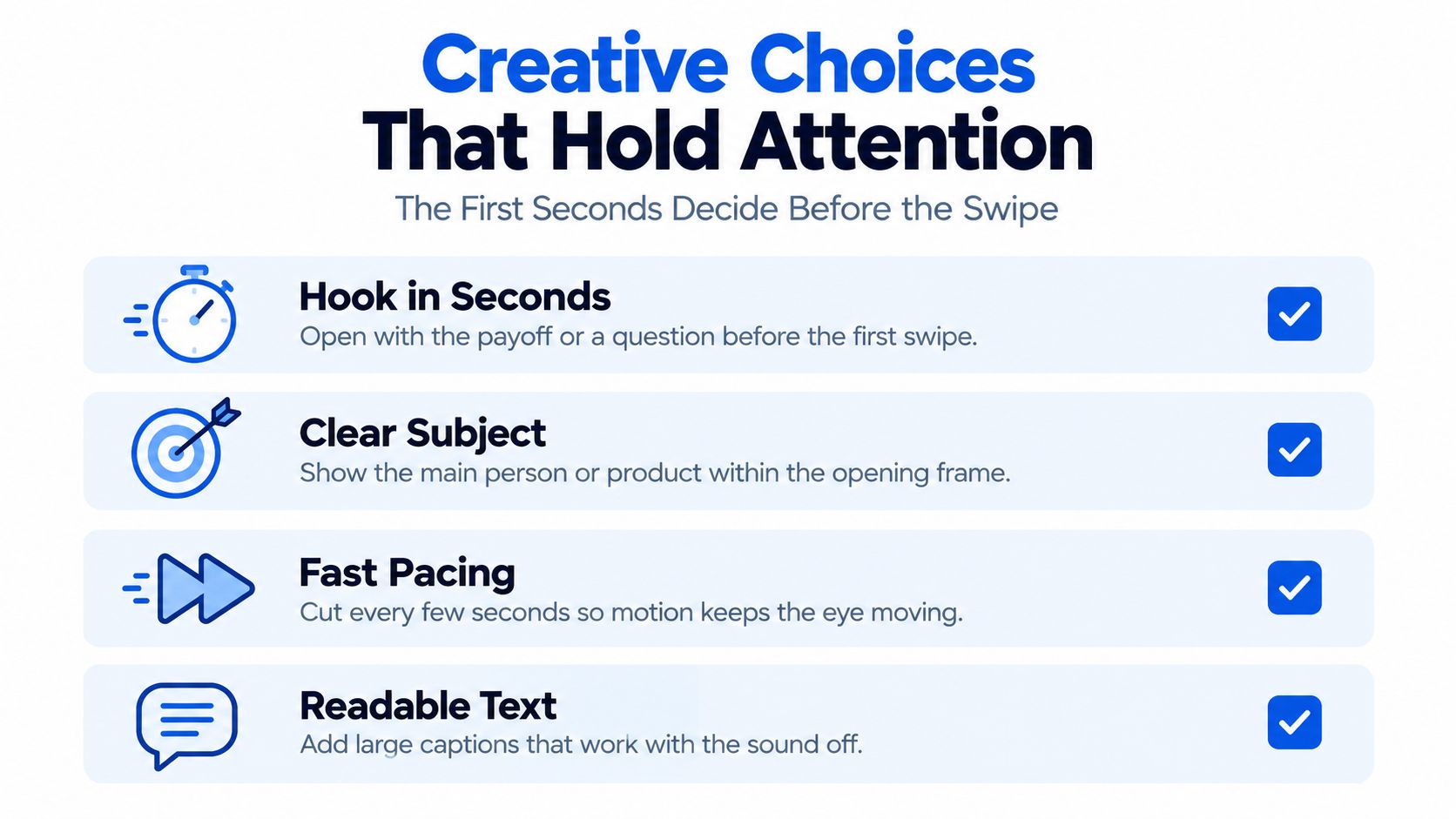
A 2025 TikTok advertising study indexed by IDEAS/RePEc identified four features significantly associated with consumer engagement behavior: colloquial language, speech or editing cadence, colorfulness, and visual prominence. The study reports associations. It doesn't prove that any one feature independently causes engagement, so none of them is a rule you can copy onto every account.
Colloquial language lowers the effort required to follow. A line that sounds like a person talking ("this setting is why your export looks soft") is easier to parse than a slogan. Pair the opening line with hooks that stop the scroll so the first words name a concrete payoff, not a greeting.
Cadence is the rate of speech or cuts. A steady, intelligible pace packs more information into each second. Rush the edit until words blur and you raise information density while lowering comprehension. The useful test is whether a stranger can repeat the point after one pass.
Colorfulness and visual prominence work as attention capture. A bright product, a face close to the lens, or a high-contrast text block wins the glance in a feed where the next clip is one thumb away. Flat, centered graphics lose that glance even when the script is strong.
Run one change at a time
- Keep the script and the offer identical across both versions.
- Change one dimension only, such as the opening visual or the pacing.
- Publish both variants to comparable audiences, not one to followers and one to a cold test.
- Compare completion rate, rewatches, shares, and comments over a sample large enough that one viral outlier can't decide the winner.
Store hook type, pacing, caption style, and colour treatment as metadata on each post. Without those tags, a strong week looks like luck and you can't repeat the choice that produced it. Captions are the default for muted autoplay, because many people scroll with sound off. If you already have a transcript, you can convert transcripts to SRT and attach the file instead of retyping every line in the editor.
The same attention constraint shows up on TikTok, Instagram Reels, and YouTube Shorts. Ranking systems and audiences still differ, so a winning colour treatment on one network is a hypothesis on the next, not a template you paste everywhere.
Metrics That Separate Real Interest From Passing Views
Views are an input. The metrics that show attention come after the view. Read them in funnel order, and don't average a TikTok number with a Reels number just because both columns say "views."
| Metric | What it tells you | Platform caveat |
|---|---|---|
| Impressions or views | How far the post was distributed | Definitions differ; a view can start on autoplay |
| First-second retention | Whether the opening held anyone | Measured differently across networks; compare within a platform |
| Average watch time | How long viewers stayed on average | Affected by clip length; compare similar lengths |
| Completion rate | Share of viewers who reached the end | Meaningful mainly for clips of similar length |
| Saves | Intent to return or reuse | Skip the row on networks that do not offer saves |
| Shares | Willingness to pass the clip on | Reported differently by platform |
| Profile visits | Interest in the creator, not just the clip | Count only accounts where the metric is shown |
| Conversions (link clicks, signups) | Action taken after watching | Match the network's reported click window before you compare |
What the review actually supports
A systematic review of 78 peer-reviewed studies, covering work published from 2018 through 2024, reports that personalized short-video campaigns produced engagement rates 60% higher than non-personalized campaigns. The same review identifies retention, shares, and real-time analytics as critical evaluation metrics. That 60% figure is an aggregate finding from a literature synthesis. It is not a guarantee on TikTok, Reels, or Shorts, and it isn't a target you should put in a client deck as "expected lift."
Store each network's raw definition next to your internal standard. A view, a retention calculation, and an attribution window are not interchangeable across those three feeds.
Segment history by platform and by format. Set a baseline for each segment from posts that already shipped, not from a benchmark you saw in a thread. Recommend a future window or a creative pattern only when it beats that baseline. Strong early viewer signals can increase distribution, which is why first-second retention sits above likes in this stack. If the opening fails, later engagement never gets a fair sample.
A workable weekly read is short. Pull completion, saves, and profile visits for the segment. Put reach beside them, not above them. If reach rises and completion falls, you gained distribution and lost attention. That pattern should change the next cut, not trigger another post in the same shape.
Setting Cadence When Feeds Are Saturated
Publishing more doesn't reliably produce more attention. A 2025 analysis covered by Marketing Tech News, drawing on Metricool's short-form report, looked at nearly 5.7 million short-form videos from more than 582,000 accounts. Videos rose 71%. Participating accounts rose 51%. Reach and engagement declined on several platforms over the same period.
On TikTok, those videos averaged 41 seconds. Viewers watched 3.75 seconds on average, and just 4% were watched to completion. Those are averages across a crowded feed, not a verdict on any single clip. A tight tutorial can clear that bar. A padded trend remix can miss it while still showing a large view count, because autoplay starts the clock before anyone decides to stay.
A cadence rule you can actually apply
- Start from your baseline on each network, using completion and saves, not a posted-per-day target copied from another account.
- Add posts only while completion and saves hold. If both stay flat as you add one slot, the extra post is earning its place.
- Cut back when reach climbs and completion falls. New viewers are passing through. More posts will widen that gap.
- Separate deliberate views from accidental ones with first-second retention and average watch time. A view that dies before one second is distribution, not interest.
A pattern that works on TikTok may not carry unchanged to Instagram or YouTube Shorts. Set cadence per network. If you time TikTok separately from the rest of the week, a TikTok scheduler keeps that slot from colliding with a Reels drop aimed at the same hour in the same time zone.
For the next month, ship fewer, better-timed posts per network. Read the weekly numbers, and change cadence only every two weeks. One quiet week is noise. Two weeks of falling completion with rising reach is a signal to remove a slot, not to film another batch in the same format.
Repurposing a Long Video Into Short Clips That Send Viewers Back
Patreon's 2025 State of Create report found that fans encounter almost twice as much short-form work on social media, yet they say long-form content provides more value and is much more likely to be worth paying for. A short clip should be a door, not the destination. Views on the door don't prove the room is worth entering.
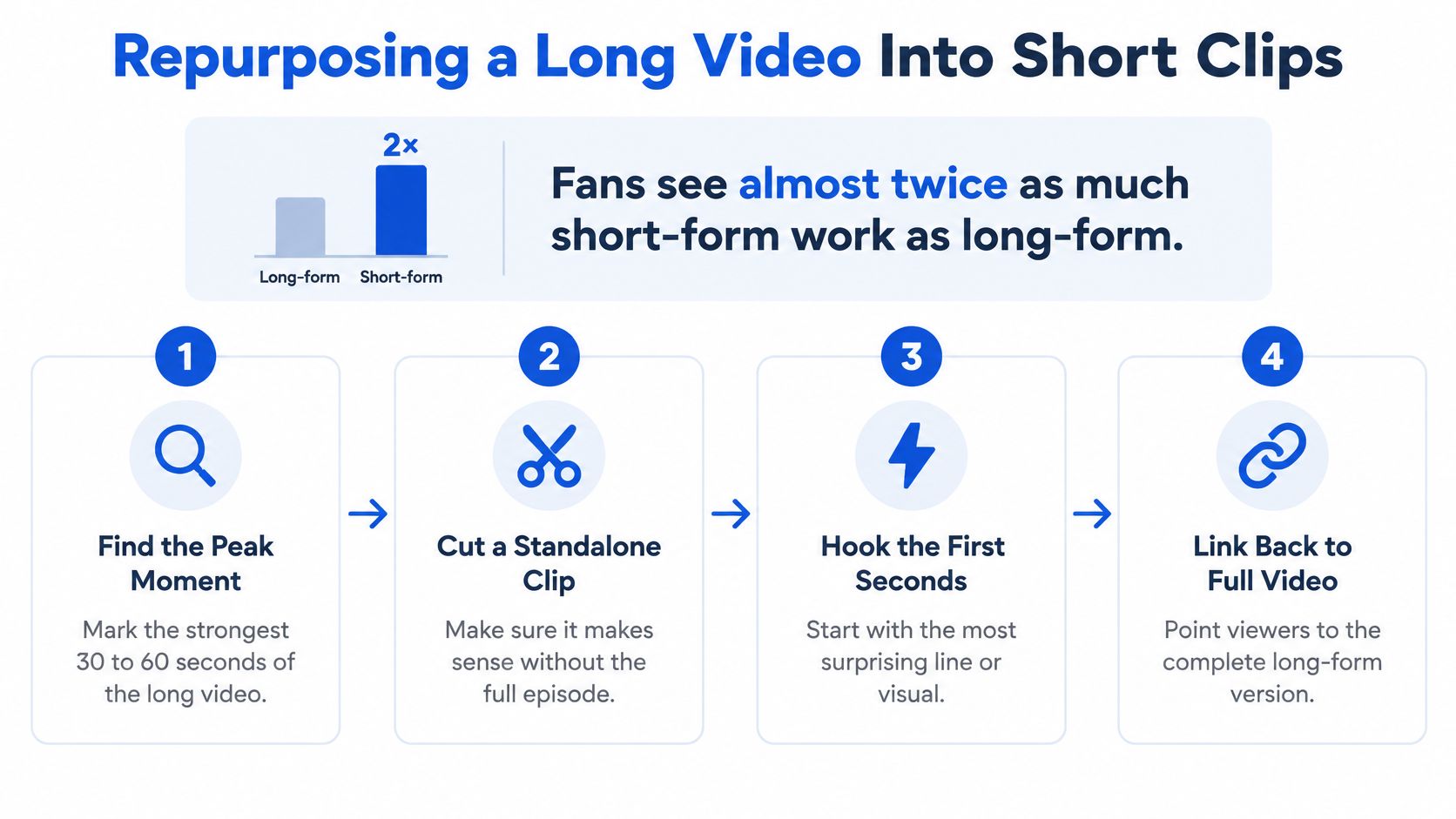
Say you're cutting a 22-minute founder interview. The long cut holds the argument. The shorts exist to send a viewer back to it, to a newsletter, or to a paid offer. Streamers cutting live archives can use the same logic, and a short-form clip strategy for streamers walks through how a VOD becomes clips without throwing away the full broadcast.
Before you queue anything, watch how a clean handoff looks when the short clip stops early and points at the full piece.
Six cuts from one interview
- Mark three to six moments where one claim is made clearly. In this interview, that might be a pricing mistake, a hiring rule, and a customer story. Skip the banter between them.
- Cut each moment down to that single claim, and put a hook in the first two seconds. "We lost the deal on price" beats a logo sting.
- Open with the problem the full interview solves, not the answer. If the clip delivers the whole fix, nobody needs the 22 minutes.
- End with a pointer phrased for the network. A pinned comment on Shorts, a profile link on TikTok, a native link on LinkedIn. One action, written in that network's language.
- Stagger the clips over the following week so each network gets its own rhythm. Don't drop all six on Tuesday morning across every account.
- Track full-video views, newsletter signups, and profile visits. Reach on the short clip is a supporting number, not the score.
Two failures break the handoff. Clips that give the whole answer turn the long video into a repeat. Calls to action that point nowhere (a "link in bio" with no link, a pinned comment that never went up) train people to ignore the ending. Queue the teaser clips ahead of the long post, with the call to action written per platform before the first short goes live. If the downstream actions don't move after the week, the clips found an audience that doesn't want the longer piece, and the next interview should change the offer, not just the hook.
Run One Calendar and Review It Weekly
Use one calendar for every network. Set the per-network rules once and reuse them, instead of rebuilding a plan inside each app every Monday.
- Attach the spec sheet to each channel, including aspect ratio, maximum length, and caption rules, so no file reaches a network without a crop check.
- Draft the core idea once, then tailor the copy, the cut, and the cover for each channel. The spoken line can stay. The on-screen text and the ending action should not.
- Tag each post with hook type, pacing, and caption style, so a result traces back to a choice you can repeat.
- Set time slots in the time zones your audience uses, and stagger posts so one network's launch doesn't crowd another's.
- Each week, read completion, saves, and profile visits against that segment's baseline before you read reach. Don't change cadence on one week's data.
- Change only one variable per fortnight so the result stays readable. A new hook and a new slot in the same week will leave you guessing which one moved the number.
A weekly rhythm like this is easier to keep if the review has a fixed shape. A weekly content system is a useful model for that review: what shipped, what held attention, what gets cut next.
One option that fits the routine is Social Media Scheduler. It keeps X, LinkedIn, Instagram, Threads, Facebook, TikTok, YouTube, and Bluesky on a single calendar, with drag-and-drop placement, per-channel time slots, and analytics for reach, engagement, and engagement rate. Recommendations draw on past results once a baseline exists, which is the point of waiting for two weeks of your own posts before you trust a suggestion.
The first test is small. Publish one repurposed series over two weeks. Review it against the baseline. Keep the slot only if completion and the downstream action hold. If they don't, change one variable and run the fortnight again.
Social Media Scheduler puts planning, per-channel tailoring, and publishing for short form videos on one calendar, including YouTube Shorts next to longer uploads. You can set time slots per network, queue posts, and read reach, engagement, and engagement rate without exporting a spreadsheet first. Visit Social Media Scheduler, attach your spec sheet, and run the two-week series before you add another posting day.